Connecting
the
TV
and
player,
etc.
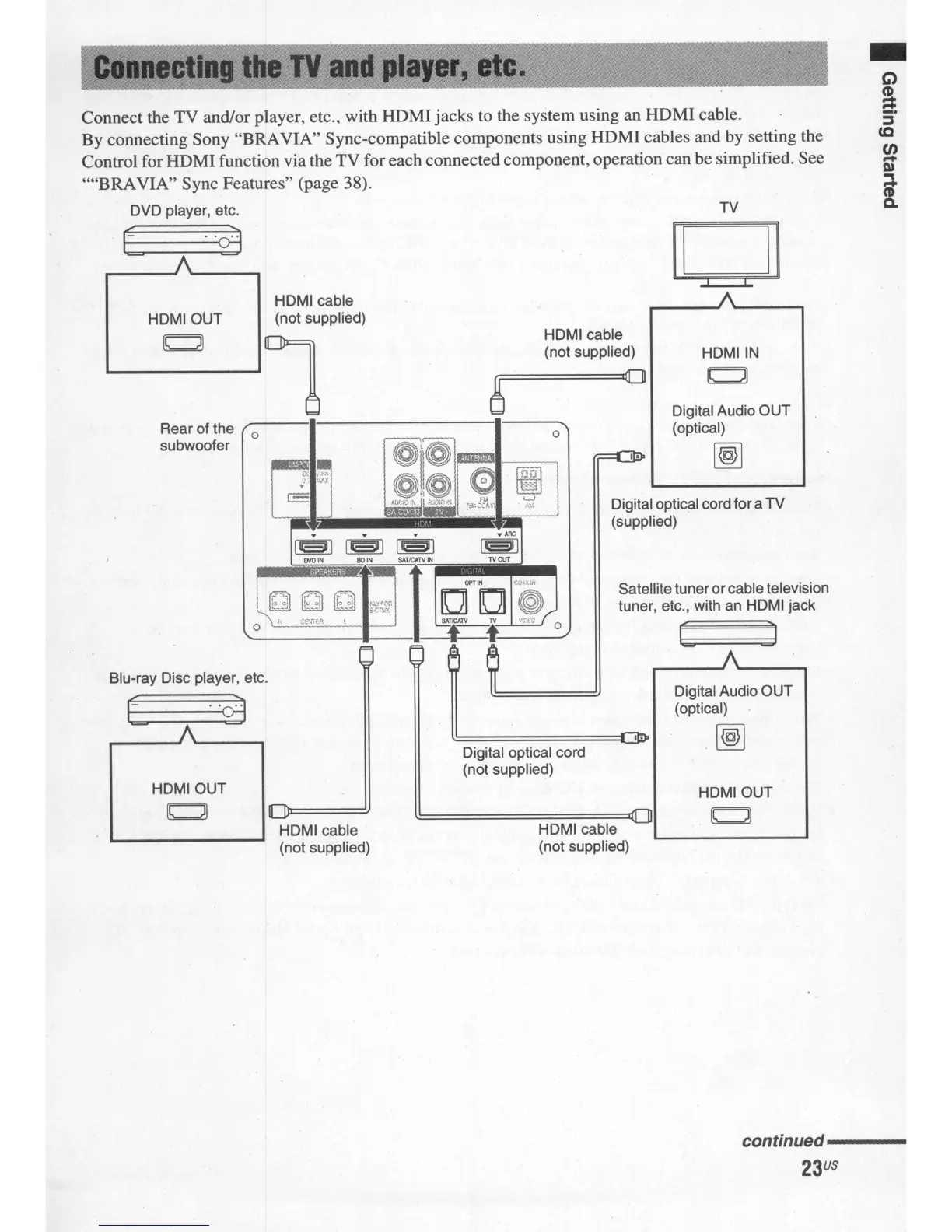
Connect the TV and/or player, etc., with HOMI jacks to the system using an HDMI cable.
By connecting Sony "BRAVIA" Sync-compatible components using HOMI cables and by setting the
Control for HOMI function via the TV for each connected component, operation can be simplified. See
....
BRA
VIA" Sync Features" (page 38).
DVD player, etc. TV
Digital optical cord foraTV
(supplied)
Satellite tuner orcable television
tuner, etc., with
an
HDMI jack
C J
It
"29
HDMI cable
HDMIOUT
(not supplied)
[C]
l
HDMI cable
(not supplied)
8
I[]
Rear of the
0
0
subwoofer
o
HDMIIN
~
Digital Audio OUT
(optical)
@2]
Blu-ray Disc player, etc.
t
HDMIOUT
~
HDMI cable
(not supplied)
Digital optical cord
(not supplied)
HDMI cable
(not supplied)
,.
Digital Audio OUT
(optical)
@2]
HDMIOUT
~
continued----
23
US


 To Next Page