Green
Connecting
the
speaker
cord
to
the
speaker
The connectors
of
the speaker cord are color-coded depending on the type
of
speaker. Connect the
connectors
of
the speaker cord
to
match the color
of
the speaker jacks.
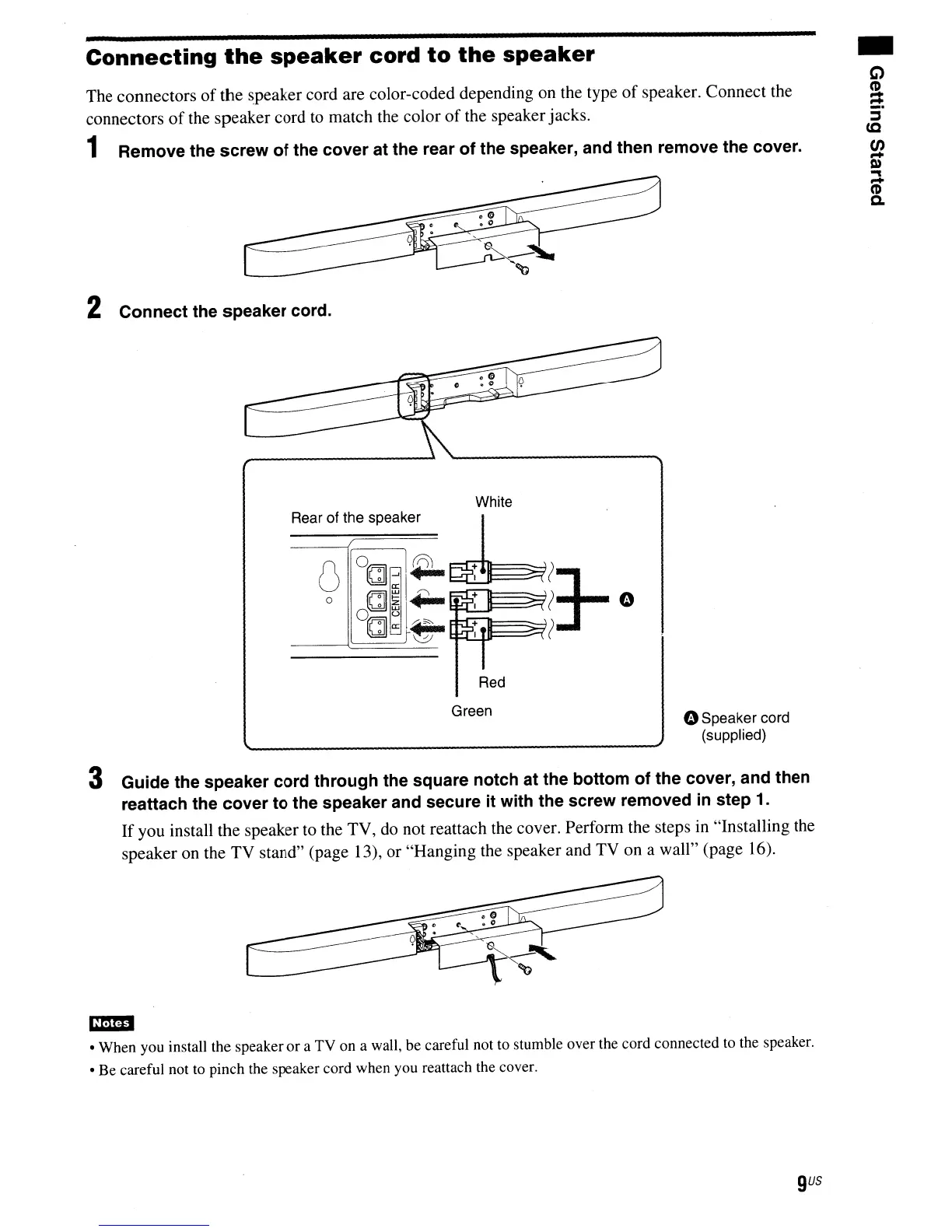
1 Remove the screw of the cover at the rear of the speaker, and then remove the cover.
2 Connect the speaker cord.
White
Rear of the speaker
I .
U
O(Cj]I~~?
o
(Cj]~I+-
~
? 0
°C!~l~:
13-
Red
oSpeaker cord
(supplied)
3 Guide the speaker cord through the square notch at the bottom of the cover, and then
reattach the cover to the speaker and secure it with the screw removed
in
step 1.
If
you install the speaker
to
the TV,
do
not reattach the cover. Perform the steps in "Installing the
speaker on the TV stand" (page 13), or "Hanging the speaker and TV on a wall" (page 16).
• When you install the speaker
or
a TV on a wall, be careful not to stumble over the cord connected to the speaker.
• Be careful not to pinch the speaker cord when you reattach the cover.
gus



 To Next Page