9
GB
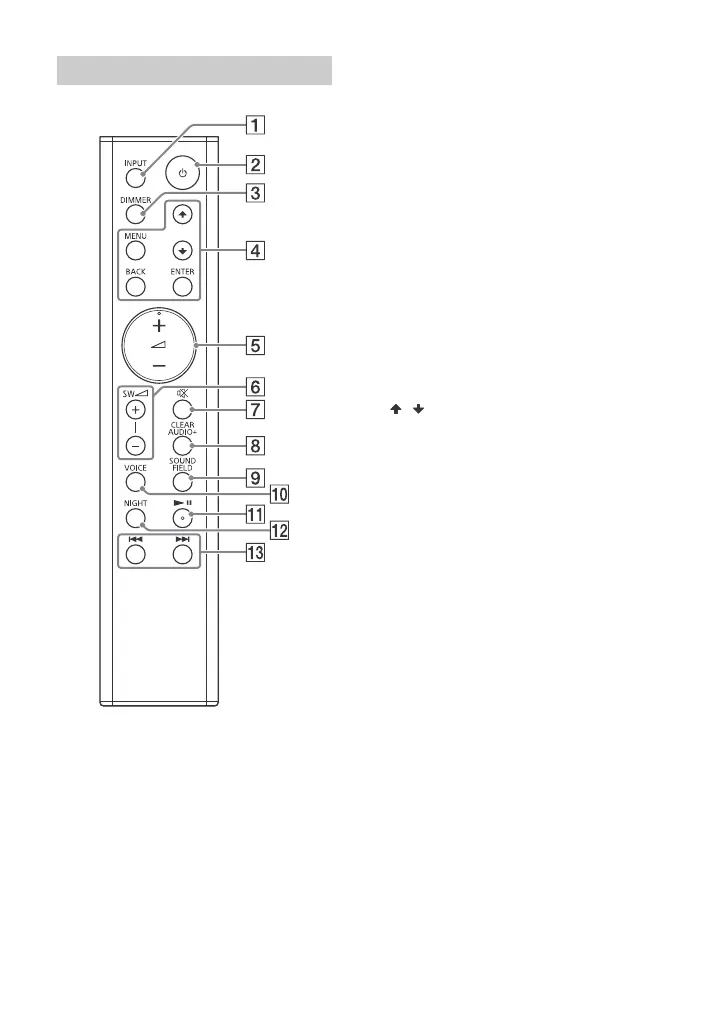
INPUT (page 12)
(power)
Turns on the system or sets it to
standby mode.
DIMMER
Adjusts the brightness of the
front panel display.
“BRIGHT” “DARK” “OFF”
• The front panel display is turned
off when “OFF” is selected. It
turns on automatically when
you operate the system, then
turns off again if you do not
operate the system for several
seconds. However, in some
cases, the front panel display
may not turn off. In this case,
the brightness of the front panel
display is same as “DARK”.
MENU
Turns on/off the menu in the
front panel display.
/
Selects the menu items.
ENTER
Enters the selection.
BACK
Returns to the previous display.
Stops USB playback.
(volume) +*/–
Adjusts the volume.
SW (Subwoofer volume) +/–
(page 14)
(muting)
Turns off the sound temporarily.
CLEARAUDIO+ (page 14)
Automatically selects the suitable
sound setting for the sound
source.
SOUND FIELD (page 14)
VOICE (page 14)
* (play/pause)
Plays, pauses or resumes
playback.
NIGHT (page 14)
Remote control



 To Next Page