9
KDF-42WE655/50WE655
KDF-42WE655/50WE655
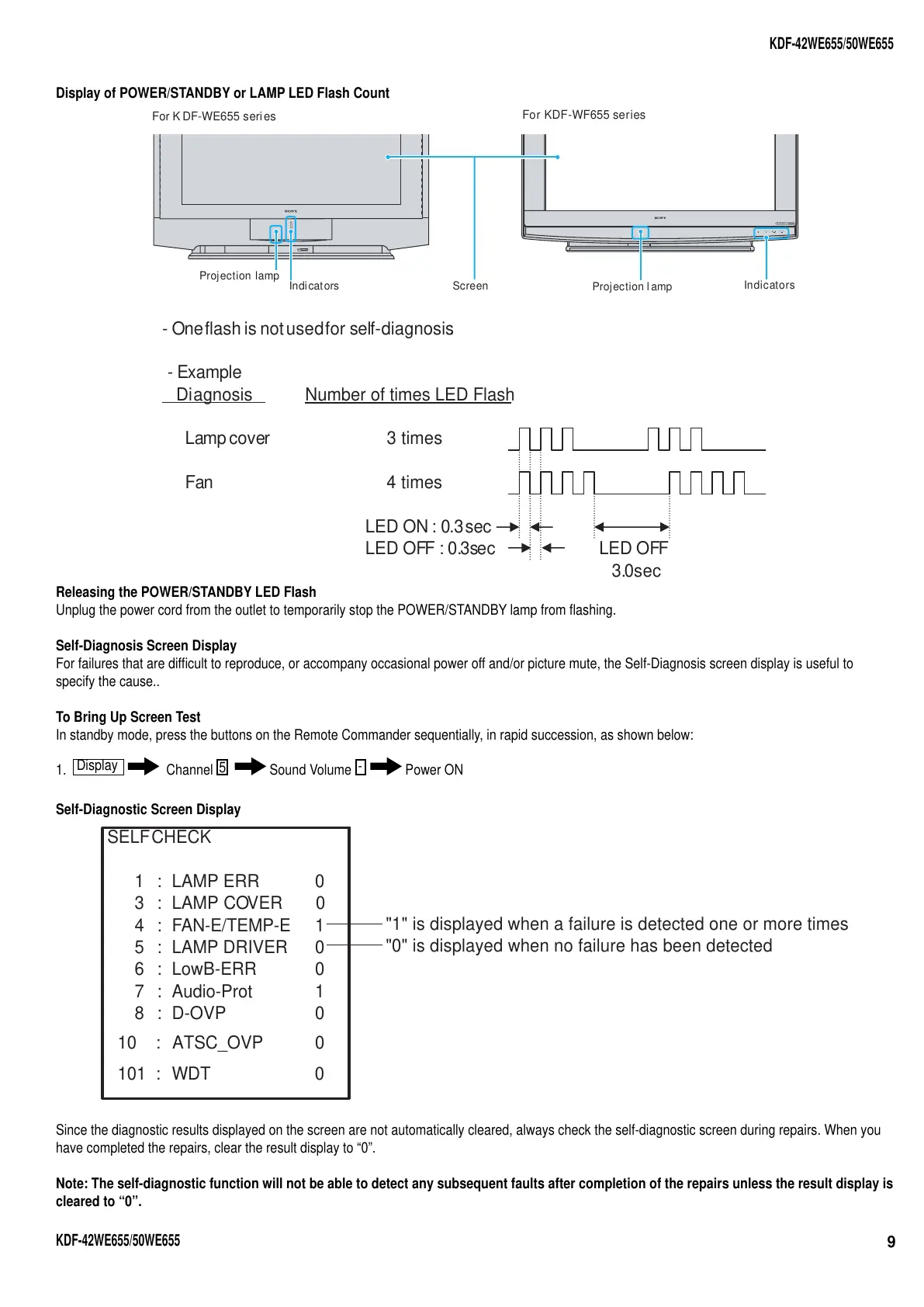
Display of POWER/STANDBY or LAMP LED Flash Count
POWER
PRO
STD/DUO
LAMP TIMER POWER/STANDBY
Screen
Projection lamp
Indicators
Projection l amp
Indicators
For K DF-WE655 series
For KDF-WF655 series
- Oneflash is notusedfor self-diagnosis.
-Example
Diagnosis
Number of times LED Flash
Lampcover 3 times
Fan 4 times
LED ON: 0.3sec
LED OFF : 0.3sec
LED OFF
3.0sec
Releasing the POWER/STANDBY LED Flash
Unplug the power cord from the outlet to temporarily stop the POWER/STANDBY lamp from fl ashing.
Self-Diagnosis Screen Display
For failures that are diffi cult to reproduce, or accompany occasional power off and/or picture mute, the Self-Diagnosis screen display is useful to
specify the cause..
To Bring Up Screen Test
In standby mode, press the buttons on the Remote Commander sequentially, in rapid succession, as shown below:
1.
Display
Channel
5
Sound Volume
-
Power ON
Self-Diagnostic Screen Display
SELFCHECK
1 : LAMP ERR 0
3:
4:
LAMP COVER 0
FAN-E/TEMP-E 1
5 : LAMP DRIVER
6 : LowB-ERR 0
0
7 : Audio-Prot
8 : D-OVP 0
1
101 : WDT 0
10 : ATSC_OVP 0
"1" is displayed when a failure is detected one or more times
"0" is displayed when no failure has been detected
Since the diagnostic results displayed on the screen are not automatically cleared, always check the self-diagnostic screen during repairs. When you
have completed the repairs, clear the result display to “0”.
Note: The self-diagnostic function will not be able to detect any subsequent faults after completion of the repairs unless the result display is
cleared to “0”.





 To Next Page