EasyManua.ls Logo

Sony M-740V - Page 2

Sony M-740V
2 pages
Print Icon
To Previous Page IconTo Previous Page
Loading...
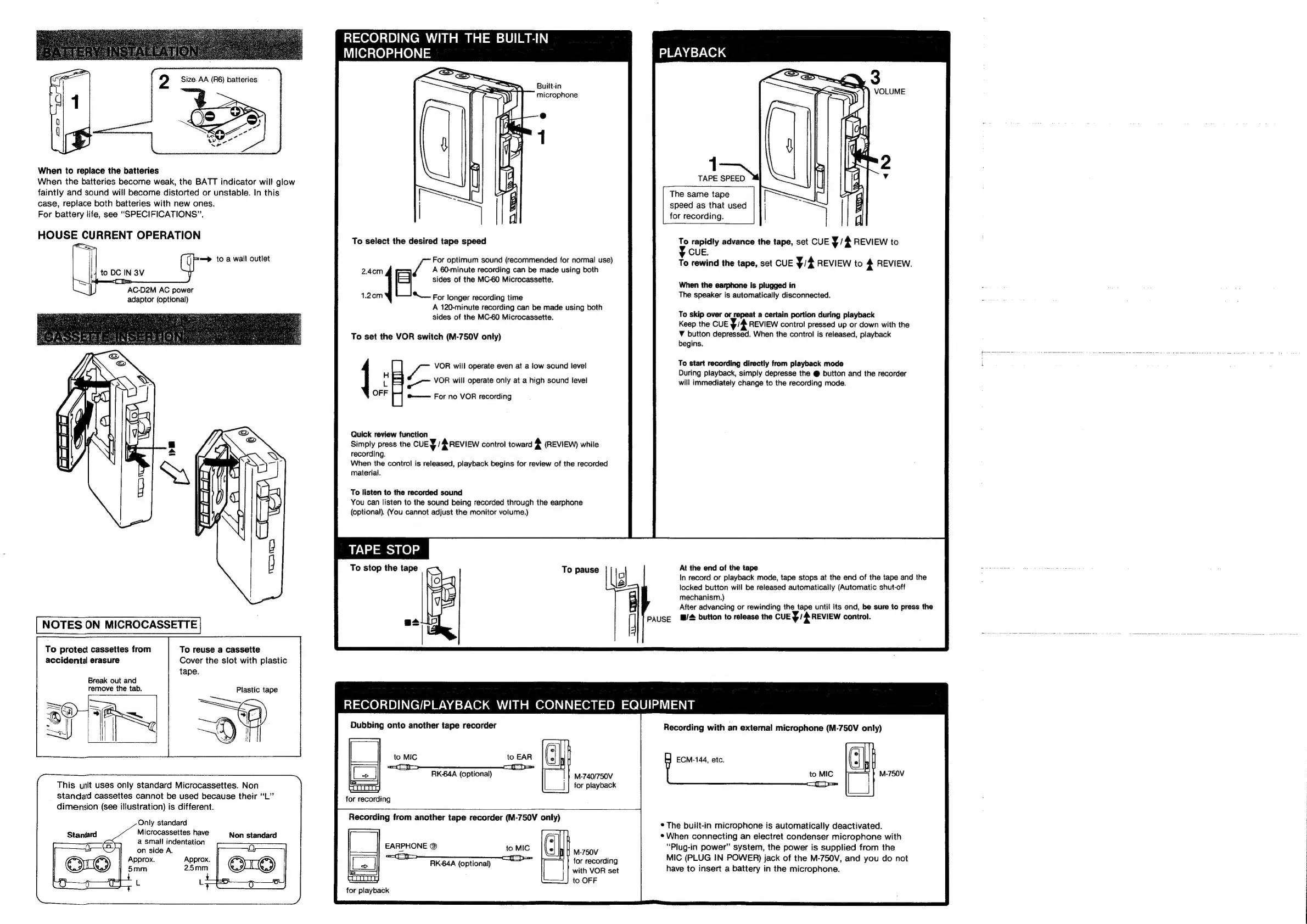
When
to
replace
the
batteries
When
the
batteries
become
weak,
the
BATT
indicator
will
glow
faintly
and
sound
will
become
distorted
or
unstable.
In
this
case,
reptace
both
batteries
with
new
ones.
For
battery
life,
see
“SPECIFICATIONS”.
HOUSE
CURRENT
OPERATION
=~
to
a
wall
outlet
to
DC
IN
3V
mS
}
AC-D2M
AC
power
adaptor
(optional)
NOTES
ON
MICROCASSETTE
To
protect
cassettes
from
To
reuse
a
cassette
accidental
erasure
Cover
the
slot
with
plastic
tape.
Break
out
and
remove
the
tab.
Plastic
tape
This
unit
uses
only
standard
Microcassettes.
Non
standard
cassettes
cannot
be
used
because
their
“L”
dimension
(see
illustration)
is
different.
Only
standard
Standard
Microcassettes
have
Non
standard
a
small
indentation
on
side
A.
Approx.
Approx.
5mm
2.5mm
RECORDING
WITH
THE
BUILT-IN
MICROPHONE
Built-in
microphone
To
select
the
desired
tape
speed
A
60-minute
recording
can
be
made
using
both
2.4cm
sides
of
the
MC-60
Microcassette.
1.2cm
“—
For
longer
recording
time
A
120-minute
recording
can
be
made
using
both
sides
of
the
MC-60
Microcassette.
a
For
optimum
sound
(recommended
for
normal
use)
To
set
the
VOR
switch
(M-750V
only)
ee
VOR
will
operate
even
at
a
low
sound
level
é
VOR
will
operate
only
at
a
high
sound
tevel
OFF
meee
FOr
nO
VOR
recording
Quick
review
function
Simply
press
the
CUEY/#
REVIEW
control
toward
4
(REVIEW)
while
recording.
When
the
control
is
released,
playback
begins
for
review
of
the
recorded
material.
To
listen
to
the
recorded
sound
You
can
listen
to
the
sound
being
recorded
through
the
earphone
(optional).
(You
cannot
adjust
the
monitor
volume.)
TAPE
STOP
To
pause
Ig!
PLAYBACK
TAPE
SPEED
The
same
tape
speed
as
that
used
for
recording.
7
rapidly
advance
the
tape,
set
CUE
y/
4
REVIEW
to
CUE.
To
rewind
the
tape,
set
CUE
yA
REVIEW
to
4
REVIEW.
When
the
earphone
Is
plugged
in
The
speaker
is
automatically
disconnected.
To
skip
over
or
repeat
a
certain
portion
during
playback
Keep
the
CUE
v4
REVIEW
control
pressed
up
or
down
with
the
¥
button
depressed.
When
the
control
is
released,
playback
begins.
To
start
recording
directly
from
playback
mode
During
playback,
simply
depresse
the
@
button
and
the
recorder
will
immediately
change
to
the
recording
mode.
At
the
end
of
the
tape
In
record
or
playback
mode,
tape
stops
at
the
end
of
the
tape
and
the
locked
button
will
be
released
automatically
(Automatic
shut-off
mechanism.)
After
advancing
or
rewinding
the
tape
until
its
end,
be
sure
to
press
the
]
PAUSE
l@/#
button
to
release
the
CUE
Y/#
REVIEW
control.
RECORDING/PLAYBACK
WITH
CONNECTED
EQUIPMENT
Dubbing
onto
another
tape
recorder
RK-64A
(optional)
M-740/750V
for
playback
Recording
with
an
external
microphone
(M-750V
only)
ECM-144,
etc.
EARPHONE
®
RK-64A
(optional)
>
Soe
to
OFF
for
playback
*
The
built-in
microphone
is
automatically
deactivated.
*
When
connecting
an
electret
condenser
microphone
with
“Plug-in
power”
system,
the
power
is
supplied
from
the
MIC
(PLUG
IN
POWER)
jack
of
the
M-750V,
and
you
do
not
have
to
insert
a
battery
in
the
microphone.

Related product manuals