filename[D:\MVC-CD1000 kaihan\3062473121\3062473121MVCCD1000UC\02GB-
MVCCD1000UC\03pre.fm]
Getting started
7
model name1[MVC-CD1000]
[3-062-473-12(1)]
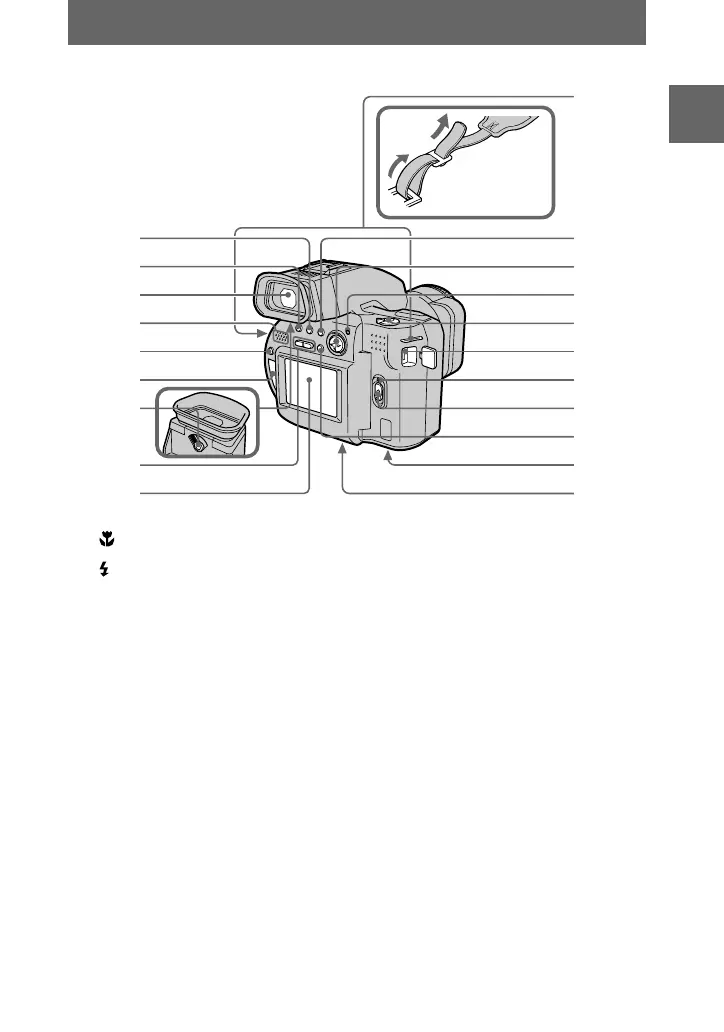
A (Macro) button (50)
B (Flash) button (22)
C Viewfinder (19)
D Speaker
E DISPLAY button (21)
F Disc window
G Viewfinder adjustment lever
(19)
H VOLUME+/– buttons (27)
I LCD screen
J Hooks for strap
K SPOT METER button (52)
L Control button (40)
M ACCESS lamp (18)
Do not shake or strike the camera
while the ACCESS lamp is lit.
N PLAY/STILL/MOVIE selector
(40)
O DC IN jack (9, 11)
P POWER ON/OFF (CHG) lamp
(9)
Q POWER switch (12)
R LCD (ON/OFF) button (19)
S Battery cover/PUSH button
(bottom surface) (8)
T Tripod receptacle (bottom
surface)
Useatripodwithascrewlengthof
less than 7/32 inch (6.5 mm). You
will be unable to firmly secure the
camera to tripods having longer
screws, and may damage the
camera.
2
3
1
5
6
7
4
8
9
q;
qd
qa
qs
qg
qh
qj
qk
qf
ql
w;
Attaching the
shoulder strap
01cov.book Page 7 Wednesday, July 19, 2000 10:33 AM



 To Next Page
 Loading...








