Basic operations
15-GB
Setting the date and time
When you use the camera first, set the date and time.
The date and time are necessary for MS-DOS format recording. If
they are not set, incorrect date and time are recorded, and CLOCK
SET screen in step 5 appears whenever you turn on the camera in
STILL/MOVIE mode.
1 Slide the POWER switch down to turn on the power.
The POWER lamp lights up.
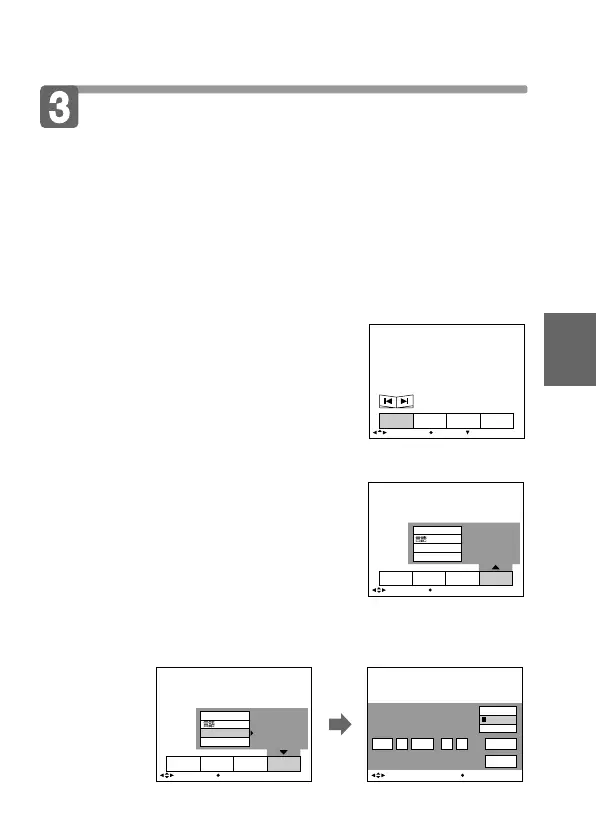
2 Press v of the control button.
The menu bar appears on the LCD
screen.
3 Select “SETUP” with the control button, then press z.
4 Select “CLOCK SET” from the menu bar with the
control button, then press z.
INDEX FILEDELETE SETUP
SELECT OK
CLOCK SET
VIDEO OUT
/LANGUAGE
BEEP
1999JAN AM: 1 12 00
D/M/Y
ENTER
CANCEL
M/D/Y
Y/M/D
CLOCK SET
BEEP
CLOCK SET
INDEX FILEDELETE SETUP
SELECT OK
/LANGUAGE
VIDEO OUT
12
:
00
:
00AM
JAN 1 1999
SELECT/ADJUST OK
INDEX FILEDELETE SETUP
MENU BAR OFF
SELECT OK



 To Next Page
 Loading...










