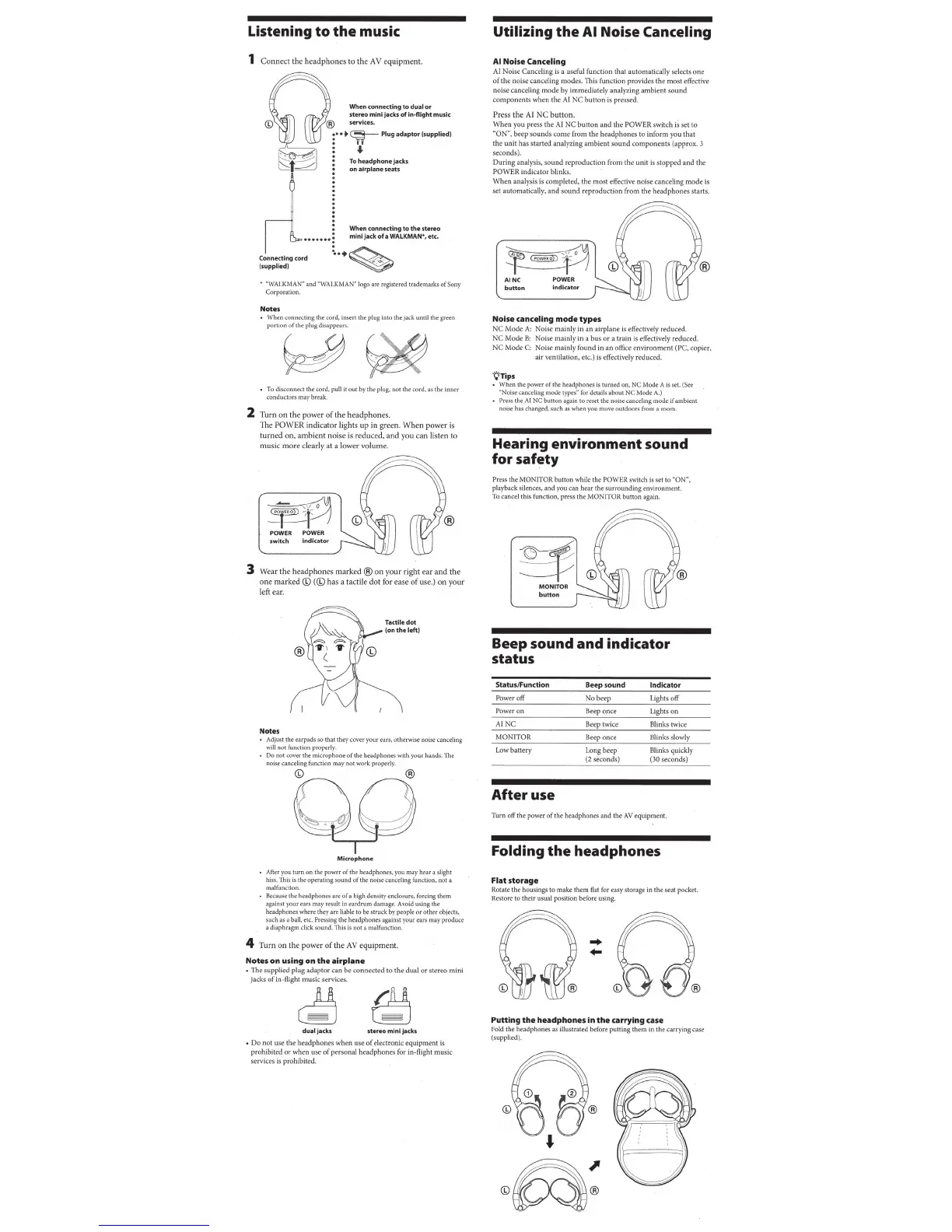
Listening
to
the
music
1
Connect
the
hea
d
phone
s to the A V equipment.
When
co
nne
c
ting
to
dual
or
ste
reo
mini
Jacks
of
in
-
flight
music
@ service
s.
r •
..
~
Plug
ada
pt
or (
supplied
)
~
l
~
"f_/
:
!~
~:rap~::::
:
~;
5
ck
s
~
1
__
,
.......
~-
Coooe<tmg
<o
•:
••••••t
•+
~
WALKMAN
•,
et<.
(s
upplied)
~
•
"WA
I.
KMANW
and
"WAL
K
MAN"Iogoare
reg
istered trademarksofSQny
Corporation.
Notes
•
Whenconnectingthecord,insertthep
lugint
othejacku
ntilthegreen
portionoftheplugdisappcars.
•
To
disconnect the (Ord, pull it
out
by
the
plug, not
the
cord.
a$
thl' inner
conductors may break.
2
Turn
on the power
of
the
headphon
es.
The
POWE
R indicat
or
li
ghts
up
in
green. Wh
en
power
is
turned on, ambient noise is reduced, and you can listen to
music
mo
re clearly at a lower volum
e.
~
·
-cO'~
ji2D'f/j
POWER POWER
switch
in
di
ca
tor
3 Wear
the
headp
h
one
s
ma
rk
ed®
on
your right ear
and
the
one
marked © (
{h)
has a tactile
do
t for ease
of
use.)
on
y
our
left ear.
Notes
• Adjust the earpads
so
that they
wver
your ears, otherwise noise canceling
willnotfunctionpropc
rl
y.
•
Do
not
wver
the microphone of the headphones with your hands. The
noise canceling function may not work properly.
~
Mi
c
rophon
~
• After you turn on the power
of
the headphones, you may h
ea
r a slight
hiss.
This
is
the operating sound
of
the noise canceling function, not a
malfunction
•
Becou:>e
the headphones are of a high density cndo>ur<:, forcing them
against your ears may result
in
eardrum damage. Avoid using the
headphones where they are liable to
be
struck
by
people
or
other objects,
suchasaball,etc.
Pressingtheheadphonesagainstyourearsmay produce
a diaphragm click sound. This
is
not a malfunction.
4 Turn
on
the power
of
the
AV
equipment.
Notes
on
using
on
the
airplane
•
The
supp
li
ed
plug
adaptor
can
be
co
nn
ect
ed
to
the
dual
or
ster
eo
mini
jacks
of
in-flight
mu
sic
services.
dualj
ack5 Jtere
omln
lja
ck
5
•
Do
not
use
the
headphones
when
u
se
of
ele
ct
roni
c
equipment
is
prohibited
or
when
use
of
personal
headphones
for in-flight
music
services
is
prohibited.
Utilizing
the
AI Noise Canceling
AI
Noise Canceling
AI
No
i
se
Canc
eling is a useful
fun
ct
ion
t
hat
automatically
selects
one
of
the
noise
canceling
mode
s.
Thi
s
function
provides
the
mo
st effective
noise
cancel
ing
mode
by
immediately
analyzing
ambient
sound
com
ponent
s
when
th
e A I
NC
button
is
pressed.
Press
the
AI
NC
button
.
W h
en
you
press
the
AI
NC
button
and
the
POWER
sw
itch
is set to
"ON",
beep
sou
nd
s
come
fro
m
the
headphone
s
to
in
form
you
that
the
unit
has
s
ta
rted
analyzing
ambient
so
und
components
(ap
prox
. 3
seconds)
.
During
analysis,
sound
reproduction
from
the
uni
t is
sto
pped
and
the
POWER
indica
t
or
blinks
.
When
analysis
is
completed,
the
most
effective
no
i
se
cance
l
in
g
mo
de is
set
automatically,
and
sound
r
ep
roduction
from
th
e
headphon
es s
tart
s
Noise canceling
mode
types
NC
Mode
A:
Noise
mainly
in
an
air
p
lane
is effectively
redu
ced
NC
Mode
8:
Noise
mainl
y in a
bus
or
a
train
is effect ively r
educed.
NC
Mode
C:
Noise
mainly
f
ound
in
an
office
env
ironm
en
t (PC,
copier,
air
ventilation,
etc.)
is effectively r
educed.
·Q·
Tip
s
• When the powe r of t
he
headphones
is
turned on, NC Mode A
is
set
(See
UNoise
canceling mode
types~
for details about NC Mode
A.)
• Press the
AI
NC button again to reset the noise canceling mode if ambient
noise has changed, such as when you move outdoors from a room.
Hearing
environment
sound
for
safety
Press the
MONITOR
button
while the
PO
WER switch
is
set
to
uONH,
playback silences,
and
you can
hear
the
surrou
nding
environment
To cancel
th
is
fu
nc
ti
on
, press the
MON
I
TOR
button
again.
Beep
sound
and
indicator
status
S
tatus
/
Function
Beep
sound
Indicator
Pow
er
off
No
b
eep
L
ights
off
Pow
er
on
Beep
once
Li
gh
ts
on
AINC
B
eep
twice
Bl
inks
t
wice
MO
N
ITOR
Beep
once
Blinks slowly
Low
batte
ry
Long
beep
Blinks
quickly
(2seconds)
(30
secon
ds)
After
use
Turn
off
the power
of
the
headphones
and
th
e
AV
equipment.
Folding
the
headphones
Flat
storage
Rotate the h
ous
ings to
mak
e them flat for easy storage in the seat pocket.
Kestore to
their
usual position before using.
Putting
the
headphones
in
the
carrying
case
Fold the
headphones
as illustrated before putting
them
in the ca
rr
ying case
(supplied).


 To Next Page
 Loading...