40
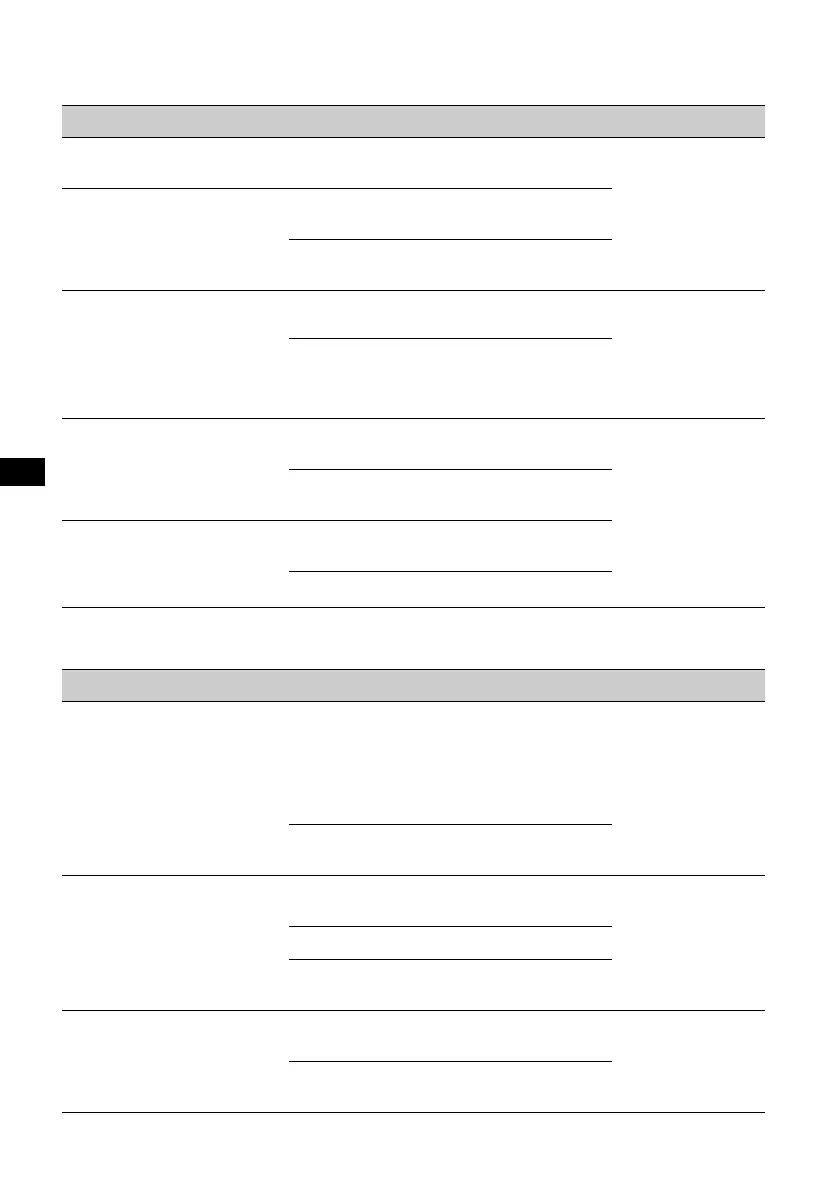
Follow the page reference for details. “z” indicates the default setting.
SET (Setup)
DSPL (Display)
Item Option Purpose Unit status
CLOCK ADJ (Clock Adjust)
(
page 42)
–
–
Any status.
BEEP
ON (z)
To activate the operation
sound.
OFF
To deactivate the operation
sound.
COLOR SYS (Color System)
Changes the TV color system.
PAL ( z: Asian
model)
To set to PAL.
Unit off.
NTSC
(z: Latin
American
model)
To set to NTSC.
RM (Rotary Commander)
Changes the operative
direction of the rotary
commander controls.
NORM (z)
To use in the factory-set
position.
Any status.
REV
To use on the right side of
the steering column.
A.OFF (Auto Off)
Shuts off automatically after a
desired time when the unit is
off.
NO (z)
To deactivate the Auto Off
function.
30S, 30M, 60M
To select the desired time.
Item Option Purpose Unit status
B.OUT (Black Out)
(Latin American model only)
Turns off the illumination
automatically for any source
(e.g, during playback/radio
reception, etc.) if no operation
is performed for 5 seconds.
ON
To turn off the illumination.
To bring the light back on,
press any button on the
main unit. (When activated,
remote operation is
unavailable.)
Any status.
OFF (z)
To deactivate the Black Out
function.
M.DSPL (Motion Display)
Selects the Motion Display
mode.
SA (z)
To show moving patterns
and spectrum analyzer.
During playback/
radio reception.
ON
To show moving patterns.
OFF
To deactivate the Motion
Display.
DEMO (Demonstration)
ON (z)
To activate the
demonstration.
Unit off.
OFF
To deactivate the
demonstration.


 To Next Page