8GB
ALBUM /
Skip an album for audio device. Press and
hold to skip albums continuously.
(Not available when a USB device in
Android mode or iPod is connected.)
Press to thumbs up, or to thumbs
down in Pandora® (page 18).
(repeat)
(Not available when a USB device in
Android mode is connected.)
(shuffle)
(Not available when a USB device in
Android mode is connected.)
MIC (page 20)
(play/pause)
EXTRA BASS
Reinforce bass sound in synchronization
with the volume level. Press to change
the EXTRA BASS setting: [1], [2], [OFF].
AUX input jack
DSPL (display)
Change display items.
SCRL (scroll)
Press and hold to scroll a display item.
USB port
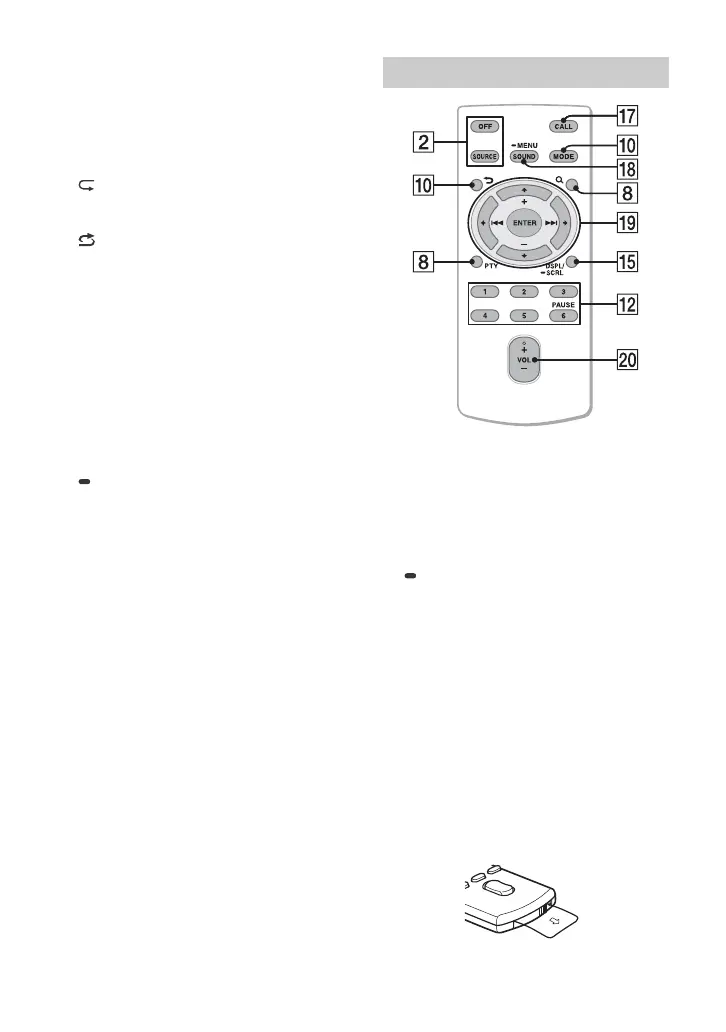
The VOL (volume) + button has a tactile dot.
CALL
Enter the call menu. Receive/end a call.
SOUND
Open the SOUND menu directly.
MENU
Press and hold to open the setup menu.
///
Select a setup item, etc.
ENTER
Enter the selected item.
Press and hold for more than 2 seconds
to establish or terminate the “SongPal”
function.
/ (prev/next)
+/– (album +/–)
VOL (volume) +/–
Remove the insulation film before use.
RM-X231 Remote commander


 To Next Page