MHC-V5
29
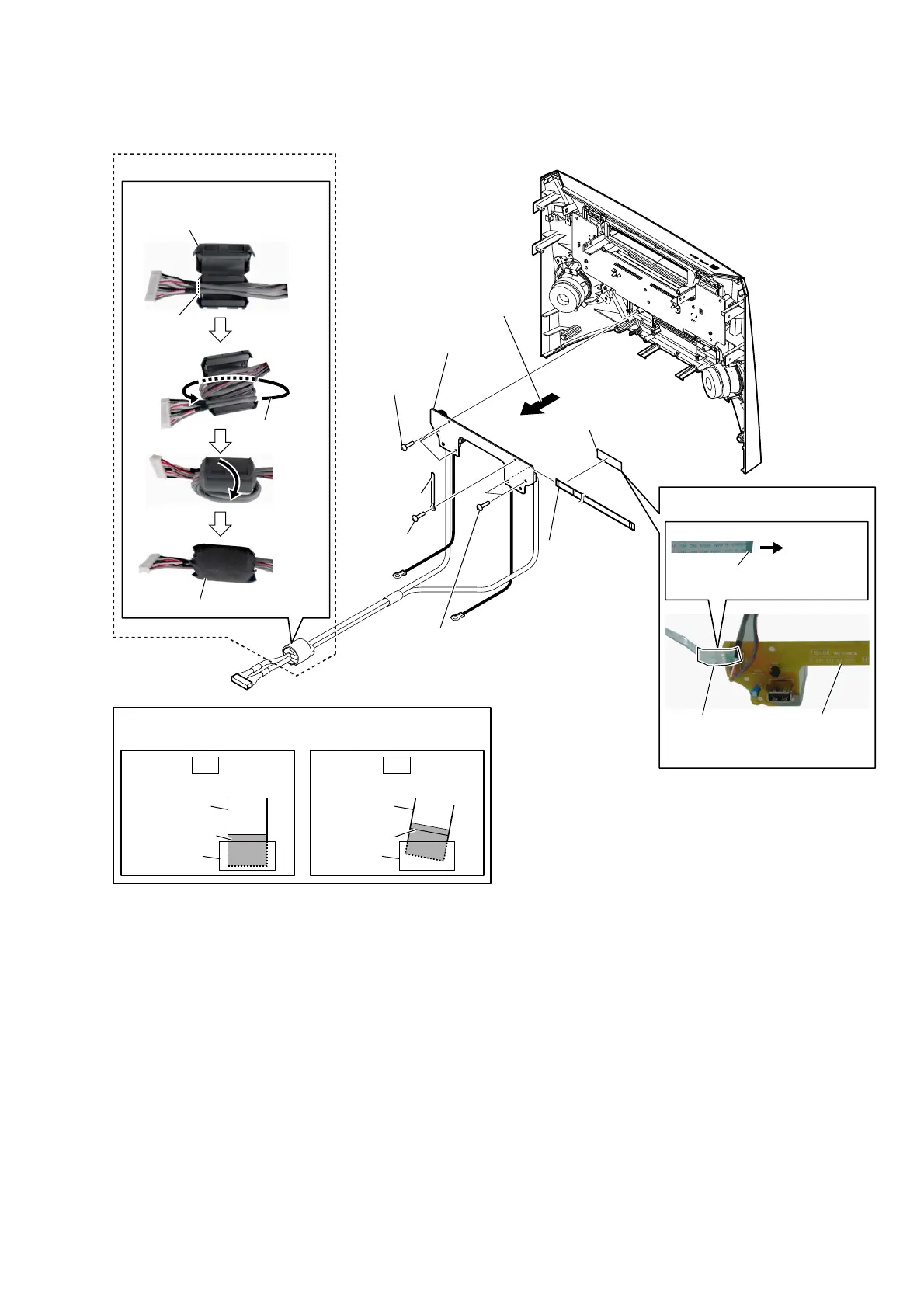
2-25. USB BOARD BLOCK
4 filament tape
(sub material)
(US)
filament tape
(sub material)
USB board
5 wire (flat type)
(4 core)
(CN2202)
6 USB board block
WireVeWWiQJ
2 coating clip
1 screw
(BVTP3 u 8)
1 two screws
(BVTP3 u 8)
1 three screws
(BVTP3 u 8)
)erriWeFRre()&)VeWWiQJ
cushion (E 0.5)
ferrite core (FC3)
guide line
Wrap once.
3 Remove the USB board block
in the direction of the arrow.
Note:
When installing the wire (flat type),
ensure that
the colored line is not slanted after insertion.
colored line
colored line
Insert is straight to the interior. Insert is incline
wire (flat type) wire (flat type)
connectorconnector
OK NG
to USB board
Terminal
face
–)rRQWSDQeOreDrYieZ–



 To Next Page
 Loading...











