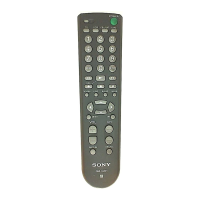
31
KEY DISPLAY
qd1
34qh
1 – 9, 0, - , ENT,
1 –, 2 –
w; (DISPLAY)
qf a
(ANT/SW)
1t
(INPUT SELECT)
waMENU
ws V
ws v
ws b
ws B
ws OK
qsm
qsH
qsM
qsREC z
qsx
qsX
qjPROG +/–
qaRETURN
VCR
FUNCTION
To turn on and off.
To change the programme. For
example, to change to programme 5,
press 0 and 5 (or, press 5 and ENT).
To expose the on-screen display.
To switch the subtitle.
To change the input mode.
To call up the MENU display.
To move the cursor upward.
To move the cursor downward.
To move the cursor to the right.
To move the cursor to the left.
To enter the selection of the MENU
display.
To rewind.
To play.
To fast-forward.
To record, press H while pressing
REC z*. First release H, then release
REC z.
To stop.
To pause.
Programme up: +
Programme down: –
To exit the mode.
* In order to avoid recording by mistake, the REC z
button does not work by itself.
KEY DISPLAY
qd1
7RED, GREEN ,
YELLOW , BLUE
3 4
1 – 9, 0, -/--
1 t
(INPUT SELECT)
0GUIDE
qaRETURN (EXIT)
qg /
(TELETEXT)
waMENU
ws V
ws v
ws b
ws B
ws OK
qjPROG +/–
qk
ql (PAP)
9FAV
8 SERVICE
w; (DISPLAY)
qsm
qsH
qsM
qsREC z
qsx
qsX
CBL (Cable box)
Continued
FUNCTION
To turn on and off.
Fastext buttons
To change programmes.
For example, to change to programme
5, press 0 and 5 .
To switch the output of the SAT
receiver to the TV. (When you connect
a TV cable or aerial to the receiver, the
output switches between a TV and
SAT programme.)
To bring up Master Guide.
To exit the mode.
To switch to teletext.
To call up the MENU display.
To move the cursor upward.
To move the cursor downward.
To move the cursor to the right.
To move the cursor to the left.
To bring up the Station Index when a
programme guide is not displayed.
To select the programme that is
highlighted.
Programme up : +
Programme down : –
To return to the last tuned station.
To show the Help screen.
To show the Box Office screen.
To show the Services screen.
To show the interactive screen.
To rewind.
To play.
To fast-forward.
To record, press H while pressing
REC z*. First release H, then release
REC z.
To stop.
To pause.



 To Next Page
 Loading...