15
GB
SHAKE-X70D/SHAKE-X30D/SHAKE-X10D.GB.4-691-054-12(1)
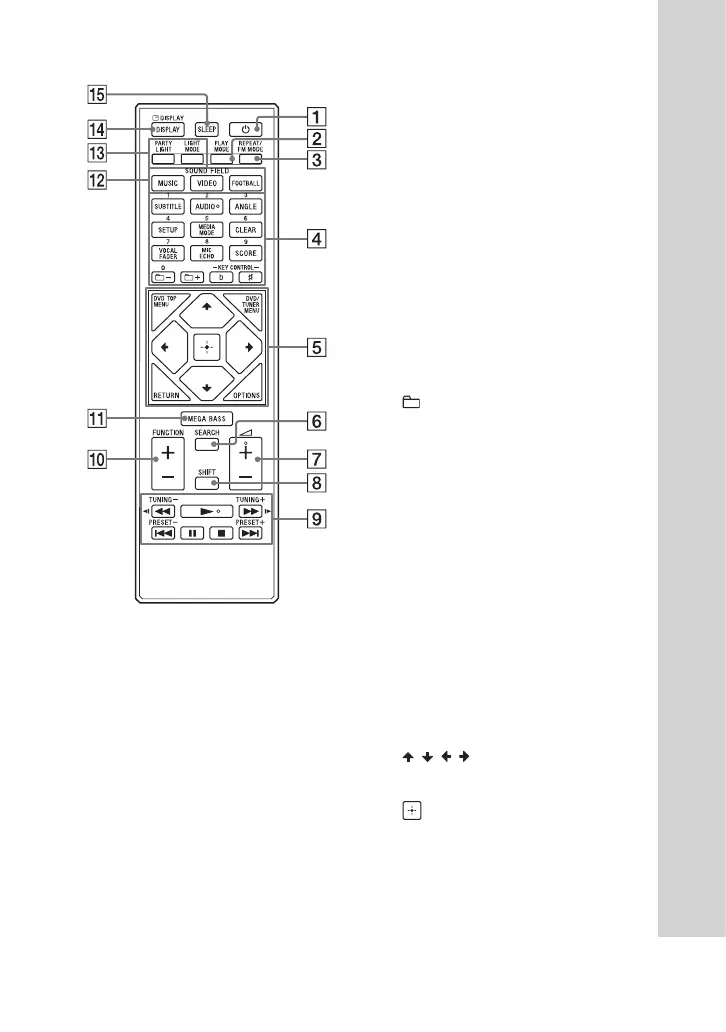
Remote control
(power)
Turns on the system, or sets it to
standby mode.
PLAY MODE (page 28,
36)
REPEAT/FM MODE (page
29, 38)
Numeric (0 – 9) buttons*
1
*
2
— Selects a track, chapter or file
with its item number.
— Enters numbers or values.
SUBTITLE (page 27)
AUDIO*
2
(page 27, 31)
ANGLE (page 27)
SETUP (page 31)
MEDIA MODE (page 25)
Selects the media to be played
back on a data disc or USB
device.
CLEAR (page 26)
VOCAL FADER (page 53)
MIC ECHO (page 53)
SCORE (page 53)
+/– (select folder)
Selects a folder on a data disc or
a USB device.
KEY CONTROL / (page
53)
DVD TOP MENU
Displays the DVD title on the TV
screen.
DVD/TUNER MENU (page
25, 26, 39)
RETURN (page 25)
OPTIONS
Enters or exits the options menu.
/ / /
Selects the menu items.
(enter)
Enters/confirms the settings.
SEARCH (page 25, 26)
(volume) +/–*
2
Adjusts the volume.


 To Next Page