EasyManua.ls Logo

Sony TA-E1000ESD - Page 47

Sony TA-E1000ESD
48 pages
Print Icon
To Next Page IconTo Next Page
To Previous Page IconTo Previous Page
Loading...
BEcedelo)(=t-jalexeyiiare|
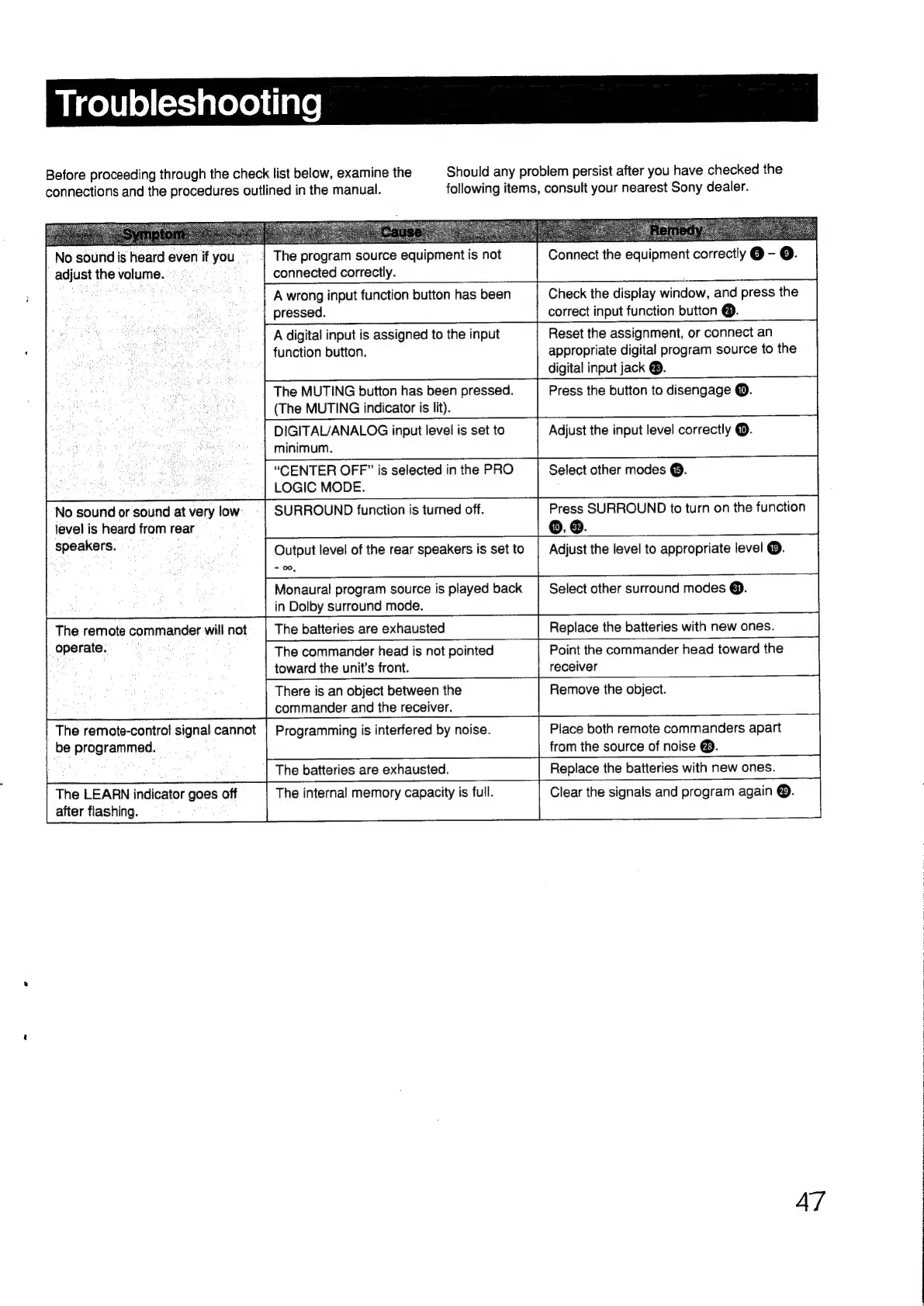
Before
proceeding
through
the
check
list
below,
examine
the
connections
and
the
procedures
outlined
in
the
manual.
No
sound
is
heard
even
if
you
adjust
the
volume.
connected
correctly.
pressed.
function
button.
(The
MUTING
indicator
is
lit).
minimum.
LOGIC
MODE.
No
sound
or
sound
at
very
low
level
is
heard
from
rear
speakers.
=
00,
in
Dolby
surround
mode.
The
batteries
are
exhausted
The
remote
commander
will
not
operate.
ce
toward
the
unit’s
front.
There
is
an
object
between
the
commander
and
the
receiver.
The
program
source
equipment
is
not
A
wrong
input
function
button
has
been
A
digital
input
is
assigned
to
the
input
The
MUTING
button
has
been
pressed.
DIGITAL/ANALOG
input
level
is
set
to
“CENTER
OFF”
is
selected
in
the
PRO
SURROUND
function
is
turned
off.
Output
level
of
the
rear
speakers
is
set
to
Monaural
program
source
is
played
back
The
commander
head
is
not
pointed
Should
any
problem
persist
after
you
have
checked
the
following
items,
consult
your
nearest
Sony
dealer.
Connect
the
equipment
correctly
@
-
©.
Check
the
display
window,
and
press
the
correct
input
function
button
@.
Reset
the
assignment,
or
connect
an
appropriate
digital
program
source
to
the
digital
input
jack
®.
Press
the
button
to
disengage
@.
Adjust
the
input
level
correctly
@.
Select
other
modes
@.
Press
SURROUND
to
turn
on
the
function
©,
@.
Adjust
the
level
to
appropriate
level
®.
Select
other
surround
modes
@).
Replace
the
batteries
with
new
ones.
Point
the
commander
head
toward
the
receiver
Remove
the
object.
The
remote-control
signal
cannot
be
programmed.
Programming
is
interfered
by
noise.
Place
both
remote
commanders
apart
from
the
source
of
noise
@.
The
batteries
are
exhausted.
The
LEARN
indicator
goes
off
after
flashing.
The
internal
memory
capacity
is
full.
Replace
the
batteries
with
new
ones.
Clear
the
signals
and
program
again
®.
47

Other manuals for Sony TA-E1000ESD

Related product manuals