EasyManua.ls Logo

Sony TA-E2000ESD - Controls and Display; Front Panel Controls

Sony TA-E2000ESD
55 pages
Print Icon
To Next Page IconTo Next Page
To Previous Page IconTo Previous Page
Loading...
Front
Panel
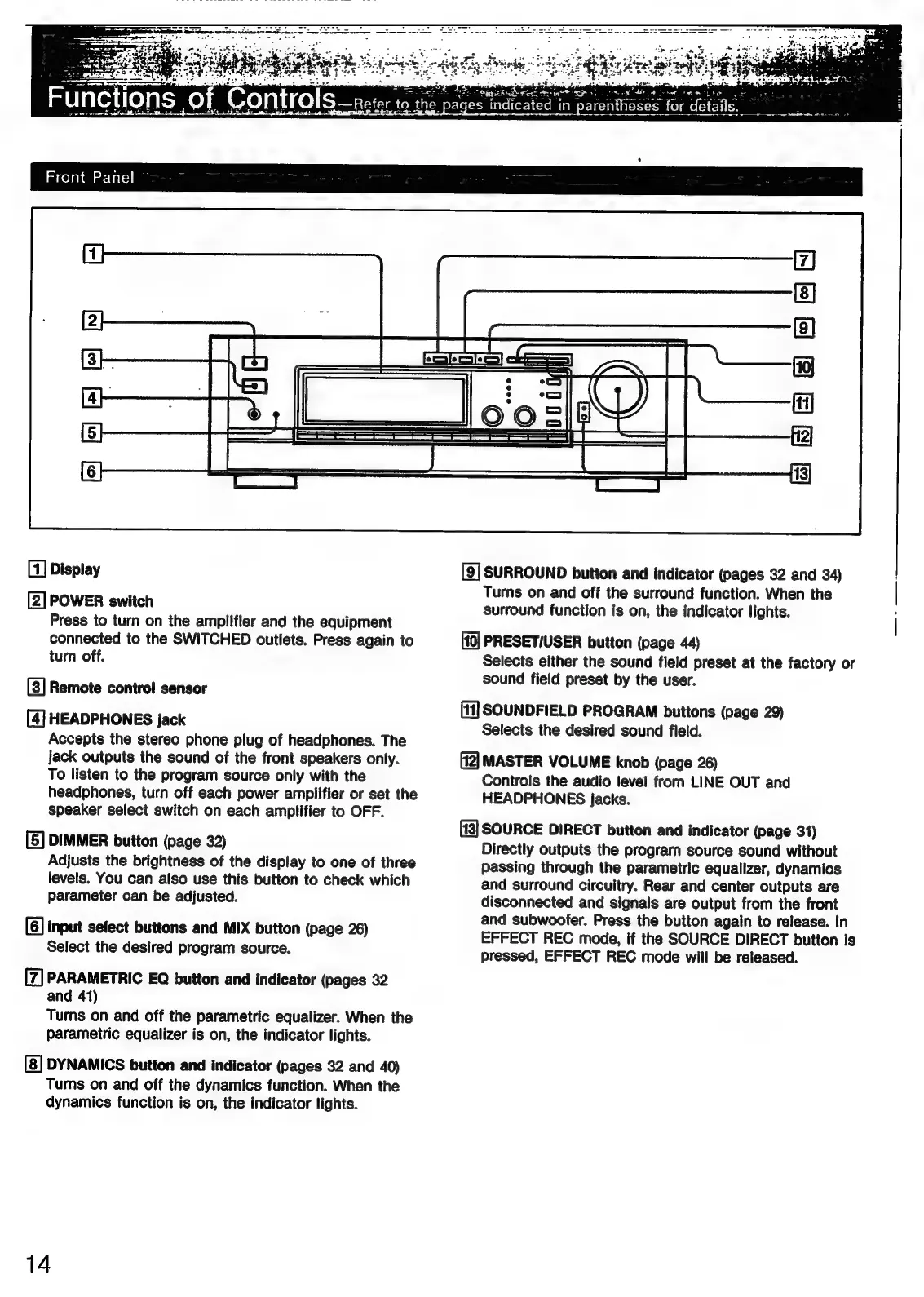
[1]
Display
[2]
POWER
switch
Press
to
turn
on
the
amplifier
and
the
equipment
connected
to
the
SWITCHED
outlets.
Press
again
to
turn
off.
[3]
Remote
contro!
sensor
[4]
HEADPHONES
jack
Accepts
the
stereo
phone
plug
of
headphones.
The
jack
outputs
the
sound
of
the
front
speakers
only.
To
listen
to
the
program
source
only
with
the
headphones,
turn
off
each
power
amplifier
or
set
the
speaker
select
switch
on
each
amplifier
to
OFF.
[5]
DIMMER
button
(page
32)
Adjusts
the
brightness
of
the
display
to
one
of
three
levels.
You
can
also
use
this
button
to
check
which
parameter
can
be
adjusted.
input
select
buttons
and
MIX
button
(page
26)
Select
the
desired
program
source.
[7]
PARAMETRIC
EQ
button
and
indicator
(pages
32
and
41)
Turns
on
and
off
the
parametric
equalizer.
When
the
parametric
equalizer
is
on,
the
indicator
lights.
DYNAMICS
button
and
indicator
(pages
32
and
40)
Turns
on
and
off
the
dynamics
function.
When
the
dynamics
function
is
on,
the
indicator
lights.
14
(9)
fi]
{i2]
13}
[9]
SURROUND
button
and
indicator
(pages
32
and
34)
Turns
on
and
off
the
surround
function.
When
the
surround
function
is
on,
the
indicator
lights.
PRESET/USER
button
(page
44)
Selects
either
the
sound
field
preset
at
the
factory
or
sound
field
preset
by
the
user.
[11]
SOUNDFIELD
PROGRAM
buttons
(page
29)
Selects
the
desired
sound
field.
MASTER
VOLUME
knob
(page
26)
Controls
the
audio
level
from
LINE
OUT
and
HEADPHONES
jacks.
[13]
SOURCE
DIRECT
button
and
indicator
(page
31)
Directly
outputs
the
program
source
sound
without
passing
through
the
parametric
equalizer,
dynamics
and
surround
circuitry.
Rear
and
center
outputs
are
disconnected
and
signals
are
output
from
the
front
and
subwoofer.
Press
the
button
again
to
release.
In
EFFECT
REC
mode,
if
the
SOURCE
DIRECT
button
is
pressed,
EFFECT
REC
mode
will
be
released.

Related product manuals