EasyManua.ls Logo

Sony TA-E2000ESD - Advanced Operation and Customization; Understanding Digital Signal Processing (DSP)

Sony TA-E2000ESD
55 pages
Print Icon
To Next Page IconTo Next Page
To Previous Page IconTo Previous Page
Loading...
DSP
(Digital
Signal
Processing)
means
that
not
only
the
digital
signals
but
analog
signals
from
a
cassette
deck
or
FM
tuner,
etc.
are
also
changed
into
digital
signals
once
and
processed
digitally
in
various
ways.
Afterwards,
they
are
restored
to
analog
signals
and
output.
For
this
amplifier,
digital
signal
processing
is
possible
in
the
following
three
areas,
in
any
of
these
cases,
press
the
respective
button
and
adjust
the
parameters.
The
adjustable
parameters
differ
according
to
the
sound
field.
See
page
33.
Parametric
equalizer—PARAMETRIC
EQ
Controls
the
specific
frequencies
or
output
level
to
raise
the
bass
sound
or
lower
the
treble
sound.
Dynamics—-DYNAMICS
Compresses
or
expands
the
dynamic
range
of
the
program
source.
The
compressor
increases
the
low
level
sound
and
as
a
result,
it
compresses
the
dynamic
range,
making
passages
played
pianissimo
audible,
for
example.
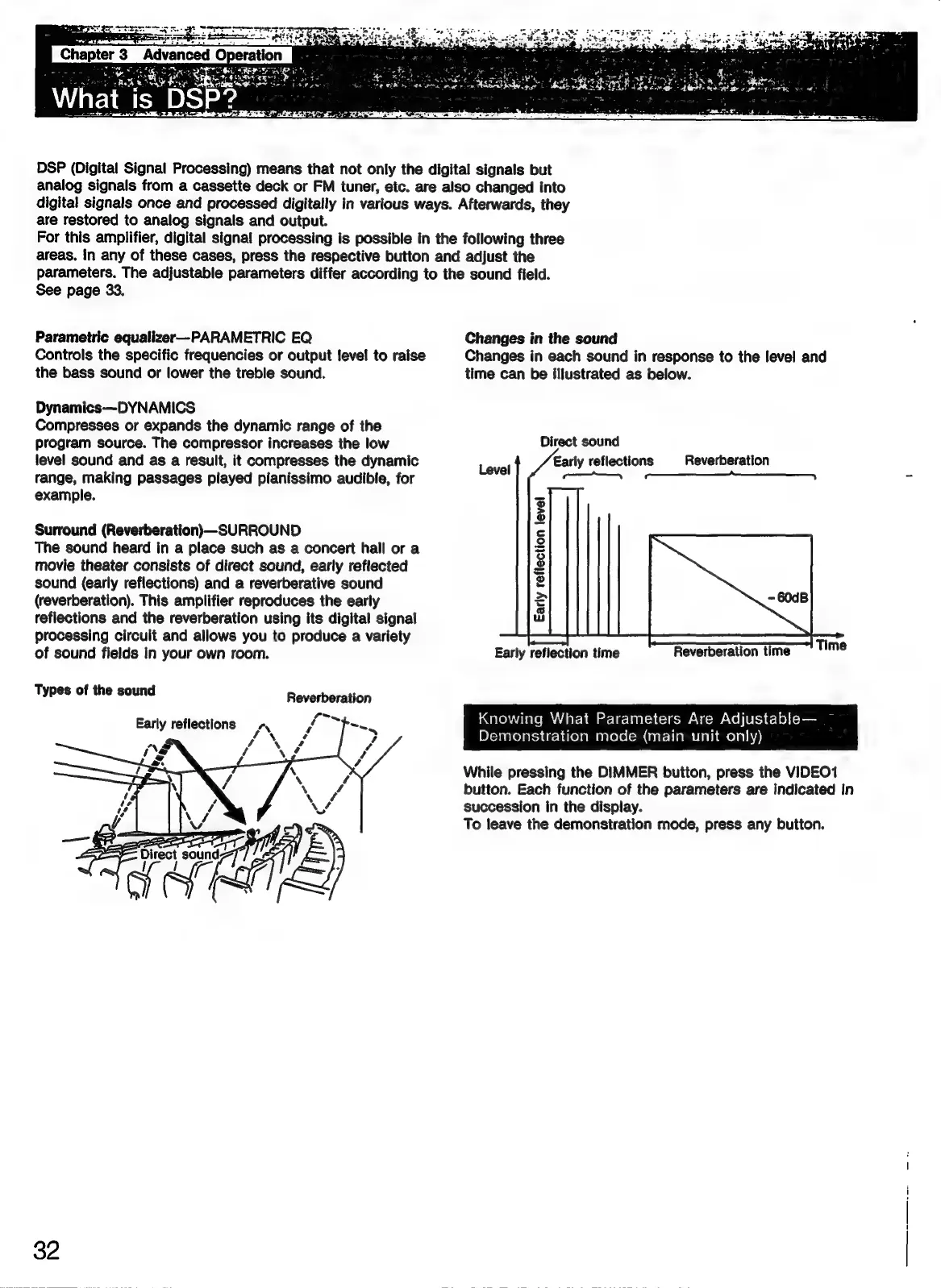
Surround
(Reverberation\—SURROUND
The
sound
heard
in
a
place
such
as
a
concert
hall
or
a
movie
theater
consists
of
direct
sound,
early
reflected
sound
(early
reflections)
and
a
reverberative
sound
(reverberation).
This
amplifier
reproduces
the
early
reflections
and
the
reverberation
using
its
digital
signal
processing
circuit
and
allows
you
to
produce
a
variety
of
sound
fields
in
your
own
room.
Types
of
the
sound
Reverberation
Early reflections
-,
YN
Changes
in
the
sound
Changes
in
each
sound
in
response
to
the
level
and
time
can
be
illustrated
as
below.
Direct
sound
Early
reflections
eS
Reverberation
Level
xd
Early
reflection
level
Time
Early
reflection
time
Reverberation
time
Knowing
What
Parameters
Are
Adjustable—
Demonstration
mode
(main
unit
only)
While
pressing
the
DIMMER
button,
press
the
VIDEO1
button.
Each
function
of
the
parameters
are
indicated
in
succession
in
the
display.
To
leave
the
demonstration
mode,
press
any
button.

Related product manuals