EasyManua.ls Logo

Sony TA-E88B - Parts Information

Sony TA-E88B
28 pages
Print Icon
To Next Page IconTo Next Page
To Previous Page IconTo Previous Page
Loading...
square
tantalum
capacitor
ce
Fig,
18.
1-3-3.
Mounting
of
Components
When
mounting
the
components
on
the
circuit
board,
take
care
that
they
do
not
touch
the
shafts
of
switches;
variable
resistors;
etc.
Be
particularly
careful
to
prevent
any
contact
between
the
com-
pound
FET
covered
by
metal
case,
and
the
ATTENU-
ATOR
shaft,
and
the
diode
leads
and
BALANCE
control
shaft.
Fig.
16
1-3-4,
Cam
Equipped
Switch
Indication
The
selector
switches
employed
in.
TA-E88/E88B
are
each
equipped
with
a'cam,
and
a
number
(3.
or
4)
of
slide.
switch
elements
which
move.
in.
an’
irregular
fashion
when
the
cam
rotates.
As.an
example
of
this
arrangement,
S1L
(FUNCTION
PHONO
INPUT)
is
shown
in
Fig.
17.
There
are
a
total
of
ten
switches
employed
in
the
TA-E88/E88B,°
making
it.
impossible
to
‘determine
which.
points
are
making
contact
at.
different
select
positions.
For
this
reason,
both
the
schematic.
dia-
gram
and
the
mounting
diagram
include
special
charts
of
the
contact
patterns
for
each
switch
position.
Bato
wie
|
TA-E88/E88B
TA-E88/E88B
|
J
Note
that
these
charts
indicate
the
position
of
the
blue
switch
link
heads
as
viewed
from
the
com-
ponent
side,
thereby
simplifying
checking
operations
as
well.
FUNCTION
oo
PHONO
14
400.
———
HEAD
AMP
<
:
aq
LOW.
FILTER
ISHz.42dB/OCT
_
PHONO2—\
movement
of
switch
contacts
viewed
from
component
side
Fig.
18
SIL-1
\
S{L-2
|
selector
links
when
SIL-3
setting
SIL
to.
step
3
(top
view}
SIL-4
:
SIL
(FUNCTION
PHONO
Switch}
viewed
from
component
side
Fig.
19
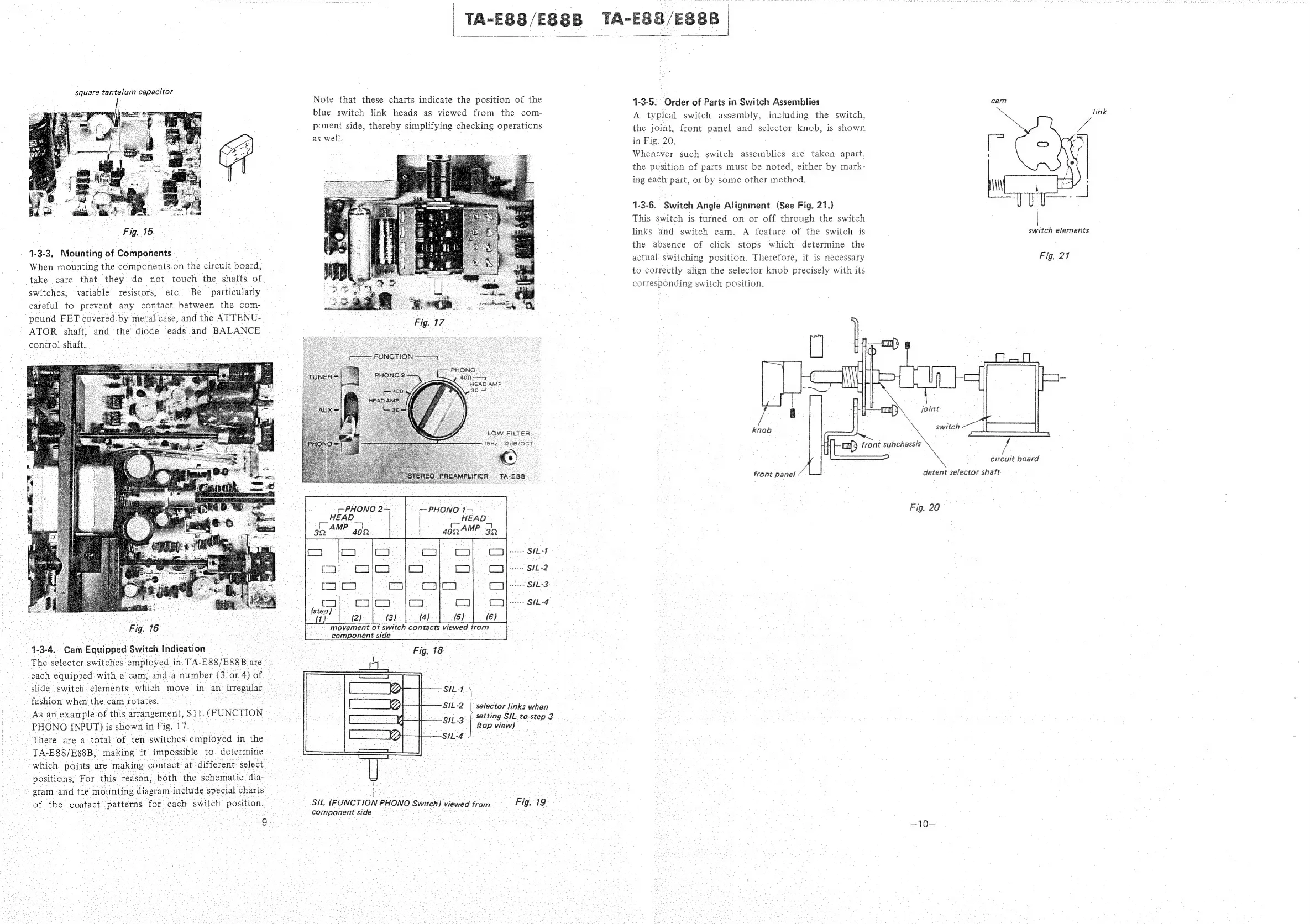
1-3-5.
Order
of
Parts
in
Switch
Assemblies
cam
A
typical
switch
assembly,
including
the
switch,
the
joint,
front
panel
and
selector
knob,
is
shown
in
Fig.
20.
Whenever
such
switch
assemblies
are
taken
apart,
the
pesition
of
parts
must
be
noted,
either
by
mark-
ing
each
part,
or
by
some
other
method.
link
1-3-6.
Switch
Angle
Alignment
(See
Fig.
21.)
|
This
switch
is
turned
on
or
off
through
the
switch
|
links
and
switch
cam.
A
feature
of
the
switch
is
switch
elements
the
absence
of
click
stops
which.
determine
the
actual
switching
position.
Therefore,
it is
necessary
to
correctly
align
the
selector
knob
precisely
with
its
corresponding
switch
position.
Fig.
217
a
:
joint
knob
switch
i
ai
circuit
board
front
panel
detent
selector
shaft
Fig.
20
—10—

Related product manuals