EasyManua.ls Logo

Sony Trinitron KV-21PS1 - Page 4

Sony Trinitron KV-21PS1
18 pages
Print Icon
To Next Page IconTo Next Page
To Previous Page IconTo Previous Page
Loading...
~<D—p|
cavie
Box
Antenna
Antenna
a
fa)
VHF/UHF
€)
VHFPUHF
IN
VHF/UHF
OUT
(2)
S-VIDEO
une
out
©)
AUDIO-R
AUDIO-L
VIDEO
S-VIDEO
VIOEO
TIN
AUDIO-R
AUDIO-L
VIDEO
VIDEO
(Rear
of
TV)
AUDIO
(yellow)
(black)
AUDIO
(black)
§:
3
(yellow)
:
i
For
models
Video
Cable
(not
supplied)
with
mono
inputs
AUDIO-R
AUDIO-L
VIDEO
AUDIO-R
AUDIO-L
VIDEO
|
(red)
(white)
(yellow)
(red)
(white)
(yellow)
a
6:
i
A
0
i
:
H
B
For
models
Video
Cable
(not
supplied)
with
stereo
inputs
S-Video
Cable
(not
supplied)
3
KV-20V60
only
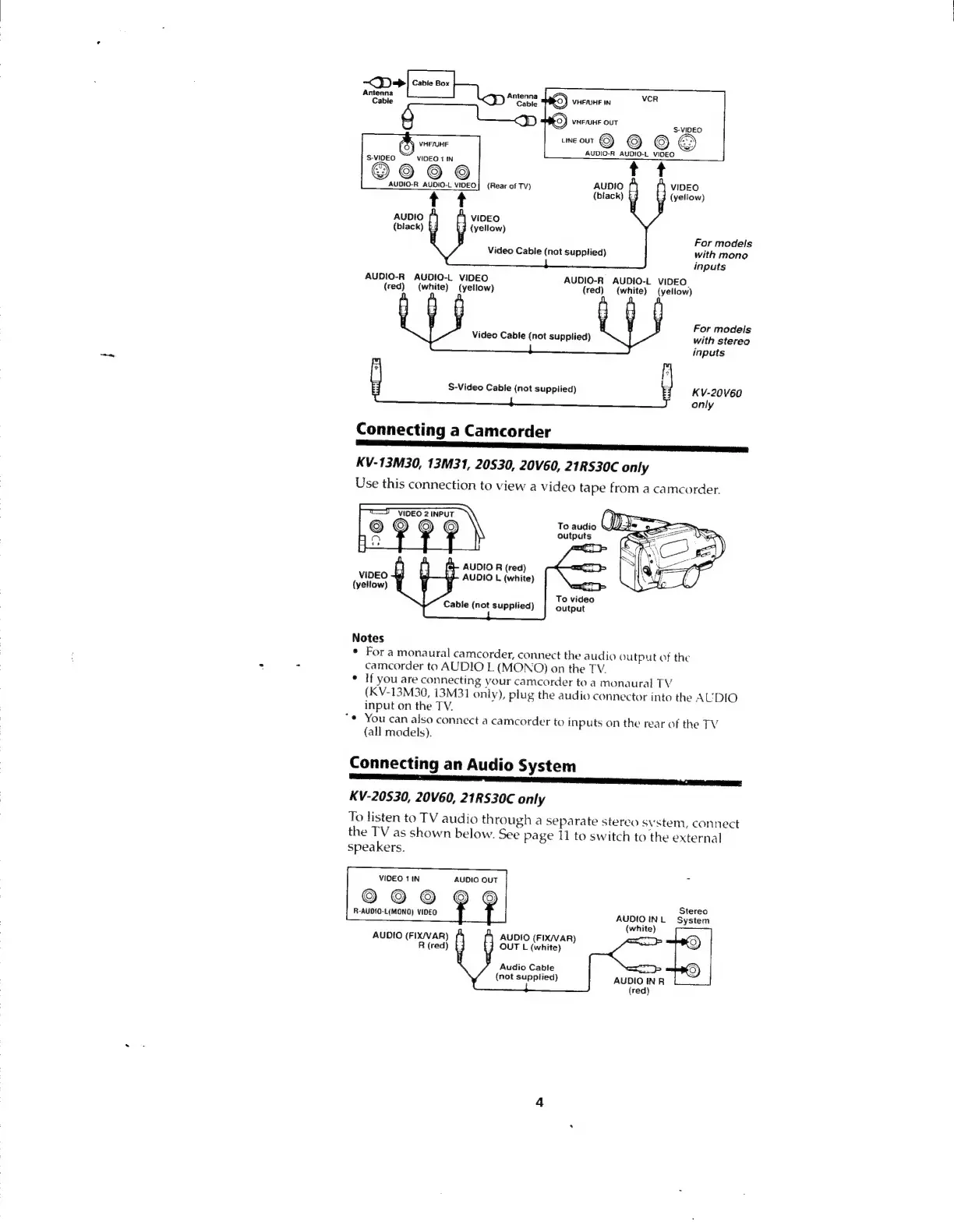
Connecting
a
Camcorder
KV-13M30,
13M31,
20530,
20V60,
21RS30C
only
Use
this
connection
to
view
a
video
tape
from
a
camcorder.
To
audio
outputs
AUDIO
R
(red)
VIDEO
+3
£5
AUDIO
L
(white)
output
Notes
¢
Fora
monaural
camcorder,
connect
the
audio
output
of
the
camcorder
to
AUDIO
L
(MONO)
on
the
TV.
*
If
you
are
connecting
your
camcorder
to
a
monaural
TV
(KV-13M30,
13M31
only),
plug
the
audio
connector
into
the
A
UDIO
input
on
the
TV.
“¢
You
can
also
connect
a
camcorder
to
inputs
on
the
rear
of
the
TV
(all
models).
Connecting
an
Audio
System
KV-20530,
20V60,
21RS30C
only
To
listen
to
TV
audio
through
a
separate
stereo
system,
connect
the
TV
as
shown
below.
See
page
11
to
switch
to
the
external
speakers.
VIDEO
1
IN
AUDIO
OUT
©9O09OgQ®O
R-AUDIO-L(MONO)
VIDEO
Stereo
AUDIOINL
System
(white)
)
AUDIO
(FIX/VAR)
OUT
L
(white)
AUDIO
(FIX/VAR)
R
(red)
Audio
Cable
(not
supptied)
AUDIO
INR
(red)

Other manuals for Sony Trinitron KV-21PS1

Related product manuals