13
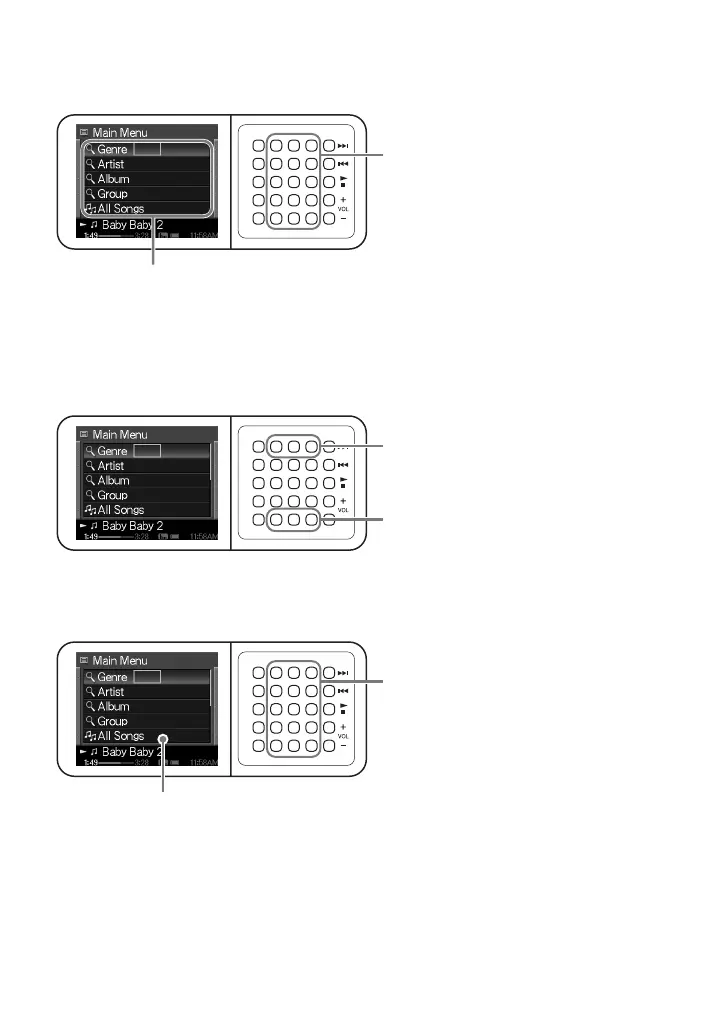
Moving the cursor in a list
Move your finger up or down over the buttons in the indicated section of the G-sense pad.
Scrolling the list
Keep touching the top row of buttons to scroll up the list.
Keep touching the bottom row of buttons to scroll down the list.
Selecting an item on the list or activating a button on the display
Press the corresponding button on the G-sense pad.
...the cursor on screen moves up or down. The cursor
appears in the same relative position as the activated
button of the G-sense pad.
When you move your finger
in this section...
Scroll down
Scroll up
When you press a button...
...you can select the list item or carry out the function
assigned to the button under the cursor.





 To Next Page