28
B
Using the radio
Improving broadcast
reception
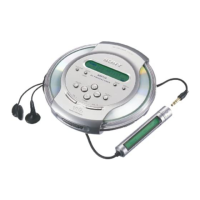
For FM, extend the headphones/earphones
cord.
For AM, reorient the CD player itself.
Note
Keep the headphones/earphones connected to the i
jack of the CD player. The headphones/earphones
cord works as the FM antenna.
If it is hard to hear the FM/
TV/WB broadcast
1 While listening to the radio, press and
hold DISPLAY/MENU until the display
changes.
LOCAL
>AVLS
2 Push the 5-way control key toward .
or > to select “LOCAL,” then press
DISPLAY/MENU.
3 Push the 5-way control key toward .
or > to select “ON,” then press
DISPLAY/MENU to enter the selection.
Headphones or
earphones
Listening to the radio
You can enjoy FM, AM, TV and WB
programs.
1
Press RADIO ON/BAND to turn on
the radio.
2
Press RADIO ON/BAND until the
band you want appears.
Each time you press the button, the
display changes as follows:
B
FM t AM t TV t WB
3
Press TUNE + or – ( + or – for
the remote control) to tune in the
station you want and adjust the
volume.
Turning off the radio
Push the 5-way control key toward x (press
and hold x•RADIO ON/BAND•RADIO
OFF for the remote control).
Tuning in the station quickly
Hold down TUNE + or – ( + or – for the
remote control) in step 3 until the frequency
digits begin to change in the display. The CD
player automatically scans the radio
frequencies and stops when it finds a clear
station.



 To Next Page
 Loading...