M ODE Set t ings
When pow er is on:
Changes the tuning mode.
“PRESET” is not displayed in manual tuning.
“PRESET” and number are displayed in preset
tuning.
During reception w ith preset channel:
Deletes preset channel.
Set ting the Clock
The time display of this clock is a 12-hour
system.
1 Set POWER to OFF to turn off the
power.
2 Press and hold down M EGA BASS/
CLOCK for more than 2 seconds until
“AM 12”starts flashing.
3 Press or hold down + or – to adjust the
hour and press M EGA BASS/CLOCK.
If you hold down + or –, the number changes
rapidly.
“AM 12:00 ”=midnight, “PM 12:00 ”=noon.
4 Press or hold down + or – to adjust the
minutes and press M EGA BASS/
CLOCK.
“:” starts flashing and the clock starts
operating.
To set the current time exactly to the second,
adjust the minute and then press M EGA
BASS/ CLOCK in time with a time signal (such
as the telephone time signal).
To cancel the setting, press M ODE.
Note
Once you start setting the clock, you must
perform each step within 60 seconds, or the clock
setting mode will be cancelled.
Changing AM Channel St ep
The AM channel step differs depending on areas.
The channel step of this unit is factory-set to 10
kHz. Change the settings as shown below to be
able to listen to the radio.
When using in Channel step
North and South 10 kHz
American countries
Other countries 9 kHz
Note
When the AM channel step is changed, the clock
time will be kept but the preset stations will be
deleted.
1 Set POWER to OFF to turn off the
power.
2 While pressing M ODE, hold down
+ or – button for more than 5 seconds.
You will hear the confirmation beep and the
channel step will change. “10kHz” or
“9kHz” will flash for 3 seconds in the display
window.
To change the channel step again, repeat step
2.
Playing the Radio
— M anual Tuning
1 Set POWER to ON to turn on the
power.
2 Press M ODE to delete “PRESET” in the
display window.
“PRESET” does not appear in manual tuning.
3 Press BAND to select the band.
4 Press or hold down + or – to select the
desired frequency.
One press of + or – button changes the
frequency by 0.1 MHz for FM and 10 kHz (or
9 kHz as determind by your AM channel step
settings) for AM.
If you keep pressing + or – button, the
frequency changes rapidly.
When the frequency matches the broadcast
frequency, the broadcast will be received.
5 Adjust the volume with VOL.
To turn off the radio, set POWER to
OFF.
To im prove stereo program recep-
tion
Set FM SENS to LOCAL if interference is
prevalent when radio wave intensity is
dramatically stronger.
Under normal conditions, set to DX.
To obt ain Pow erf ul Bass Sound
Press M EGA BASS/ CLOCK.
“MB” appears in the display window.
To reduce bass tone, press M EGA BASS/ CLOCK
again. If the sound is distorted, press M EGA
BASS/ CLOCK again.
Preset t ing your Favorit e
St ations — Preset Tuning
You can preset up to 15 FM stations and 5 AM
stations. To access the stations, simply select the
corresponding preset numbers
(FM:1-15, AM:1-5).
All the preset numbers are preset to certain
stations at the factory. To preset your favorite
stations, delete the preset numbers you do not
need or change the stations you wish to preset.
Preset ting or Changing a St ation
1 Follow steps 1 to 5 in “Playing the
Radio”, and manually tune in to the
station you wish to preset.
2 Hold down ENTER until you can hear
the confirmation beep.
When all the preset numbers are set to certain
stations (factory-set), “1” flashes and
“PRESET” appears.
When the unit has an available preset
number, only the number flashes and
“PRESET” does not appear.
If you do not carry out any further steps, the
unit stops flashing after about one minute.
The display before step 2 is restored.
3 Press + or – to select the number you
wish to preset and press ENTER.
After selecting the preset number (displayed
with “PRESET”) set to the radio station,
pressing ENTER deletes the preset stations
and presets the station being received.
Example: Display window when you preset
90.0MHz on FM as the position 1.
Tuning in to a Preset Stat ion
1 Set POWER to ON to turn on the
power.
2 Press M ODE to show “PRESET” in the
display window.
3 Press + or – to select the desired preset
number.
Only the preset numbers set to certain
stations are displayed.
4 Adjust the volume with VOL.
Deleting a Preset Stat ion
1 Follow steps 1 and 2 in “Tuning in to a
Preset Station”.
2 Press + or – to select the preset number
to be deleted.
3 Hold down M ODE for more than 3
seconds until “PRESET”, “dEL” and
the preset number flash.
4 While the letters and the number are
flashing, press ENTER.
Pressing ENTER deletes the station set to the
preset number and the unit starts receiving
the station set to the preset number just
before it (or, if that preset number is not set
to any station, to the preset number before
that again).
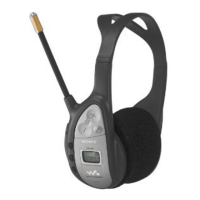
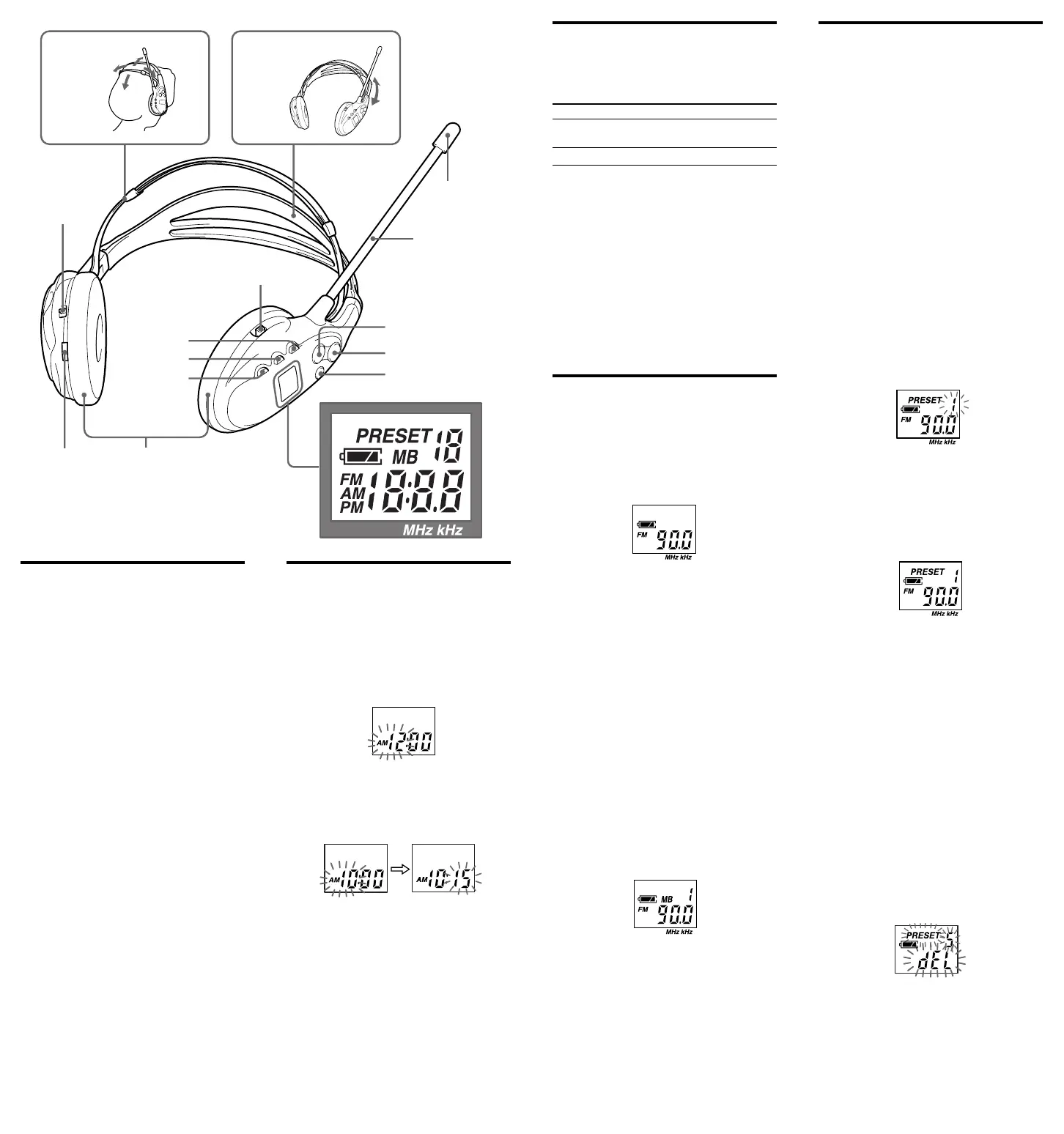
POWER
ON/ OFF
M ODE
ENTER
M EGA BASS/
CLOCK
BAND
+
–
FM SENS
DX/ LOCAL
Support band
Headband
Adjust it to
your head
Light
reflector
FM flexible
antenna
VOL
Driver unit
Display w indow
L(left)
R(right)
Downloaded from: https://www.usersmanualguide.com/


 To Next Page
 Loading...