ZV-E10
5-027-835-31(1)
GB
4
C:\Users\gotanda\Desktop\50 27835311_RKSG GB book\5027835311ZVE10CE C\01GB-ZVE10CEC\01GB.indd
DTP data saved: 2021/03/10 18:13
PDF file created: 2021/03/10 18:16
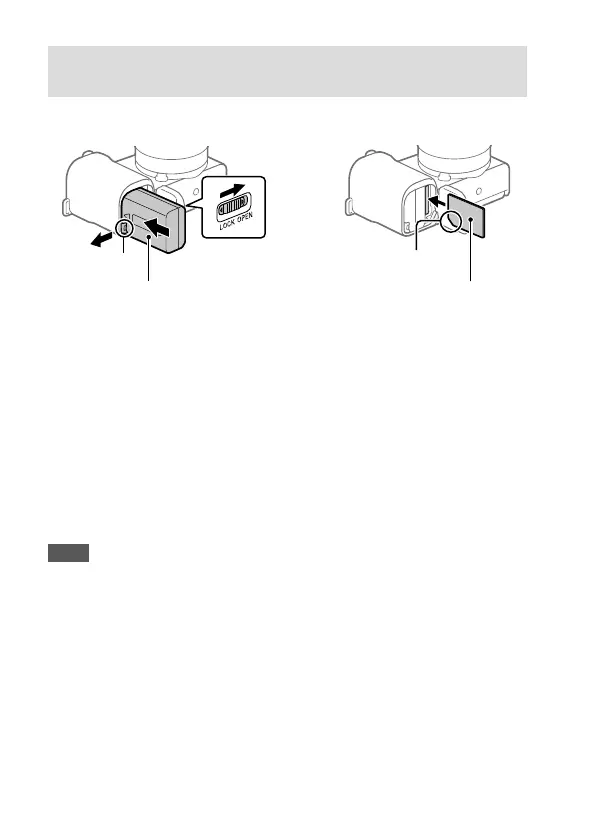
Inserting the battery pack (supplied)/memory card
(sold separately) into the camera
Open the battery/memory card cover, and insert the battery pack and a
memory card into the camera. Then, close the cover.
Memory card
Battery pack
Lock lever
Ensure the notched
corner faces correctly.
Battery pack
Make sure that the battery pack is facing in the correct direction, and insert
it while pressing the battery lock lever.
Memory card
Insert the memory card with the notched corner facing as illustrated.
This camera is compatible with SD memory cards and Memory Stick media.
For details on the compatible memory cards, refer to the “Help Guide.”
When you use a memory card with this camera for the first time, format the
card using the camera in order to stabilize the performance of the memory
card.
Note
• Formatting erases all data, including protected images and registered
settings (M1 to M4). Once erased, this data cannot be restored. Save
valuable data to a computer, etc. before formatting.



 To Next Page