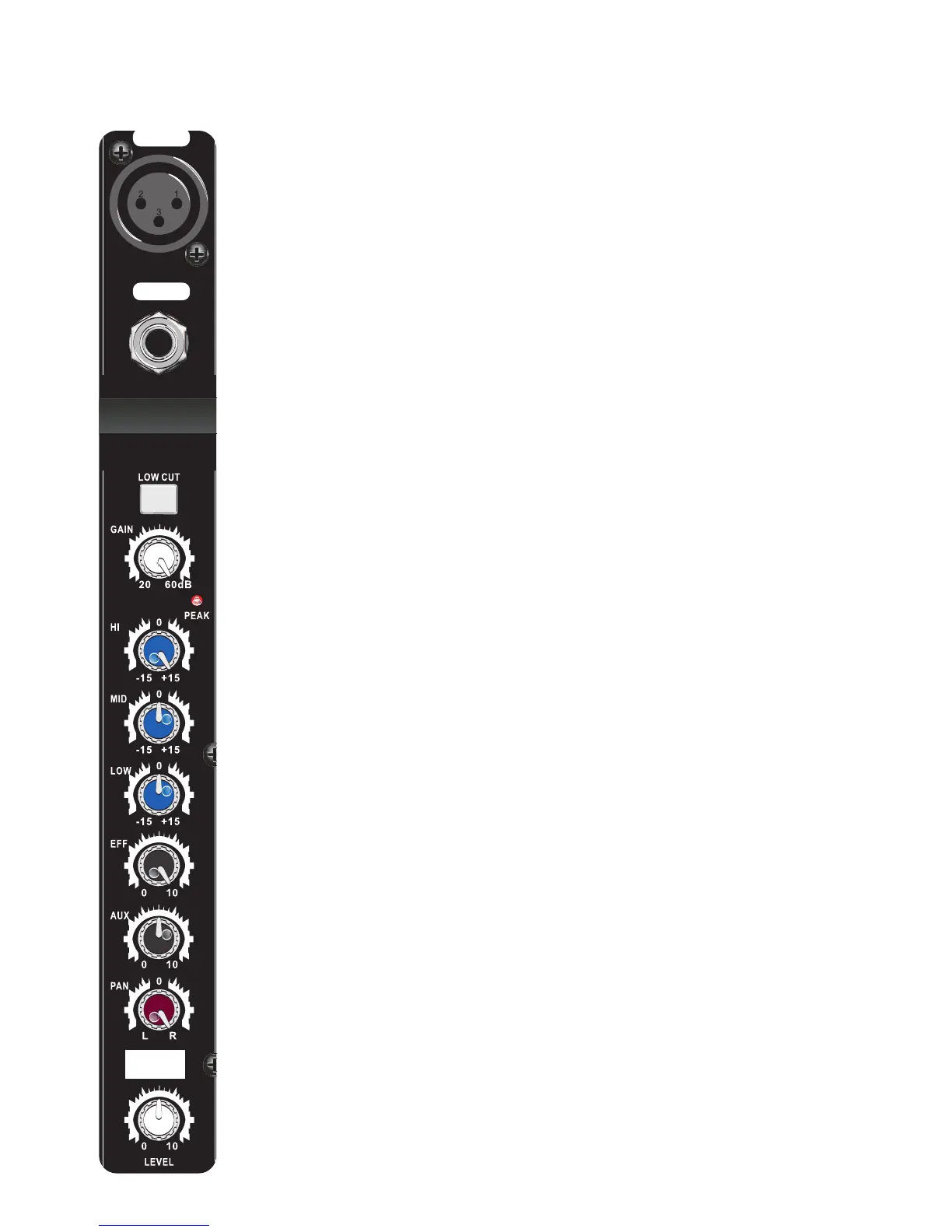
Mic. A balanced microphone input via 3 pin XLR. The socket
can also provide a 48V phantom power when the phantom
power button is switched on.
Warning Make sure all products are switched off and all controls set at zero
before connecting or disconnecting products. Failure to do so may lead to
damage of the microphone and the amplifier. Only use high quality balanced line
microphones (phantom off) or condenser microphones (phantom on) A selection
of these can be found at www.electrovision.co.uk
Line. A balanced mono line input via 6.35mm (1/4”) jack.
Low Cut. A push button that filters frequencies below 80Hz from
the channel input.
Gain. Increases or decreases the input channel signal level.
Hi. Increases or decrease the high frequencies ±15 dB.
Low. Increases or decreases the low frequencies ±15 dB.
Eff. Controls the amount of effect the channel receives from the
built in effects processor. It is set after the channel fader.
Aux. Controls the signal level sent from this channel to the aux
output.
Pan. Pan control for altering the amount of signal in the right
and left channels.
Level. Contr
ols the output level of this channel into the main
mix..
Peak. Led indicator showing excessive signal level is present in
the channel.
Mid. Increases or decreases the mid frequencies ±15 dB.
Diag. 1
Input Channels 1-4 (Mono)


 To Next Page
 Loading...