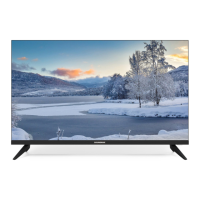
This document describes the SOUNDMAX SM-LED24M11 LCD TV with LED backlight, a color liquid crystal display television.
Function Description
The SM-LED24M11 is a versatile LCD TV designed for displaying color images. It supports various input sources, including antenna, AV, HDMI, VGA, USB, and component video, making it suitable for a wide range of entertainment and computing needs. The TV features an on-screen display (OSD) menu for easy navigation and adjustment of settings, including channel tuning, picture and sound modes, time settings, and parental controls. It also offers multimedia playback capabilities via USB, supporting photo, music, and video files. Advanced features like Electronic Programme Guide (EPG) and PVR/Time Shift functionality enhance the user experience for digital TV.
Important Technical Specifications
- Size (diagonal): 23.6 inches (60 cm)
- Response time: 9.5 ms
- Resolution: 1366 x 768
- Aspect ratio: 16:9
- View angle (Horizontal/Vertical): 178°/178°
- Color system: PAL, SECAM
- Sound system: B/G, DK, I, L
- Audio output: 2 x 3 W (built-in speakers)
- Digital coaxial audio output (SPDIF): Yes
- Component video input (mini): Yes
- AV input (CVBS): Yes
- USB port: Yes (USB 2.0, FAT32 file system, max 1 TB capacity, 500 mA output)
- HDMI input: Yes (with ARC support)
- VGA input: Yes
- DVB-T/DVB-T2/DVB-C signal reception: Yes
- PCMCIA slot (CI, CI+ support): Yes
- OSD languages: Russian and English
- Progressive scan: Yes
- Digital comb filter: Yes
- Number of channels: DTV 700, ATV 99
- Electric shock protection class: II
- Nominal voltage range: ~100-240 V; 50 Hz
- Unit dimensions (with stand): 552 x 371 x 154 mm
- Unit dimensions (without stand): 552 x 330 x 76 mm
- Net weight: 2.3 kg
- Operating temperature: 5 to 35 °C
- Operating relative humidity: 45 to 75%
- Operating atmospheric pressure: 750 mmHg +/- 10%
- Storage temperature: 0 to 40 °C
- Storage relative humidity: 35 to 80%
- Storage atmospheric pressure: 750 mmHg +/- 15%
Usage Features
Installation: The TV can be installed on a stand using the provided screws and protective caps, or wall-mounted using a VESA 100x100 mm bracket (not included) with M4 threads. Proper ventilation is crucial, with at least 10 cm clearance around the TV.
Connections:
- Antenna: Connect a 75 Ohm coaxial cable for outdoor antenna reception.
- AV (CVBS): Connect external video sources using a CVBS cable.
- Stereo Audio: Connect external audio sources.
- Coaxial Output: For multichannel digital audio output to an external decoder.
- HDMI: Connect high-definition video sources. HDMI (ARC) input is supported.
- Mini YPbPr: For component video signals.
- CI Slot: For PCMCIA (CI) modules from digital TV providers to access encrypted services.
- Earphone Output: Connect headphones to mute built-in speakers.
- VGA: Connect a PC for use as a computer monitor.
- PC Audio Input: Connect PC audio when using VGA input.
Operation:
- Power: Turn on/off the TV via the panel button or remote. Unplug the power cable for complete shutdown.
- Volume: Adjust using VOL+/- buttons.
- Channels: Switch using CH+/- or number buttons.
- Input Source: Select from available sources (Antenna, AV, HDMI, VGA, USB, Component) using the INPUT button.
- OSD Menu: Access main settings (Channel, Picture, Sound, Time, Lock, Setup, Screen) using the MENU button. Navigate with cursor buttons and confirm with OK.
- Picture Settings: Adjust contrast, brightness, color, tint (NTSC only), sharpness, color temperature (Cold/Normal/Warm), noise reduction, and HDMI mode.
- Sound Settings: Select sound mode (Standard/Music/Movie/Sports/Personal), adjust treble and bass, balance, auto volume level, SPDIF mode (Auto/PCM/Off), and AD Switch (Audio Description for visually impaired, DTV mode only).
- Time Settings: Set clock, time zone, sleep timer, auto standby, and OSD timer.
- Lock Settings: Enable System Lock with a 4-digit password (default 0000) to restrict access to tuning and program editing. Set a private password, lock/unlock channels, set parental guidance for age-restricted content, lock TV panel buttons, and enable Hotel Mode to restrict main menu access.
- Setup Menu: Select OSD language, Teletext language, audio languages, subtitle languages, hearing impaired mode, PVR file system settings (Select Disc, Time Shift Size, Format, Speed Check), aspect ratio, blue screen toggle, first time installation, reset to factory settings, software update via USB, environment modes, and HDMI CEC.
- USB Playback: Insert a USB drive to play photos (JPEG), music (MP3), and video files (AVI, TS, MP4, MKV, MOV with H264/AVC, H263, MPEG1/2/4 video codecs and PCM, MP3, AC3 audio codecs). Navigate files and control playback (play/pause, fast forward/rewind, next/previous, stop, repeat, zoom, rotate, etc.) via the MENU button during playback.
- EPG (Electronic Programme Guide): Access program schedules in DTV mode using the EPG button on the remote.
- PVR/Time Shift: Record TV programs to a USB drive (REC button) or activate Time Shift (HI button) to pause and resume live TV.
Maintenance Features
General Safeguards:
- Unplug the power cord and contact service if any abnormality (smoke, strange smell/sound, liquid spill, no picture/sound, broken cover) occurs.
- Disconnect power and antenna during storms.
- Do not fix power cord with metal nails.
- Unplug power and signal cables when unused for long periods.
- Always hold the wide slot of the plug when unplugging; do not pull or twist the cord.
- Contact service if the power cord core is exposed or broken.
- Replace AC outlet if the plug cannot be inserted completely or fastened.
- Avoid touching antenna or power plug during thunderstorms.
- Do not touch power plug with wet hands.
- Use rated power sockets; avoid overloading.
- Read and understand all instructions and warnings.
- Use manufacturer-provided accessories.
- Adjust settings via panel buttons or remote; do not remove covers or attempt self-service.
- Avoid over-pressing the panel.
- Place the product on a stable, flat, well-ventilated surface, away from heat sources, direct sunlight, vibration, high temperature, and humidity.
- Do not place liquid containers on the product.
- Avoid strong magnetic or current fields.
Remote Controller (RC) Maintenance:
- Use two AAA batteries.
- Point the RC at the sensor within 8 meters and 30 degrees.
- Remove batteries if the RC is unused for a long time.
- Do not mix new and used batteries or different types.
- Do not expose the RC to shock, liquids, or high humidity.
- Replace used batteries with new ones of the same or comparable type.
CI Card Handling:
- Do not insert or pull out the CI card when the TV is powered on.
- Do not operate the TV during CI card initialization.
- Avoid frequent insertion/removal of the CI card to prevent damage.
- If there's no picture/sound with a CI+ CAM module, contact the service provider.
Troubleshooting: A table is provided in the manual to help resolve common issues such as no picture/sound, abnormal picture/sound, VGA mode issues, snowy picture, blue screen, no audio, and remote controller malfunction. Solutions typically involve checking power connections, adjusting settings, ensuring proper cable connections, and replacing batteries.
Interference: The TV is designed to minimize interference, but local electromagnetic radiation can affect picture quality. Common sources of interference include RF interference (short-wave radio), diathermy equipment, weak TV signals ("snow"), multiple images ("ghost") from reflected signals, and car ignition/electrical motors. Proper antenna positioning and amplification can help mitigate these issues.
Pixel Policy: The LED panel is a high-technology product. Occasionally, a few non-active pixels (fixed blue, green, red, black, or white points) may appear on the screen. This is not considered a defect and does not affect the performance of the TV.
Software Updates: The TV's software can be updated using a USB storage device via the "Software Update (USB)" option in the Setup menu.
Disposal: Do not dispose of the product with general household waste. It should be disposed of through a separate collection system for used electronic products, in accordance with local regulations, to ensure proper treatment, recovery, and recycling, preventing negative environmental and health effects.

 Need help?

 To Next Page
 General