Many applications using the RTK Surveyor will use a 3rd party GIS application or mobile app like SW Maps and
receive the data over Bluetooth. Alternatively, for embedded applications a user can obtain the NMEA data over
serial directly.
For this example we will connect the output from the DATA port to a USB to Serial adapter so that we can view the
serial data.
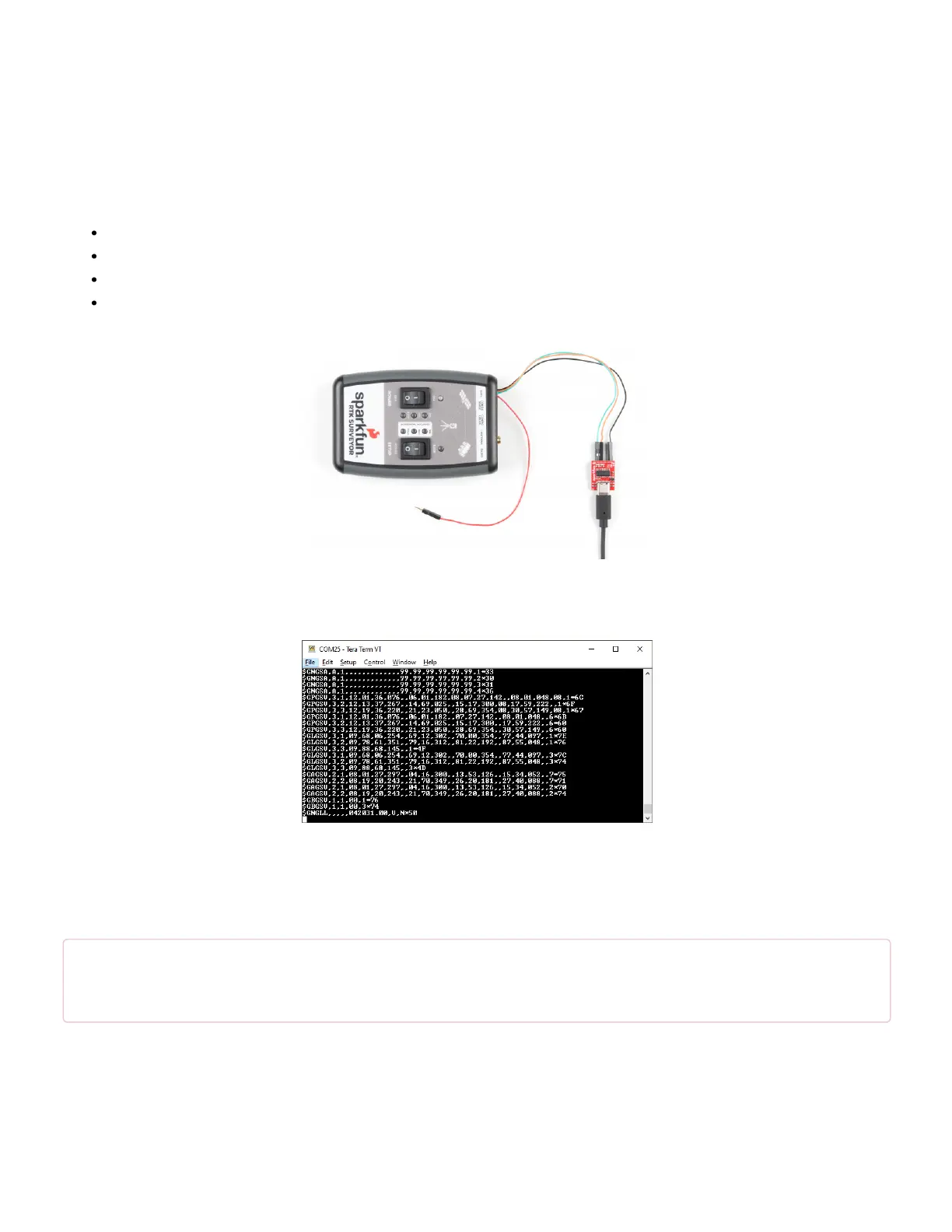
Connect the included 4-pin JST to breadboard cable to the DATA port. The cable has the following pinout:
Red - 3.3V
Green - TX (output from RTK Surveyor)
Orange - RX (input to RTK Surveyor)
Black - GND
Click on the image for a closer view!
Open a terminal at 115200bps and you should see NMEA sentences:
The Data connector on the RTK Surveyor is a 4-pin locking 1.25mm JST SMD connector (part#: SM04B-GHS-TB,
mating connector part#: GHR-04V-S). 3.3V is provided by this connector to power a remote device if needed.
While the port is capable of sourcing up to 600mA, we do not recommend more than 300mA. This port should not
be connected to a power source, so if your embedded device has its own power do not connect the red wire.
⚡ Warning! All data in and out of RTK Surveyor is 3.3V. Exposing these pins to 5V logic will damage the
device.
The parsing of NMEA sentences is straightforward and left to the reader. There are ample NMEA parsing libraries
available in C++, Arduino, python, and many more languages.
System Configuration


 To Next Page
 Loading...