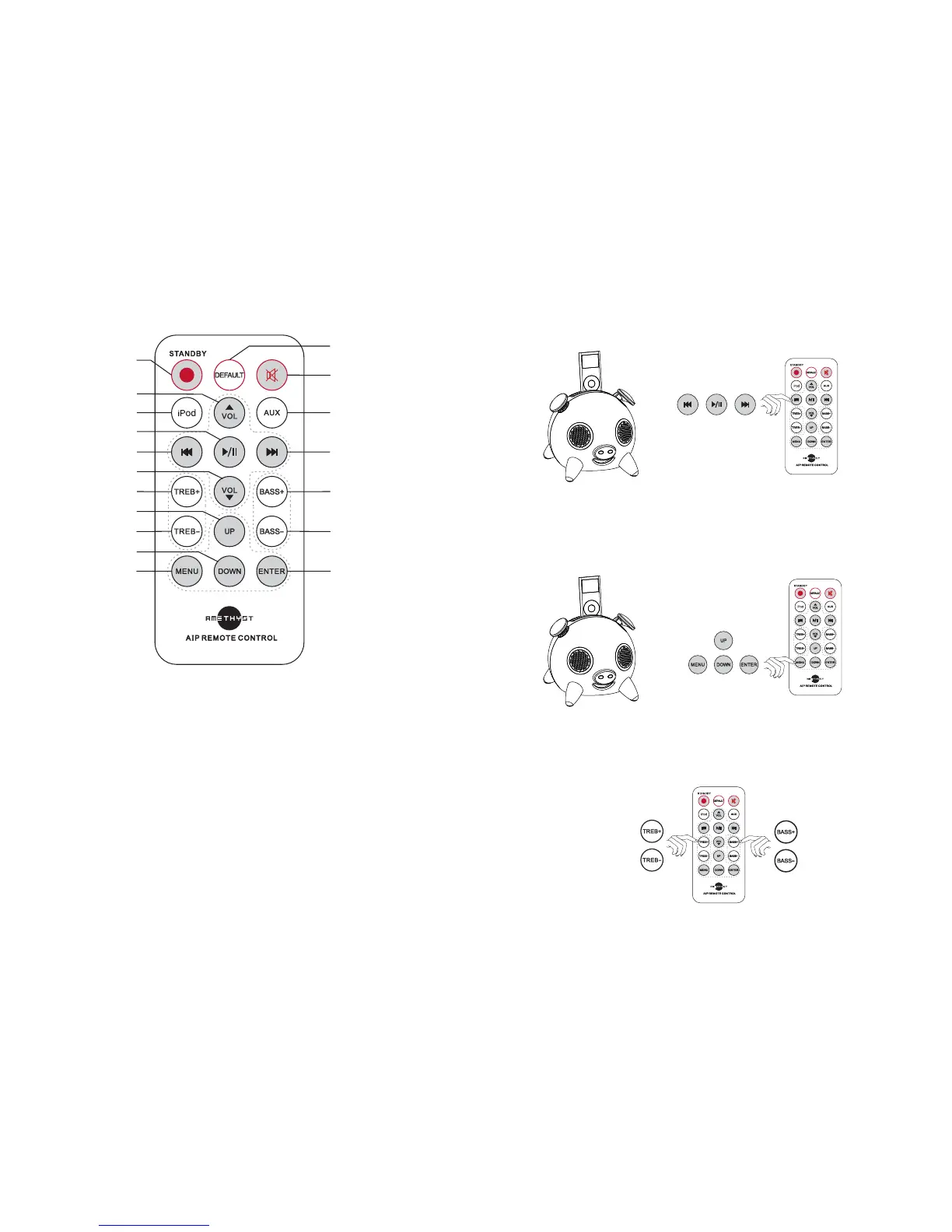
4. To select music from the iPod, please press “” / “/” /“” on the
remote control to select Preview, Play, Pause and Next.
5. If you want to review the menu on the iPod, please press the “MENU” button
on the remote control to activate, press “UP”/ “DOWN” to select then press
3
1
4
5
7
8
9
10
11
12
13
14
15
16
17
18
3
6
2
REMOTE CONTROL MANUAL & FUNCTIONS
1. Standby: Press to Start to Standby when the AIP is Power On.(the iPod is also
can be start to standby at same time if the iPod is inserted on the dock.)
2. Default: Press to make AIP to default if the EQ is confused.
3. Mute: Press it to start to mute when the AIP is playing, press again to get back.
4. iPod: press to select iPod as audio source when the AIP play music from AUX.
5. Volume +: press to increase the volume when the AIP is playing.
6. AUX : press to chose AUX as audio source when the AIP is playing music from
iPod.
7. Preview: press to select preview in iPod when the AIP play music from iPod.
6
“ENTER” to confirm.
6. Press “TREB+” / “TREB-” and “BASS+” / “BASS-” to adjust the level of the
“TREB” / “BASS”.


 To Next Page
 Loading...