4
TURBO CONNECT DISPLAY (TCD) CHARGE LEVEL
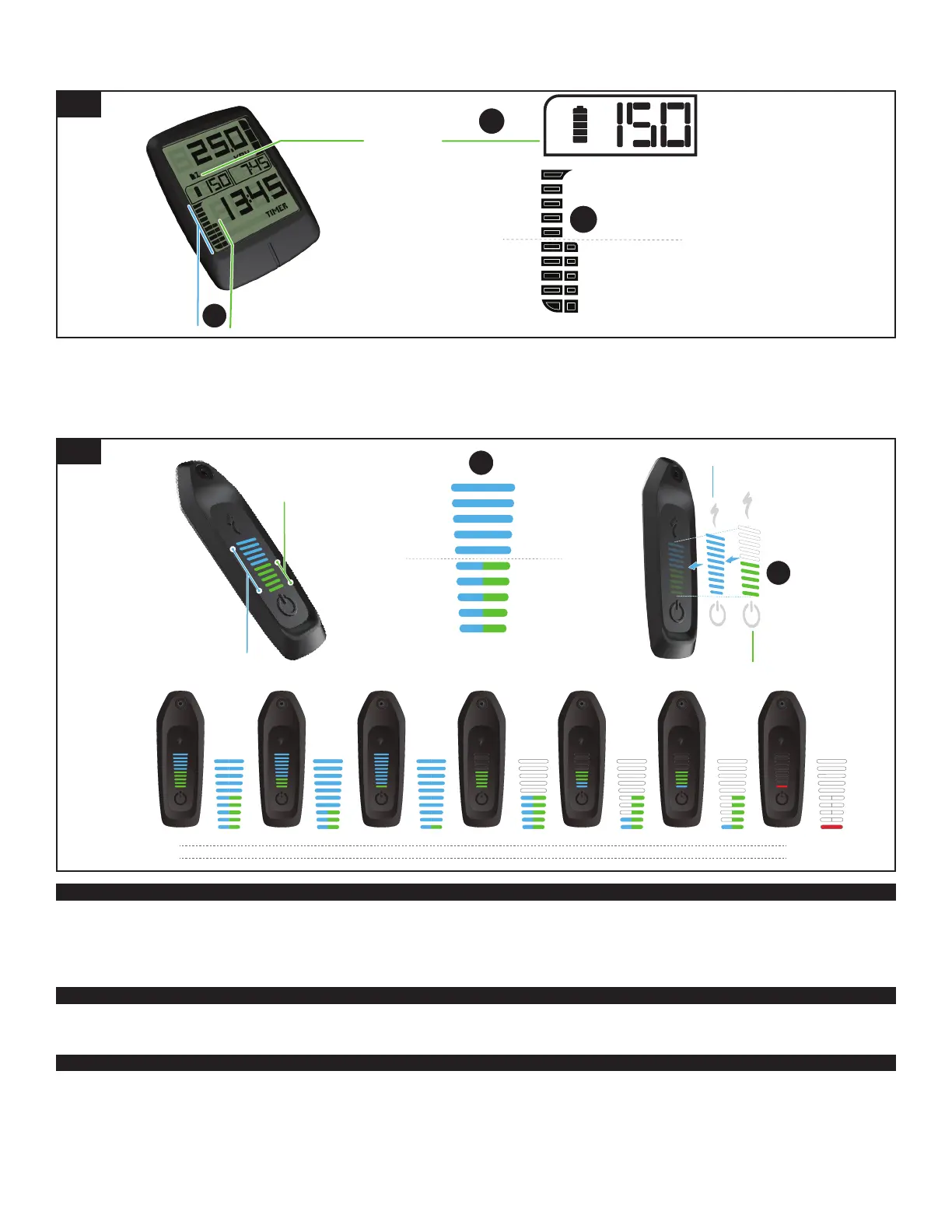
With both the internal battery and the RE fully charged, the TCD will display both charge levels separately (fig. 10 A) and combined (fig. 10 B).
40-49
30-39
20-29
10-19
0-9
90-100
80-89
70-79
60-69
50-59
40-49
30-39
20-29
10-19
0-9
80-100
60-79
40-59
20-39
0-19
%
=
=
=
=
=
A
B
A
RANGE EXTENDER
BATTERY LEVEL
RANGE EXTENDER
BATTERY LEVEL
INTERNAL
BATTERY LEVEL
INTERNAL
BATTERY LEVEL
RANGE
EXTENDER
+
INTERNAL
BATTERY
10
TURBO CONNECT UNIT (TCU) CHARGE LEVEL
With both the internal battery and the RE fully charged, the TCU shows the charge level as overlaying light bars. The internal battery charge level is displayed with 10 blue light bars and the RE
charge level is displayed with 5 green light bars (fig. 11 A).
The RE green light bars will overlay on the first 5 blue light bars of the internal battery light bars (fig. 10 B) and will hide some or all the blue bars depending on their state of charge. When the
charge levels of both blue and green bars are equal the green bars will show on top, when the charge levels drop lower the color with the lowest charge level will show on top.
INT BAT
RE BAT
TOP LAYER
BASE LAYER
90-100 %
80-100%
90-100 %
40-59%
90-100 %
0-19%
40-49%
80-100%
10-19%
80-100%
0-9%
80-100%
0-9%
0-9%
B
90-100
80-89
70-79
60-69
50-59
40-49
30-39
20-29
10-19
0-9
80-100
60-79
40-59
20-39
0-19
%
A
INTERNAL
BATTERY LEVEL
RANGE EXTENDER
BATTERY LEVEL
11
MISSION CONTROL INTEGRATION
When the RE is plugged in, the system default is to discharge both the RE and the internal battery simultaneously. Using the Mission Control App, you can adjust the default to completely
discharge the RE(s) first. This will require you to restart the bike to take effect.
When riding in “RE first” mode, once the RE reaches a low state of charge, the power assistance will be reduced, even if the internal battery is fully charged. This reduction is due to the BMS
protecting the RE from high currents which can damage the RE. Once the RE is completely drained, the TCD will display a 3% drop in range.
KNOW YOUR RANGE
Know the range of your electric bicycle before you start your ride. You can calculate your range by visiting www.specialized.com, selecting your Turbo Bicycle model, then clicking on the range
calculator. In addition to the range calculator, we recommend using the Smart Control feature in the Mission Control App to control your range.
CLEANING
Ensure the charge port lid on your bicycle is closed before cleaning.
Make sure the RE plug is free of water and/or dirt. The port should be clean before use. Make sure the system is switched off before cleaning. Blow out any contamination with low air pressure or
use a soft brush to remove dry contamination.
Make sure the RE plug is completely dry before connecting to a charger or bicycle. Always close the charge port lid when the internal battery is not being charged or the RE is not in use.


 To Next Page
 Loading...