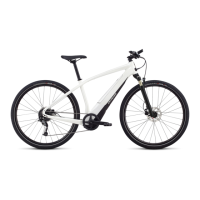
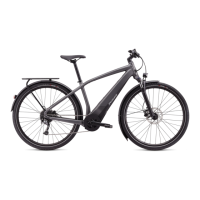
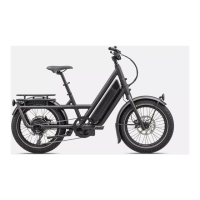
The document provides guidelines and tips for Specialized Turbo SL e-bikes, covering setup, usage, maintenance, and recommended accessories.
Function Description:
Specialized Turbo SL e-bikes are electric bicycles designed to enhance the riding experience through motor assistance. The system integrates a motor, battery, and control units, often managed via a dedicated Specialized App and optional display accessories. The e-bike system provides assistance for pedaling, making rides more efficient and enjoyable, especially on varied terrain or for longer distances. The motor is designed to support riders at higher cadences, optimizing range and support.
Important Technical Specifications:
- Motor: The motor unit is fully enclosed and protected. It provides additional power, which can lead to increased wear on drivetrain parts, brake pads, and tires. Firmware manipulation to derestrict the speed limit is illegal and voids the warranty. Motor warranty is 2 years.
- Battery: The e-bikes use Lithium-Ion battery technology. Batteries feature undercharge and overcharge protection.
- Range Extender Battery (RE): An optional external battery that adds 160 Wh, or 50%, of range, typically providing an additional hour of ride time. It weighs 1 kg.
- State of Charge and Power Output: Motor support starts reducing between 20% and 15% remaining battery charge to ensure uninterrupted support at lower levels. Between 5% and 1% remaining charge, motor support shuts off, but the system remains on to power wired lights for about two more hours.
- Battery Storage: For long-term storage (2 weeks or more), batteries should be at about 60% charge, stored in a dry, cool place, and recharged to 60% every three months.
- Battery Warranty: 2 years or at least 75% capacity after 300 charge cycles.
- Connectivity: The system can connect wirelessly via ANT+ (for Turbo Connect Display) and Bluetooth (for the Specialized App).
- Software: The system runs on Specialized software, which is continuously updated to improve ride experience. Updates can be performed over-the-air via the Specialized app or by a retailer.
Usage Features:
- Saddle Height: Crucial for pedaling efficiency and comfort. A guideline involves placing the heel on the lower pedal with the foot parallel to the ground, resulting in a slightly bent knee.
- Tire Pressure: Essential for a controlled and enjoyable ride. Refer to tire sidewall for pressure range. Individual settings vary by rider weight, load, terrain, and ride style. Front tires can have less pressure than rear tires. Tubeless setups are recommended for better performance. Tire pressure should be checked before each ride.
- Suspension Setup: Key for riding performance, handling, and offroad fun. Refer to the bike manual for detailed setup instructions. A dedicated shock pump may be needed.
- Specialized App: A free app that allows customization of motor characteristics (range vs. power), control range, diagnose the system, record rides, and sync with Strava.
- Turbo Connect Display Wireless (TCD): An optional wireless display that complements the bike display, especially useful for first-generation TCU units. It shows bicycle computer data plus Turbo data like battery state of charge (%), rider power, cadence, and selected mode. It can connect to a heart rate strap.
- Shifting: Reduce pedaling force when shifting. Avoid shifting under heavy loads (e.g., accelerating or climbing). Shift one gear at a time for smoother, quieter shifting and drivetrain longevity.
- Mode Selection: Use Eco and Sport/Trail modes for increased range. Turbo mode is suitable for maximum power when range is not a primary concern.
- Smooth Cadence: The motor supports best at higher cadences (around 75 crank rotations per minute and above). A smooth cadence optimizes range and motor support. The bike display or TCD can monitor cadence.
- Parallel Discharging / Range Extender First: The default parallel discharge scenario is recommended when using a Range Extender battery. This ensures motor assist reduction occurs later and benefits battery health long-term. Discharging the RE first is only useful if it needs to be removed for a lighter bike or to make room for a water bottle. For SL 1.2 motors, discharging the RE first/only results in a 10% power reduction from the start (RE at 100% charge) and about 30% less at 15% state of charge, assuming normal battery and motor temperatures.
- Display/App State of Charge Inactivity: After more than two hours of inactivity, the displayed state of charge may differ by up to 6% due to batteries recalibrating in deep sleep mode.
- Avoiding Cable Damage: Do not rotate cranks backward or push the bike backward when the charge cable is connected or when the RE cable is not connected to the frame port. The RE cable should either be connected at both ends or completely removed. Disregarding this can damage the charger connector, RE cable, or RE/charge port.
- Transporting Batteries: When carrying the bike on a car rack, remove any removable batteries. Close all covers, contacts, and ports. Transport batteries inside the car and secure them appropriately.
Maintenance Features:
- Regular Inspections: Have the Turbo e-bike regularly inspected and serviced by an authorized Specialized retailer.
- Software Updates: Ensure the system runs with the latest software. Retailers can update the system, and bike display updates are often available over-the-air via the Specialized app.
- Cleaning:
- Never use a high-pressure washer; use a wet cloth or low-pressure garden hose for dirt removal.
- Always turn off the bike before cleaning.
- If applicable, remove extender batteries and close all ports before cleaning. Clean external batteries with a wet cloth and remove dirt from connectors with a soft brush or low-pressure air.
- Inspect charge/connector ports for dirt accumulation; clean inside with a soft brush or low-pressure air.
- Before connecting the charger or external battery, ensure all contacts and ports are dry and clean.
- Regularly clean the speed sensor magnet at the rear brake rotor with a cloth to remove brake dust.
- Maintain the drivetrain by regularly cleaning its components (chain/belt, chainring, cassette/cog, derailleur pulleys) and applying high-quality chain oil. Belt drive systems should not be lubricated; refer to manufacturer instructions (e.g., Gates Carbon Drive).

 Need help?
 General

 To Next Page