
 Need help?
Do you have a question about the SPIDER GRILLS VENOM and is the answer not in the manual?
Discusses hazards and symptoms of carbon monoxide poisoning from grills and provides preventative guidelines.
Details risks associated with hazardous voltage, grounding requirements for North America, and earthed outlets in the EU.
Warns about hot grill parts during and after operation, unattended use with children, and moving the grill.
States the product must be attached to a Weber Kettle Grill to avoid injury or fire.
Specifies minimum clearances from the grill to combustible materials, including overhead obstructions.
Instructions for connecting the Pit Probe, plugging in the unit, and powering it on.
Details how to set target temperatures for the grill and meat probes using the controller.
Details the warranty period, coverage against defects, and replacement part policy.
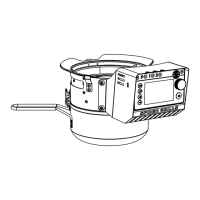
The Spider Grills Venom controller is a sophisticated accessory designed to enhance the grilling experience on original series 22" Weber® Kettle Grills. This device functions as a precise temperature management system, allowing users to achieve consistent and controlled cooking results, transforming a traditional kettle grill into a more advanced and automated smoker or oven. The Venom controller is engineered to monitor and regulate the grill's temperature, ensuring that food is cooked perfectly every time, whether you're smoking low and slow or grilling at higher temperatures.
At its core, the Venom controller works by managing airflow to the charcoal, which in turn controls the internal temperature of the grill. It features a draft door mechanism that integrates seamlessly with the grill's existing vent lever. By precisely adjusting this draft door, the controller can increase or decrease the oxygen supply to the coals, thereby raising or lowering the temperature. This automated control eliminates the need for constant manual adjustments, freeing the user to focus on other aspects of their cook or simply relax.
The device is equipped with multiple probe ports, including a dedicated pit probe port and additional meat probe ports. The pit probe is crucial for monitoring the ambient temperature inside the grill, typically placed about 2 inches (50 mm) from any food to get an accurate reading of the cooking environment. The meat probes, on the other hand, are inserted directly into the food, allowing users to track the internal temperature of their meats and ensure they reach the desired doneness. This dual-probe system provides comprehensive temperature oversight, which is essential for achieving optimal results, especially with larger cuts of meat or longer cooking times.
A key feature of the Venom controller is its intuitive user interface, which includes a cycle screen, set temp button, set timer button, and a Wi-Fi connect function. The cycle screen allows users to navigate through various views, including a visual log of probe temperatures, individual meat probe readings, and timer settings. This graphical representation of temperature data can be incredibly useful for understanding temperature fluctuations during a cook and for making informed adjustments if necessary.
Setting the desired temperature is straightforward. Once the charcoal bed is fired up, users can press the "Set Temp" button, select their target temperature, and confirm. The controller then takes over, adjusting the draft door to maintain that temperature. The device also provides visual cues on the controller screen, guiding users on how to adjust the top vent of their grill to work in conjunction with the automated draft door for optimal temperature stability. For meat probes, users can set target temperatures, and an alarm will sound once the food reaches the desired doneness, preventing overcooking.
The timer function is another valuable asset, offering both countdown and count-up options. Users can set a specific duration for their cook, and an alarm will notify them when the time is up. Alternatively, a long press of the "Set Timer" button initiates a count-up timer, useful for tracking the total cooking time without a predefined end. This flexibility caters to various cooking styles and preferences. The controller also allows users to switch between Fahrenheit and Celsius temperature units, accommodating different regional standards and personal preferences.
Beyond its on-device controls, the Venom controller boasts smart capabilities through its Wi-Fi connect feature. By downloading the Spider Grills® App, users can connect their controller to their smartphone, enabling remote monitoring and control of their grill. This means you can check on your cook, adjust temperatures, and receive notifications from anywhere, as long as you have an internet connection. This remote access adds a layer of convenience, allowing users to attend to other tasks without constantly needing to be near the grill. It's important to note, however, that the Venom controller remains fully functional even without the app, offering a robust standalone experience.
Installation of the Venom controller is designed to be user-friendly. Before attaching the unit, it's recommended to clean out any loose ash from the Weber® Kettle. The controller then slides onto the grill, with its vent lever passing through the draft door on the side of the unit. Rear mounting tabs secure the controller to the grill's upper rim, fitting into openings above the grill legs. The unit is then tilted upward, allowing other flexible mounting tabs to snap into place above each grill leg. Finally, an inner latch underneath the Venom™ attaches to the grill's vent lever, completing the secure installation. This process ensures a stable and integrated setup, crucial for accurate temperature control.
Maintenance of the Venom controller is simple and essential for its longevity and optimal performance. All maintenance should be performed with the unit unplugged from its power source and completely cool. The exterior of the unit can be cleaned with a disposable rag or cloth dampened with warm soapy water, avoiding abrasive cleaners or pads. Proper storage is also important; when not in use, the unit should be unplugged, and if stored outdoors in rainy or humid conditions, a grill cover is recommended to protect it from the elements.
Ash clean-out is a critical maintenance task, especially given the controller's interaction with the grill's charcoal. The ash bucket on the Venom™ should be emptied after every cook to prevent overflow, which can negatively affect performance. Additionally, ash may accumulate within the moving track inside the Venom™, so periodic cleaning of ash from both the unit and the grill is necessary to ensure smooth operation. When disposing of ashes, they should be placed in a metal container with a tight-fitting lid, on a noncombustible surface, and well away from any combustible materials until they have thoroughly cooled. Once cooled, the ashes can be safely disposed of by burial in soil or according to local regulations.
The Spider Grills Venom controller is not just an accessory; it's an upgrade that brings modern precision and convenience to traditional kettle grilling. Its ability to maintain consistent temperatures, monitor food doneness, and offer remote control transforms the cooking process, making it easier to achieve professional-level results with minimal effort. Whether you're a seasoned pitmaster or a casual backyard griller, the Venom controller aims to elevate your outdoor cooking experience.
 General
| Connectivity | Wi-Fi |
|---|---|
| Control Type | Digital |
| Display | LCD |
| App Integration | Yes |
| Power Source | AC Adapter |
| Compatibility | Pellet grills |

 To Next Page