4 5Spytec GL300 Tracker - User Manual
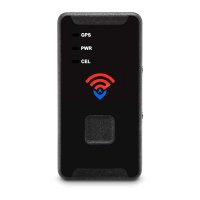
• When placing the GL300 under a vehicle, position it on a at part of the frame
towards the edge of the vehicle with the LEDs on the face of the device facing
the pavement. When you get low to the ground, you should be able to see the
device.
Important Facts
• Standard programming for the GL300 is to update every 3 hours when not
moving and once a minute when moving.
• The more frequently the device is set to update, the faster the battery will be
depleted. For example, 1-minute updates will result in approximately 2.5 weeks
of battery life, while 30-second updates will result in approximately 14 days of
battery life.
• When the device is on, the green LED will ash once every 3 seconds.
• When powering off, the red LED will remain on for up to 2 minutes, then power
down.
Troubleshooting
Q
: GPS platform says the device is in New Jersey (or was last read 1000 days
ago). This isn’t accurate.
A
: Make sure the green light is blinking once every 3 seconds and take it out for
a drive that lasts at least 10 minutes.
Q
: GPS platform shows a blue screen or the coast of Africa.
A
: This means the device has not yet locked onto a GPS signal. Take it outside for
a 10-minute walk or drive, and its location should update.
Q
: What should I do if my device says “last updated X days ago,” even if it’s been
in use?
A
: Verify that the green light is blinking every 3 seconds and the device is
properly positioned. If the problem persists, email support@spytec.com
Q
: My device has been turned on for some time, but it is not updating. Why?
A
: If the green LED is blinking once every 3 seconds, take it out for a 10-15 minute
drive. If the unit is still not updating on the platform, contact Tech Support.


 To Next Page
 Loading...