EasyManua.ls Logo

Squire STRAPLOK COMBI 10 - Page 2

Squire STRAPLOK COMBI 10
10 pages
Print Icon
To Next Page IconTo Next Page
To Previous Page IconTo Previous Page
Loading...
UK
info@henry-squire.co.uk
Henry Squire & Sons Limited
Hilton Cross Business Park, Featherstone, Wolverhampton, WV10 7QZ, England
+44 (0)1902 308052
www.squirelocks.co.uk
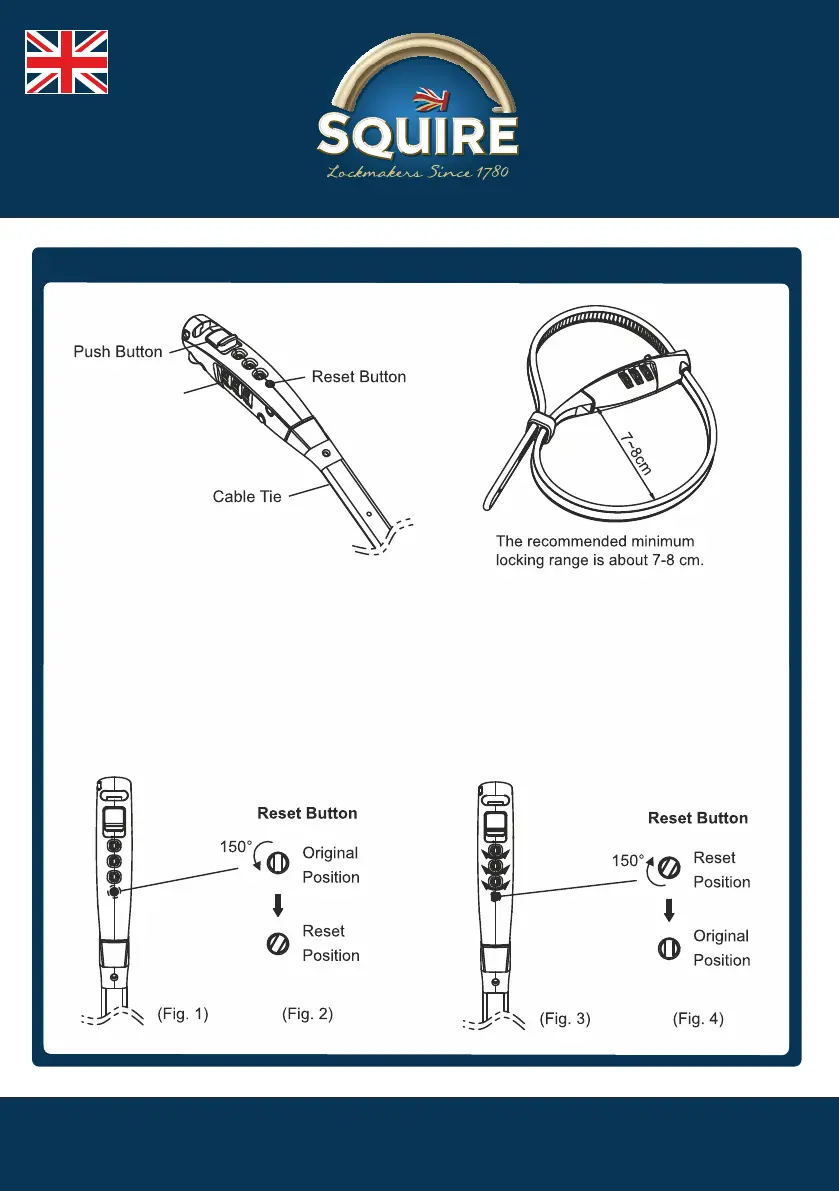
How to set your own code
STEP 1
Set the lock by
aligning the
combination number
to the factory preset
combination 0-0-0
with the Guide Line.
(Figure 1)
STEP 2
Rotate the Reset
Button 150 degrees
counter clockwise to
the reset condition
(Figure 2)
STEP 3
Set your desired
combination
(Figure 3)
STEP 4
Rotate the Reset
Button 150 degrees
clockwise to it's
original position.
Verify your new
combination before
using the lock. Then
your lock is ready to
use (Figure 4)
Dial