
 Need help?
Do you have a question about the SSK SSK-DK100 and is the answer not in the manual?
Instructions for installing drives and connecting the device for standard operation.
Explanation of LED indicator colors for status and activity.
Steps and requirements for using the one-click hard drive cloning feature.
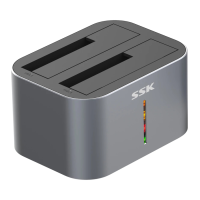
The SSK-DK100 is a versatile hard drive docking station designed for convenient data management and cloning. This device serves as an external enclosure for both 2.5-inch and 3.5-inch SATA I/II/III HDDs and SSDs, allowing users to easily access and transfer data to and from their computers. Its dual-bay design supports two hard drives simultaneously, providing flexibility for various tasks.
One of the primary functions of the SSK-DK100 is its ability to operate as a mobile hard drive. In this mode, users can install one or two hard drives into the designated bays, connect the docking station to a computer via a USB 3.0 cable, and power it on using the provided adapter. Once connected and powered, the computer will detect the new hardware, and the installed hard drives will become accessible for data storage, retrieval, and management. This plug-and-play functionality, combined with hot-swap support, makes it easy to switch between different hard drives without needing to restart the computer. The device is compatible with Windows, Mac, and Linux operating systems, ensuring broad usability across different computing environments.
Beyond its function as an external hard drive enclosure, the SSK-DK100 also features a standalone offline cloning capability. This allows users to duplicate the contents of one hard drive (source drive) to another (target drive) without the need for a computer connection. To initiate a clone, two hard drives are installed into the bays: the source drive in the "HDD-A" area and the target drive in the "HDD-B" area. It is crucial that the target hard drive has a capacity equal to or greater than the source hard drive to ensure a successful clone. After installing the drives and connecting the power adapter, the cloning process is started by pressing the dedicated clone button for more than three seconds. The device's LED indicators provide visual feedback on the cloning progress, flashing alternately during the process and remaining steadily lit once the clone is complete. This offline cloning feature is particularly useful for data backup, system migration, or creating exact duplicates of hard drives, offering a convenient and efficient solution without consuming computer resources.
The SSK-DK100 incorporates several user-friendly features to enhance its functionality. It includes four LED indicators (Green, Red, Yellow, and Orange) on the front, which serve multiple purposes. In mobile hard drive mode, a steady green light indicates that the docking station is powered on. When a hard drive is connected, a blue light turns on, and it flashes during read and write operations, providing clear visual cues of activity. If two hard drives are inserted, two blue LEDs will illuminate. During the offline cloning process, these LEDs also act as a progress indicator. For instance, a green light indicates 25% completion, a red light signifies 50%, a yellow light shows 75%, and all four LEDs lit simultaneously (green + red + yellow + orange) confirm 100% completion. This visual feedback system helps users monitor the status of their operations at a glance.
The physical design of the SSK-DK100 includes clearly labeled interfaces for ease of use. On the rear of the device, there is a USB 3.0 interface for connecting to a computer, a DC 12V interface for the power adapter, a power button to turn the unit on and off, and a dedicated clone button for initiating the offline cloning process. The hard drive bays are designed to accommodate both 2.5-inch and 3.5-inch SATA drives, with clear instructions to ensure correct insertion, emphasizing the importance of aligning the SATA interface direction. The robust construction and thoughtful layout contribute to the device's durability and ease of operation.
In terms of maintenance and care, the manual provides important notices to ensure the longevity and proper functioning of the SSK-DK100. Users are advised to partition and format newly added HDDs in disk management before initial use, which is a standard procedure for new storage devices. It is also recommended to handle the product with care, avoiding drops or impacts, to prevent damage. The device should not be used in environments with extreme temperatures (too high or too low) or high humidity, as these conditions can negatively affect its performance and lifespan. Furthermore, users are cautioned against dismantling, repairing, or manufacturing the unit without proper authorization, highlighting the importance of professional service if issues arise. These guidelines help users maintain the device in optimal condition and ensure reliable operation over time.
The SSK-DK100 is a comprehensive solution for individuals and professionals needing flexible and efficient hard drive management. Its dual functionality as an external hard drive dock and a standalone cloning station, combined with user-friendly indicators and broad compatibility, makes it a valuable tool for data backup, migration, and storage expansion. The emphasis on proper usage and environmental considerations further ensures a stable and long-lasting experience for its users.
 General
| Model | SSK-DK100 |
|---|---|
| Category | Docking Station |
| Power Delivery | Up to 100W |
| Ethernet Speed | 10/100/1000Mbps |
| Operating System Compatibility | Windows, macOS, Linux |
| Material | Aluminum Alloy |
| Compatible Devices | Laptops, smartphones, tablets |
| Ports | USB-C, USB 3.0, HDMI, Ethernet |
| Video Output | HDMI up to 4K @ 30Hz |
| Data Transfer Speed | 5Gbps (USB 3.0) |
| Card Reader Support | SD, MicroSD |

 To Next Page