8
•If a display is in the power saving
mode,thersttimeabuttonis
pressed this only reactivates the dis-
play and has no other function.
Procedure:
•Incoming calls are picked up using
the green Pick up button.
•If you pick up the call by pressing
the Mouth button, the call will be
held in the handsfree mode.
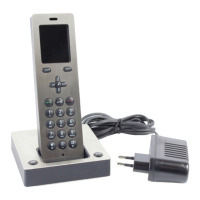
•If the cordless handset is in the
charging cradle, the call can also be
picked up using the Mouth button
on the charging cradle.
Procedure:
•To lock and unlock the keypad,
hold down the Hash button until
the Key symbol in the status bar
at the top of the display appears /
disappears.
Note
If the keypad lock is switched on, it
is also not possible to call emergency
numbers.
Procedure:
•Enter the required call number
using the numerical keypad.
•Afterenteringtherstnumbers,
these are indicated by the display.
•Corrections can be made using the
display button <C.
Procedure:
•To establish a call, press the green
Pick up button.
Procedure:
•To establish a call in the handsfree
mode, press the left-hand display
button with the mouth symbol.
If the handsfree mode is active,
the mouth symbol is highlighted in
yellow.
Switching the cordless handset
on and off
Incoming calls
The call number is visible in the
display, provided the caller has not
withheld their number. If you have
stored the call number with a name
in the Scope phonebook, the name
of the caller can be read in the
display.
or
Keypad lock
The keypad lock prevents uninten-
tional operation of the telephone.
The keypad lock switches off
automatically when you receive an
incoming call. At the end of the call,
it switches back on again.
Dial the required number
+
Holding a call
Handsfree
If the handsfree mode is active,
the mouth symbol is highlighted in
yellow.
Getting started
Telephony


 To Next Page
 Loading...