9
Procedure:
•To switch the muting function on
and off, hold down the Star button
until the bell symbol in the status bar
at the top of the display appears /
disappears.
Procedure:
•Using the left-hand control button,
select the minus symbol, or with
the right-hand control button select
the plus symbol.
Procedure:
When using the telephone, select
the microphone symbol with the
line through it on the display using
the upper control button.
Procedure:
•Select the dot symbol using the
lower control button.
•Select the telephone number of
the user to which you wish to for-
ward the call.
•To establish a call, press the green
Pick up button.
•For successful call forwarding,
terminate the conference by pressing
the red End call button.
•If, alternatively, you wish to return
to the waiting call, press the Dot
button again.
Call silencing
If required, all ringtones can be
muted.
Incoming calls are then only sig-
nalled optically at the display.
Volume
Using the symbols + and - it is
possible to increase and decrease
the volume of the current call;
Depending on the call mode, this
affects either the receiver or the
handsfree speaker volume.
Thevolumecanbesetin8stages.
-
+
Microphone silencing
Using the microphone silencing
function, you can mute the cord-
less handset in the middle of a call
should you wish to speak privately to
a person in the room. The person at
the other end is unable to listen in.
The microphone symbol is high-
lighted in yellow when the micro-
phone silencing function is active,
and the cordless handset gives off a
warning signal tone.
Call parking
The dot button is the so-called
“Flash” button. The function initi-
ated by the “Flash” button depends
on the telephone system to which
the Scope is connected.
Dependingontheconguration,for
example, it can be used to park the
call to confer with a third party user,
to whom the call is then forwarded.
Any telephone connected to a PBX
extension of the telephone system
can be a third party user.
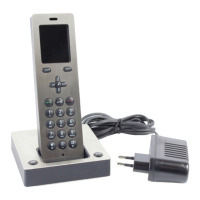
Forwarding to a different Scope
cordless handset registered at the
same base station is carried out
using the Transfer display button.
Getting started
Telephony


 To Next Page
 Loading...