Description of the code
1:Receiver
With the jumper inserted "ID SET" light is flashing when the receiver state,
waiting for the transmitter to the code commands。
2:Transmitter
Hold down the "ID SET" key to boot into the right code feature (green light
blinking), enter the right code state.
3:The success of the code.
Long green light transmitter, receiver indicator light is off, unplug the receiver
jumper, receiver Changlian
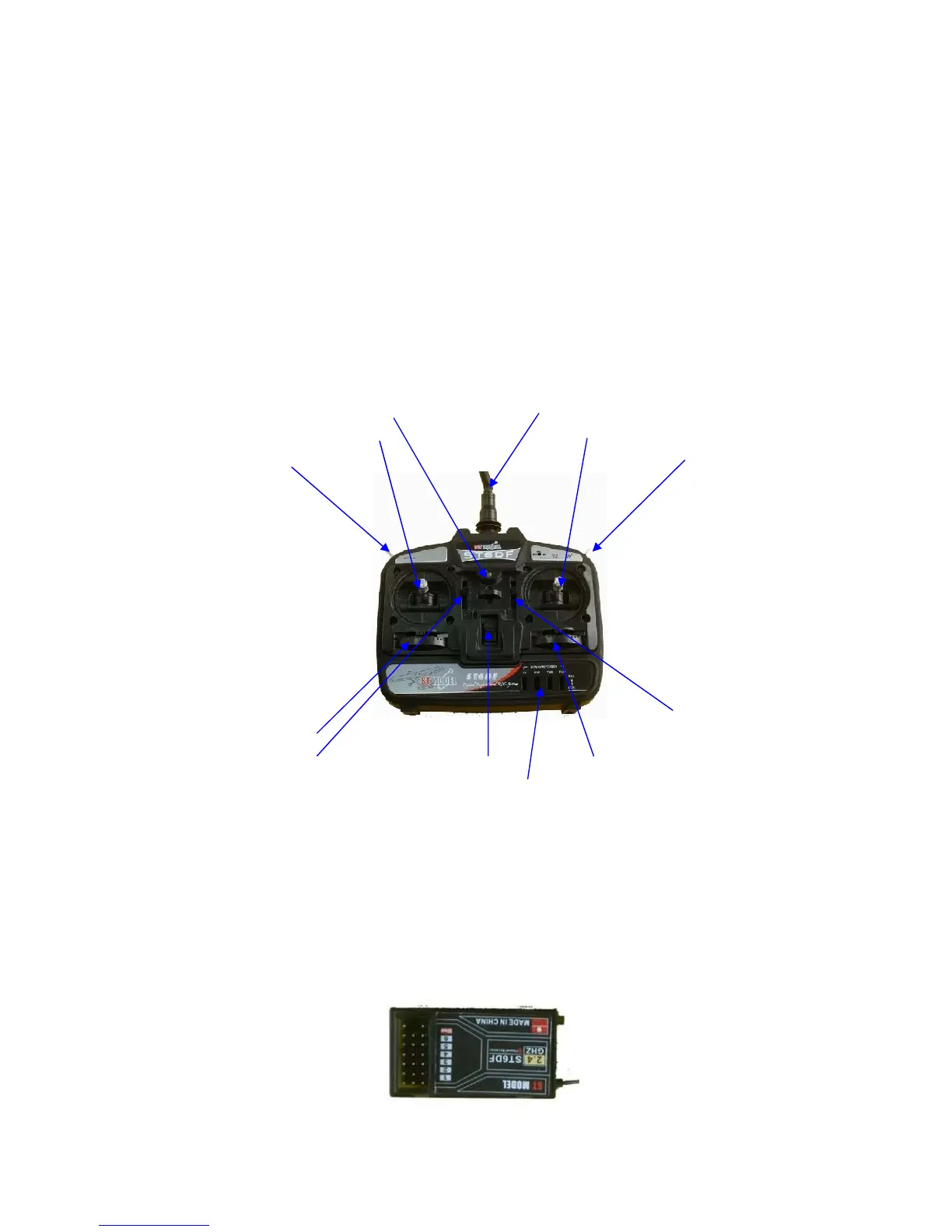
Remote control method statement
Power LED 2.4GHz Antenna
Elevator / rudder rocker Aileron/throttle stick
Band SW 5/6 channel function switch
Aileron-fine-tuning
The direction of fine-tuning
Elevator fine-tuning Power ON/OFF Throttle tuning
Positive and negative switching
Receiver connection method (ST6DF 2.4GHz 6-channel receiver).
1 AIL: Aileron (1channel)--------------------------------------------------------------
1. THR: Throttle (3channel)----------------------------------------------------------
2. ELE: Lifting (2channels)-----------------------------------------------------------
3. RUD: Rudder ( 4channel)-------------------------------------------------------
4. GER: Landing Gear (5channel)------------------------------------------------
5. PIT: Flap (6 channel))-------------------------------------------------------------
6. ID SET(For code channels)--------------------------------------------------------
2



 To Next Page
 Loading...