
 Need help?
Do you have a question about the stabo xm3003e and is the answer not in the manual?
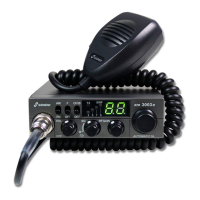
Controls the audio output level and powers the device on/off.
Adjusts the noise threshold for reception or enables automatic squelch.
Regulates the receiver's sensitivity to incoming signals.
Used to navigate through different CB radio channels.
Shows the current channel, operating mode, and signal status.
Allows selection of different frequency bands or configurations.
Switches between different modulation modes like AM and FM.
Provides quick access to Channel 19, often used for traffic information.
Connector for attaching the microphone to the radio unit.
Activates the transmitter when pressed for communication.
Port for connecting the radio to a DC power source.
Standard connector for attaching the CB radio antenna.
Output for connecting an optional external loudspeaker.
Specifies the device is a CB mobile radio for vehicles, usable stationary.
Lists the main features like 12/24V operation, ASC, selectable bands, and microphone socket.
Crucial advice regarding pacemakers, antennas, vehicle distraction, and modifications.
Outlines regulations for CB radio use in Germany and internationally, including registration.
Advises consulting dealers for installation specs to maintain vehicle type approval.
Discusses rules for using radio communication in vehicles, stressing driver attention.
Lists the components provided with the CB mobile radio, such as microphone and bracket.
Step-by-step guide for mounting the radio unit and routing cables safely in a vehicle.
Recommendation to use an external speaker if internal speaker radiation is obstructed.
Emphasizes antenna quality for range and provides selection recommendations.
Discusses mounting tuned and tuneable mobile antennas on vehicle surfaces.
Notes regulations for outdoor antennas and recommends expert installation.
Explains the process of adjusting antenna impedance for optimal transmitter output using a VSWR meter.
Details voltage requirements and reverse voltage protection, stressing correct polarity.
Step-by-step instructions for wiring the radio's power cable directly to the vehicle battery terminals.
Describes the 3.5mm jack for connecting an external speaker.
Instructions for connecting the supplied microphone to the front panel jack.
Explains how to select different channel setups to comply with regulations in various countries.
Guides users on turning the radio on and initial checks like volume and squelch.
How to use the channel selector knob to choose a specific CB channel.
Explains the squelch feature for noise suppression and how to set the correct level.
Details the patented ASC function for automatic noise suppression based on signal quality.
How to use the RF Gain control to prevent signal distortion in AM mode.
Guides on choosing between AM and FM modulation based on contact requirements.
Instructions for using the dedicated switch to access Channel 19.
Describes the bar display indicating received signal strength in S-grades.
Step-by-step guide on how to use the PTT button and speak into the microphone.
Explains the function that automatically ends transmission after a set period.
How the device indicates relative transmitting power during transmission.
Provides a diagram and list of pin functions for the microphone connector.
Lists overall specs like channels, frequency range, power supply, dimensions, and accessories.
Details frequency stability, transmission power, interference, and frequency response.
Covers sensitivity, frequency response, audio power, and squelch sensitivity.
Steps to diagnose and fix issues related to transmission power or lack thereof.
Troubleshooting steps for resolving problems with receiving signals.
Checks for power supply, wiring, and fuse issues if the radio fails to turn on.
A quick guide on how to initiate a transmission and ensure proper reception.
Standard phonetic alphabet used for clear communication in radio operations.
Explains technical terminology related to CB radio systems.
Lists common slang and coded phrases used within the CB radio community.
Codes representing specific radio settings for different European countries.
Details the FM channel assignments for each configuration code.
Details the AM channel assignments for each configuration code.
Lists the countries or regions associated with each configuration code.
Outlines the five-year warranty period and coverage within the EU.
Details how to make claims and lists conditions under which warranty is voided.
Official declaration that the radio complies with EU Directive 2014/53/EU.
Advice on contacting customer support for operational difficulties with the device.
Identifies the manufacturer, model name, and article number of the radio.
Lists the specific EU directives and standards the product adheres to.
Lists the accessories that are supplied with the radio equipment.

 To Next Page
 General