ONE-BUTTON CONTROL
Power On/Off: Long press for 2 seconds
Play/Pause, Mute: Press once
Switch Connection Mode: Press twice
Switch RGB Lighting: Press three times
Reset: Press six times
Raise the Volume: Rotate clockwise
Lower the Volume: Rotate anticlockwise
CONNECTION:
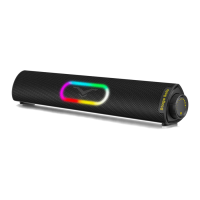
-STAGE-sound
Stage Solo
Mini Sound Bar
User Manual
DIAGRAM
4
(V)RGB Light
(2) Multi-function Button
AUX Analog Audio n (3 5mm Stereo)
SPECIFICATION
2
6
(4)
3.5mm Headphone Port
USB Cable
@35mm AUX Cable
2
3
4
There are 3 connection modes: USB Audio Mode, Bluetooth
Mode, AUX Mode
USB Audio Mode only works when connect the USB cable to
the host computer or laptop
The soundbar supports 3.5mm headphones, it's not built with
microphone.
When connect the soundbar with the PC, the USB cable can
supply power and play audio at the same time. No AUX cable
is required, so as to avoid signal interference
Model
Connection
Power Supply
Power Input
Frequency
SNR
Net Weight
Dimensions
Stage Solo
Bluetooth & 3.5mm Audio Plug & USB-A Plug
USB-A Plug(Not Built in Battery)
5V =-.2A Max
50Hz 20KHz
294dB
773g / 27.27 Oz
16 x 2.9 x 3.1 (LxHxW) Inch
FCC STATEMENT
Any changes or modifications not expressly approved by the party responsible
for compliance could void the user's authority to operate the equipment.
This device complies with part 15 of the FCCRules. Operation is subject to
the following two conditions:
(1) This device may not cause harmful interference.
(2) This device must accept any interference received, including interference
that may cause undesired operation.
FCC RADIATION EXPOSURE STATEMENT
This equipment complies with FCCradiation exposure limits set forth for an
uncontrolled environment.
LIGHTING:
5. There are 4 lighting modes in order: Rhythm, Flow, Single, Off
(Choose the Off mode to turn off the light completely)
6. The lighting mode will be saved to the next time you use it.
NOTE:
7. In Bluetooth mode and USB audio mode, you can press once on
the button to play/pause the audio, while in AUX mode, you can
mute the audio
8. We follow a global energy saving philosophy. If there is no signal
connection or no playback for 20 minutes, the sound bar will
power off automatically, please power it on manually.
For more latest products, please visit:
www.coolmetech com
For any assistance, please Email us:
service@coolmetech com
Made in China


 To Previous Page
 Loading...