API A065 series Interfacing Via bowling (MC2)/Switch pinsetters
22
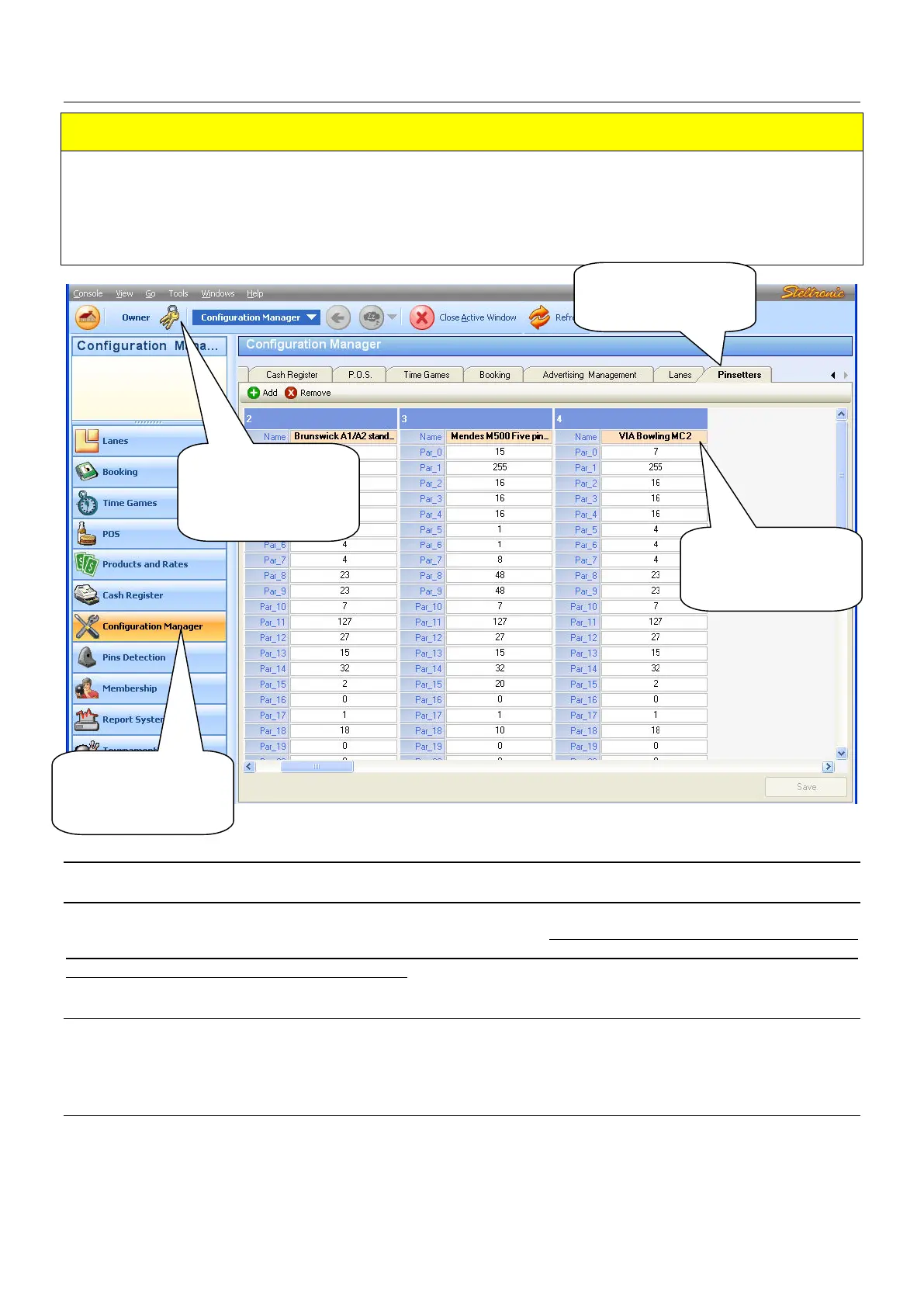
A.P.I. Database settings (FOCUS Scoring)
REMARKS
The most standard parameters are selected automatically choosing the Pinsetter type in the
Advanced pinsetter configuration. To change some parameters, like pin read delay, bumpers, 1
Sciba per etc lane etc. it’s necessary edit the Database table from Focus Configuration.
The following chapter describes how and which parameters can be editable, change only if is strictly
necessary.
EDITABLE PARAMETERS
PAR_18 (START DISTANCE)
This parameter, multiplied by the ball Diameter (22 cm), corresponds to the distance between Sciba
Start sensors and last row of pins. The default value is 18. Change this parameter (increasing the
value) when the Sciba is installed with the extra support for rise the Bumpers because photocells will
see only a “cord” when the ball pass trough
PAR_21 (BUMPER ENABLE/DISABLE/TOGGLE)
0= ON (Default) Bumper out ALWAYS CLOSE until the next player begin
1 to..= [Bumper Toggle] One pulse= Bump UP, next pulse = Bump Down. Value indicates length of
close pulse (1 unit= 100 ms).
PAR_22 (BUMPER UP SWITCH DETECT)
50=(default) Indicate the timeout for UP Switch detect; time starts after parameter 21, if a
UP/DOWN switch is not detected before 16H time expires, score give another pulse for bumper; (1
unit= 100 ms).
(1) Start the
Focus program
and login as
authorized user
(2) Click on
configuration
manager
(3) Open the
PINSETTER TAB
(4) The columns
for Via Bowling
MC2 is the n^ 4


 To Next Page
 Loading...