API A065 series Interfacing Via bowling (MC2)/Switch pinsetters
26
A.P.I. Software Update (FOCUS Scoring)
• Browse the Focus Server C drive to find the folder C:\Program Files\Steltronic\Vision
• If not exist, create a sub folder API_Loader into the directory Vision
• Copy in the API_Loader directory the file API_Loader.exe and the UE028xx.Bin file
received from Steltronic Service
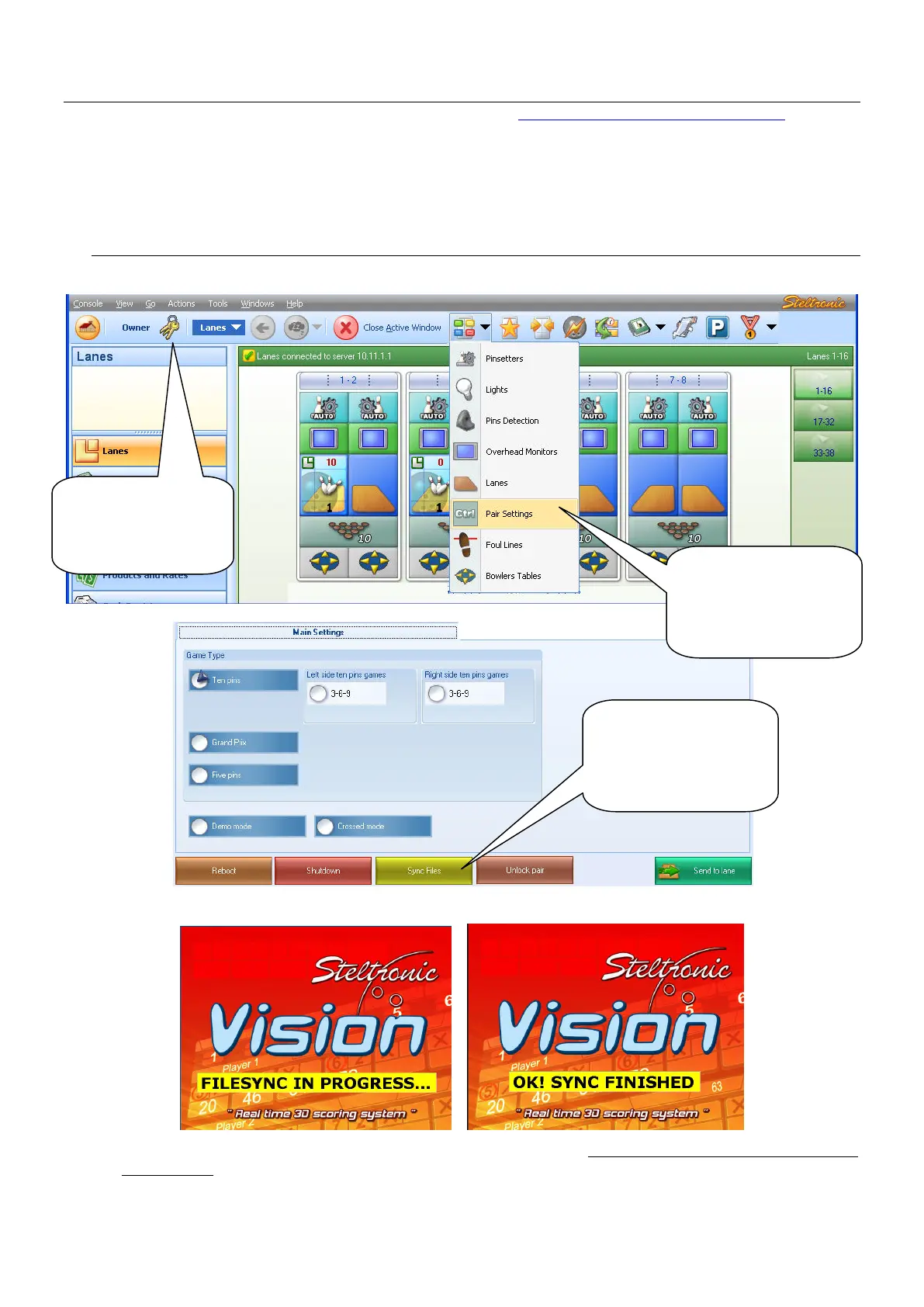
• Now is necessary sync the Lane Computer for upload the API file on each Vision
Lane Computer:
[1] Open the Focus program
• The lane icon became grey, on the lanes screen will be visible the sync operation sequence:
• At the end of file sync, the lane computer reboots by self. Now it’s possible proceed with the
API update.
(1) Start the
Focus program
and login as
authorized user
(2) Fast multiple
lane selection: click
on Action then on
PAIR SETTINGS
(3) Click here to
start sync files
and confirm when
required


 To Next Page
 Loading...