EasyManua.ls Logo

Steren CLK-260 - User Manual

Steren CLK-260
7 pages
Print Icon
To Next Page IconTo Next Page
Loading...
Make sure that the radio is off to make the settings.
Press and hold the AL1 button until the numbers on the screen begin to blink.
Press the HOUR button to select the time; press the MIN button to select the minutes.
Press AL1 again to save the configuration.
Once the alarm is set, press the AL1 button once if you want the buzzer to sound
or press it again to turn on the radio at the scheduled time.
Repeat this procedure using the AL2 button to program a second alarm.
SNOOZE
AL1
MIN
HOUR
TIME
AL2
PM
1
1
Z
Z
2
2
12 : 00
1
1
SNOOZE
AL1
MIN
HOUR
TIME
AL2
PM
1
1
Z
Z
2
2
12 : 00
Digital clo radio
Instrucon manual
Impoant
Cauons
Pas How to use SPECIFICATIONS WARRANTY
Radio
Alarm configuraon
Deacvate e alarm
Clo seings
Funcon Sleep
Snze funcon
CLK-260
V0.00118A
SNOOZE
ON/OFF SLEEP AM/FM PRE/M+
TUNING
VOLUME
HOUR MIN
AL1 AL2
TIME
This device is not intended for use by people (including children), whose physical, sensory or
mental abilities are different or reduced, or who lack experience or knowledge.
• Children should be supervised to ensure they do not use the device as a toy.
• Do not use or store this equipment in places where it is subject to splashing or dripping, this
may cause malfunction.
• If the power cord is damaged, go to an authorized dealer for replacement.
Please read this instruction manual to know how to properly use the product.
Check the latest version on our website www.steren.com
1
2
7
1. PM indicator
2. Alarm indicator with buzzer 1
3. Alarm indicator with radio 1
4. Alarm indicator with buzzer 2
5. Alarm indicator with radio 2
6. Sleep mode indicator
Press the "ON / OFF" button to turn the clock radio on or off.
Press the AM / FM button to select the radio band.
Press TUNING or TUNING to select the desired station or frequency.
Press the VOLUME - or + button to decrease or increase the volume.
To save stations in the radio memory:
1. Select the desired station.
2. Press and hold PRE / M + (the display will flash with the memory number eg: P01)
3. Press PRE / M + once again to confirm.
Note that you can only recover the preset station up to
Save the 10 stations.
Connect the power cable of the clock radio to an electrical contact. *
* You can place a pair of AAA batteries to prevent the equipment from becoming deconfigured in case of
some electrical failure.
Input: 120 V~ 60 Hz 100 mA
3 V - - - (2 x AAA) backup battery
AM frequency: 520 - 1710 kHz
FM frequency: 87,5 - 108 MHz
1. Press and hold the TIME button until the screen begins to flash.
2. Press the hours and minutes button to set the hour and minutes.
3. Press the TIME button to confirm the setting.
You must turn off the radio before setting the time for the radio to turn off automatically.
Press the SLEEP button repeatedly to select the sleep time
(90, 80, 70, 60, 50, 40, 30, 20, 10 min or off).
Press the SNOOZE bar when the alarm is sounding.
The alarm will stop; but it will sound again after 9 minutes.
You must turn off the radio before setting the alarm.
Press the AL1 or AL 2 buttons, as the case may be, until the alarm indicator icons
stop being selected on the screen.
7. Power cable
8. Radio antenna
9. On / Off / Alarm button
10. Sleep mode button
11. AM / FM mode button
12. Preset memory selection / set time
13. Tuning button (back) / Time button
14. Tuning button (forward) / Minute button
15. Decrease volume / Alarm 1
16. Increase volume / Alarm 2
17. Snooze button
18. Battery compartment
3
4
8
9 10
17
11
12 13 14 15
16
18
5
6
This Steren product is warranted under normal usage against defects in workmanship and materials to the original purchaser for one year from the date of purchase.
CONDITIONS
1. This warranty card with all the required information, invoice or purchase ticket, product box or package, and product, must be presented when warranty service is required.
2. If the product is in the warranty time, the company will repair it free of charge.
3. The repairing time will not exceed 30 natural days, from the day the claim was received.
4. Steren sell parts, components, consumables and accessories to customer, as well as warranty service, at any of the addresses mentioned later.
THIS WARRANTY IS VOID IN THE NEXT CASES:
If the product has been damaged by an accident, acts of God, mishandling, leaky batteries, failure to follow enclosed instructions, improper repair by unauthorized
personnel, improper safe keeping, among others.
a) The consumer can also claim the warranty service in the purchase establishment.
b) If you lose the warranty card, we can reissue it, if you show the invoice or purchase ticket.
RETAILER INFORMATION
Name of the retailer ____________________________________
Address _____________________________________________
Product ______________________________________________
Brand _______________________________________________
Serial number _________________________________________
Date of delivery _______________________________________
Product: Digital clock radio
Number part: CLK-260
Brand: Steren
Question and Answer IconNeed help?

Do you have a question about the Steren CLK-260 and is the answer not in the manual?

Overview

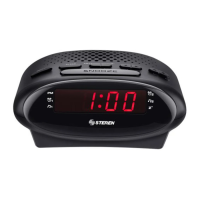
This document describes the CLK-260 Digital Clock Radio, a versatile device designed for timekeeping, alarm functions, and radio entertainment. It serves as a comprehensive guide for users to properly operate and maintain the product.

Function Description

The CLK-260 is primarily a digital clock radio, offering accurate time display and the ability to set multiple alarms. It integrates a radio tuner, allowing users to listen to their favorite AM and FM stations. The device also includes a "Snooze" function for temporary alarm silencing and a "Sleep" function for automatic radio shutdown after a set period. Its design prioritizes ease of use, with clearly labeled buttons for various operations.

Usage Features

Clock Settings:

To set the time, press and hold the "TIME" button until the display flashes. Use the "HOUR" and "MIN" buttons to adjust the time, then press "TIME" again to confirm. This intuitive process ensures the clock is always accurate.

Alarm Configuration:

The CLK-260 supports two independent alarms, AL1 and AL2. To configure an alarm, ensure the radio is off. Press and hold the desired alarm button (AL1 or AL2) until the numbers on the screen blink. Use the "HOUR" and "MIN" buttons to set the desired alarm time. Press the alarm button again to save the settings. Once an alarm is set, you can choose its sound source: press the alarm button once for a buzzer sound (indicated by the buzzer icon), or press it again for the radio to turn on at the scheduled time (indicated by the radio icon). This flexibility allows users to wake up to their preferred sound.

Deactivating Alarms:

To deactivate an alarm, the radio must be off. Repeatedly press the AL1 or AL2 button until the corresponding alarm indicator icons are no longer selected on the screen, ensuring the alarm will not sound.

Snooze Function:

When an alarm is sounding, pressing the "SNOOZE" bar will temporarily silence it. The alarm will then sound again after 9 minutes, providing a brief reprieve before resuming the wake-up process.

Radio Operation:

To turn the radio on or off, press the "ON/OFF" button. Select the desired radio band (AM or FM) using the "AM/FM" button. Tune to a specific station or frequency by pressing the "TUNING" buttons (back or forward). Adjust the volume using the "VOLUME" buttons (- or +).

Saving Radio Stations:

The device allows users to save up to 10 favorite radio stations for quick access. To save a station, first tune to the desired station. Then, press and hold the "PRE/M+" button until the display flashes with a memory number (e.g., P01). Press "PRE/M+" once more to confirm the save. This feature enhances convenience by eliminating the need to manually tune to frequently listened-to stations.

Sleep Function:

The "Sleep" function allows the radio to automatically turn off after a set period. Before setting, ensure the radio is off. Repeatedly press the "SLEEP" button to cycle through the available sleep times: 90, 80, 70, 60, 50, 40, 30, 20, 10 minutes, or off. This is ideal for users who enjoy falling asleep to the radio without worrying about turning it off manually.

Maintenance Features

Power and Backup:

The clock radio connects to an electrical outlet via its power cable. For uninterrupted timekeeping and alarm functionality during power outages, the device supports a backup battery system. Users can insert a pair of AAA batteries to prevent the equipment from losing its settings in case of electrical failure. This ensures reliability and peace of mind.

General Cautions:

The manual emphasizes several important cautions for safe and proper use. The device is not intended for use by individuals with reduced physical, sensory, or mental abilities, or those lacking experience or knowledge, unless supervised. Children should be supervised to ensure they do not use the device as a toy. It is crucial not to use or store the equipment in places subject to splashing or dripping, as this can cause malfunction. If the power cord is damaged, it must be replaced by an authorized dealer to prevent hazards.

Warranty Information:

The CLK-260 comes with a one-year warranty against defects in workmanship and materials under normal usage. To claim warranty service, the warranty card, invoice or purchase ticket, product box, and the product itself must be presented. The company will repair the product free of charge if it is within the warranty period, with a repair time not exceeding 30 natural days. The warranty is void if the product has been damaged by accident, acts of God, mishandling, leaky batteries, failure to follow instructions, improper repair by unauthorized personnel, or improper safekeeping. Consumers can also claim warranty service at the purchase establishment, and a lost warranty card can be reissued with proof of purchase. This comprehensive warranty policy ensures customer support and product longevity.

Steren CLK-260 Specifications

General IconGeneral
BrandSteren
ModelCLK-260
CategoryClock Radio
Display TypeLED
Power SourceAC Power
Alarm FunctionYes
Radio BandAM/FM