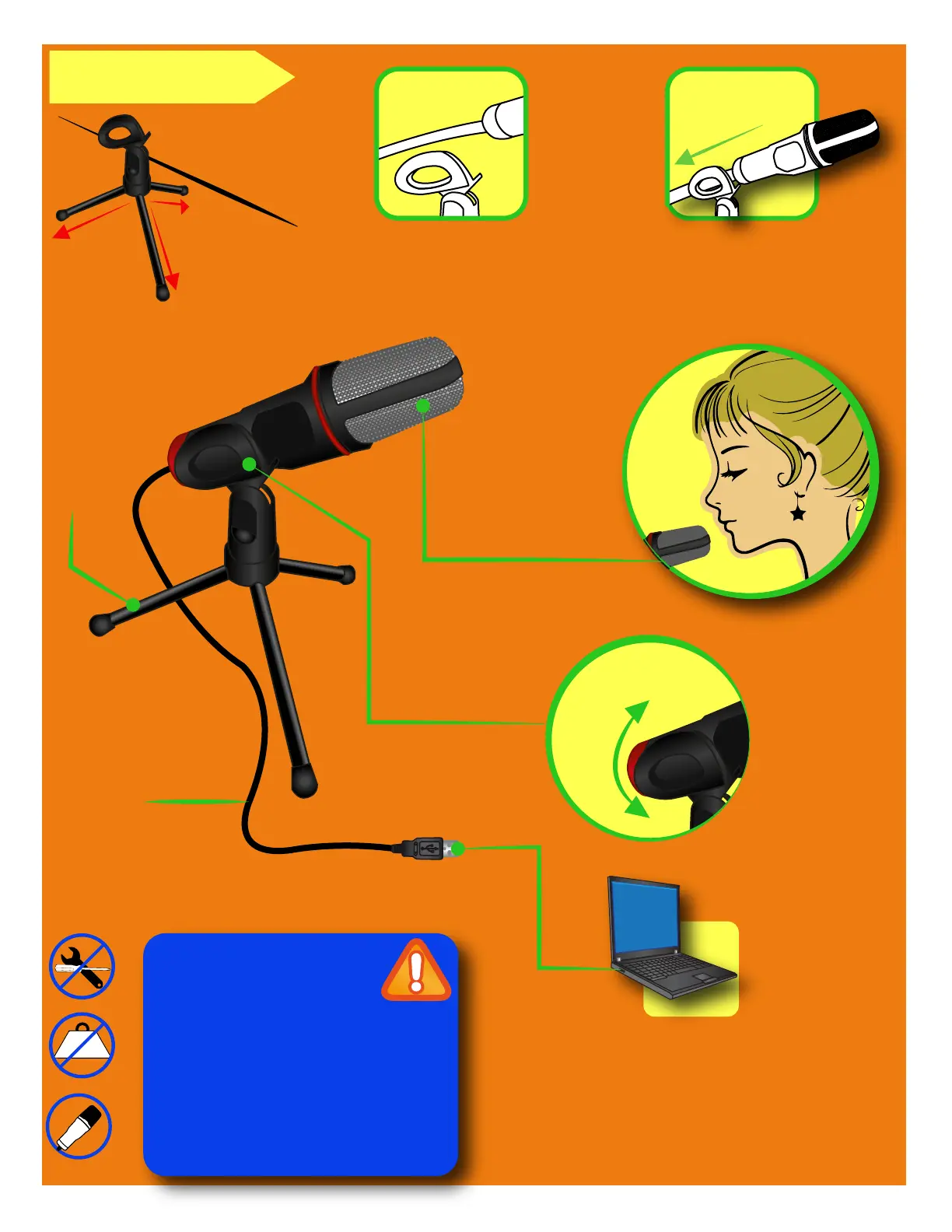
Ajuste la posición.
Adjust the positions
Micrófono
Microphone
Clip ajustable
Adjustable clip
Tripié
Tripod
Conector USB
USB connector
COLOCACIÓN
1. Inserte el conector USB del micrófono en algún puerto USB
de la PC. La PC detectará e instalará automáticamente el
micrófono
2. Utilice su programa de grabación de voz favorito.
1. Insert the connector into a some USB port of the PC. The
PC detects and install automatically the microphone.
2. Use your favorite voice recording software.
• No intente abrir el equipo.
• Do not try to open the device.
• No coloque objetos pesados sobre el equipo.
• Do not try to open the device.
• Coloque el micrófono a un lado o detrás de los
altavoces.
• Place the microphone to side or behind of the
speakers.
1,35 m
1.35 m
Pase el cable por encima del clip.
Pass the cable above the clip.
Coloque el micrófono frente al
clip y deslícelo hacia abajo.
Set the microphone in front to
clip and slide to down.



 To Previous Page