10
AUS
1300 112 534
tempo.org/support
MODEL: 8IN1MULTI PRODUCT CODE: 713681 01/2024
AFTER SALES SUPPORT
Preset
Menu
ON/ OFF
TimerTemp
Turbo
Boil
Hot pot
Slow Cook
Fry
Grill
Stir-fry
Steam
Stewed Meat
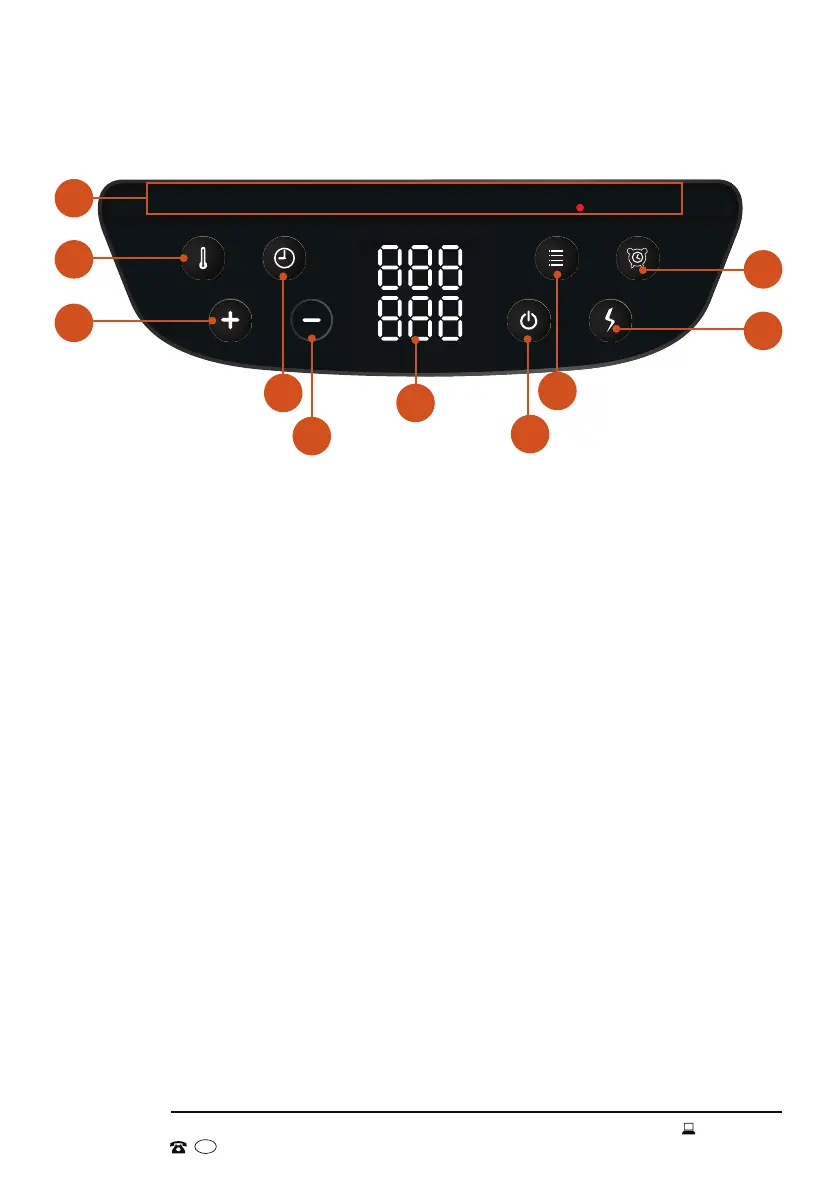
Control panel
Product Overview (Cont.)
A Program indicators
These indicators light up when the respective program is selected.
B Temperature button
Press this button, and the use the [ - ] or [ + ] buttons to adjust the cooking
temperature.
C [ + ] button
This button be used to increase the temperature and time.
D Timer button
Press this button, and the use the [ - ] or [ + ] buttons to adjust the cooking
time.
E [ - ] button
This button be used to decrease the temperature and time.
F Display screen
Shows the time remaining and time/temperature icons.
G "ON/OFF" button
Press this button to turn the multi cooker on or o.
H "Menu" button
Press this button repeatedly to select the desired cooking mode.
I Turbo button
Press this button to switch to turbo mode.
J Preset button
Press this button to add a preset time.
A
B
C
I
J
D
F
H
E
G


 To Next Page