P. 7
DR
2.4Ghz 6 Channel Transmitter and Receiver
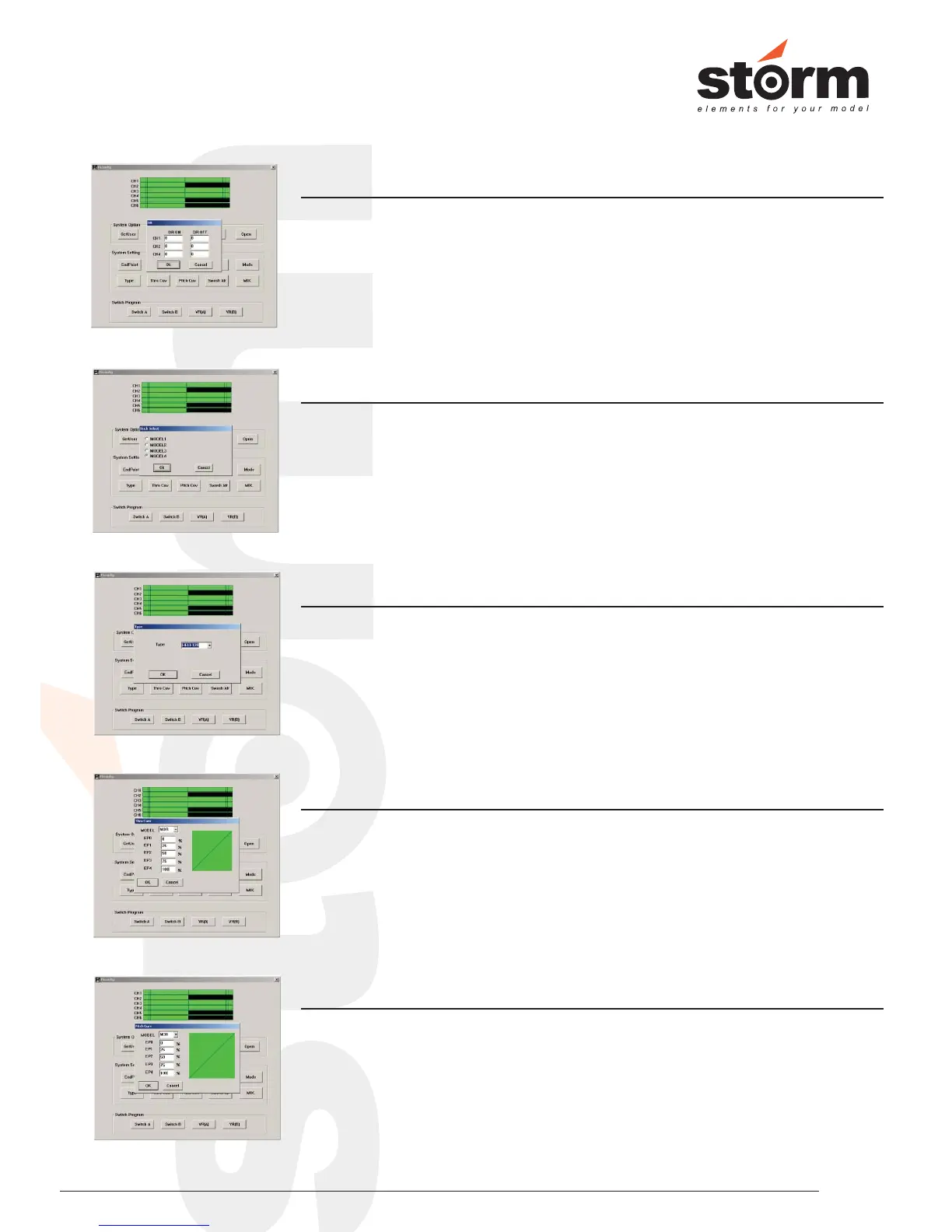
Click “DR” button to set the “Dual Rates” value for each channel. This function is
available for Ch 1, Ch 2 and Ch 4. Adjustable value is from 0% to 100%.
Left click “DR” to set Dual Rates value to Ch 1, Ch2 and Ch 4.
Click “Mode” button to set the contol mode according to user preference. This
means Right hand throttle = Mode 1, Left hand throttle = Mode 2. The system
offers 4 different modes to choose.
Left click “Mode” to set throttle contol mode.
Mode
Click “Type” to set the Swashplate Type for your helicopter. It has ACRO
(Aeroplane), HELI-90, HELI-120 and HELI-140. Storm Thunder 450 is using
HELI-120.
Left click “Type” to set swashplate type for your helicopter.
Type
Click “Thro Cuv” to set the Throttle Curve in 2 modes, NOR = Normal , ID = Idle 1.
The system allows you to set throttle curve in 5 points.
Left click “Thro Cuv” to set Throttle Curve for 2 flight modes.
Thro Cuv
Click “Pitch Cuv” to set the Pitch Curve in 2 modes, NOR = Normal , ID = Idle 1.
The system allows you to set pitch curve in 5 points.
Left click “Pitch Cuv” to set Pitch Curve for 2 flight modes.
Pitch Cuv


 To Next Page