Need help?
Do you have a question about the Street Guardian SG9663DCPRO+ and is the answer not in the manual?
Guidance on selecting a mounting location and routing cables for optimal setup.
Configuring time and date settings, including automatic updates via GPS and manual time zone adjustments.
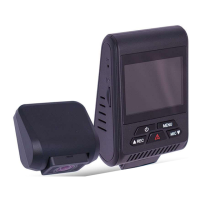
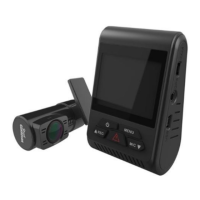
The Street Guardian SG9663DCPRO+ is a Dual Channel Digital Video Recorder (DVR) designed to capture video footage while driving. It is pre-configured with logical default settings, making it ready for use with minimal adjustment after installation. The primary function of this device is to record video in Full High Definition (1080P/30FPS) at high bitrates, ensuring clear and detailed footage.
One of the key usage features is its automatic operation. The DVR powers on and begins recording shortly after the vehicle starts, and powers down shortly after the vehicle is turned off. This hands-free operation ensures that recording is initiated and stopped without manual intervention, providing continuous coverage during vehicle use. The recordings are segmented into easy-to-navigate chapters, simplifying the process of reviewing footage.
For storage management, the device employs a 'first in, first out' system. Once the memory card is full, the oldest recorded segment is automatically deleted to make way for new recordings. This continuous cycling ensures that the most recent recordings are always available. For example, a 128GB memory card can store approximately 6 hours of recordings before the recycling process begins. An important exception to this rule is emergency files. These files, created either by the activation of the built-in G-Sensor or by pressing the ok/lock key, are protected and will not be overwritten when the camera recycles old recordings. This feature is crucial for preserving critical incident footage.
The DVR is designed to operate within a temperature range of -20°C to +70°C. Operating outside these temperatures may lead to unpredictable results, so it's important to adhere to this range for optimal performance and longevity.
Installation of the DVR front camera unit is recommended behind or to either side of the rear-view mirror, within the sweep area of the windscreen wipers. Before mounting, it's essential to ensure sufficient space for cables and to clean the glass thoroughly for a strong adhesive bond. Cables should ideally be routed across the passenger side of the vehicle to prevent interference with vehicle controls or potential distractions. The mounting bracket uses 3M adhesive tape; for best results, the bracket should be pressed firmly against the glass for 2 minutes after cleaning, and then allowed to bond for 20 minutes before attaching the camera. A full bond is achieved after 72 hours, emphasizing the importance of proper initial installation to prevent the adhesive from failing.
Connectivity features include ports for the rear camera, GPS, and power. The GPS antenna should be mounted with the adhesive side to the windscreen, ensuring correct orientation. To optimize GPS performance, it's advised to maintain at least a 15cm separation between the main camera unit and the GPS antenna. Power is supplied via an in-vehicle charger inserted into the cigarette lighter socket, or optionally through a hardwire kit.
Adjusting the DVR lens angle is a crucial step for optimal video quality. The lens should be aimed slightly down from the horizon (approximately 40% sky, 60% road) to improve the auto exposure function and capture a balanced view of the road and surroundings.
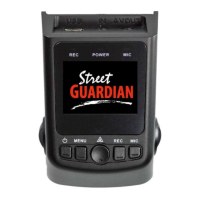
Regarding settings, the DVR comes with logical default configurations. Upon powering on, the internal capacitors will charge, and then the DVR will power up and commence recording. Time and date settings are automatically updated via GPS (if fitted) and periodically synced for accuracy. However, the time zone needs to be manually configured to suit the specific region. To adjust the time zone, the user must first stop any active recording by pressing the REC key, then enter the SETUP submenu by pressing the MENU key. From there, scrolling down to the TIME ZONE menu using the Mic/pg down key and pressing the OK/lock key allows for adjustment. It's important to note that the GPS signal provides GMT 0 time and date information, and the DVR sets the time offset for the region. If the region observes daylight savings, the time zone will need to be adjusted accordingly at the beginning and end of those periods. The DVR does not contain a battery, so it must be connected to a power source to configure settings.
Maintenance features primarily revolve around the memory card and lens care. The DVR records a large amount of data, so it's recommended to use good quality, high-speed Class 10 Micro SD cards with a minimum capacity of 32 GB. High Endurance memory cards are particularly recommended for their durability and reliability in continuous recording environments. It is critical that memory cards are formatted within the camera using its built-in formatting menu option to ensure compatibility. The DVR does not support hot plugging of the Micro SD memory card; the card should only be removed or replaced when the recorder is powered off to prevent damage to the card or recordings.
For cleaning, only a soft, dry cloth should be used. Care must be taken not to apply excessive pressure when cleaning the lens. The use of liquids or cleaning fluids is strictly advised against, as they may damage the product and void the warranty. Maintaining a clean windshield is also important for video performance; ammonia-free automotive glass cleaners are recommended for the inside glass surfaces to achieve optimum results.
The product is warranted against faults in material and manufacture for a period of two years. For warranty claims, users should contact their place of purchase to arrange a Return Merchandise Authorisation (RMA). It's important to retain sales documentation to validate warranty claims. The warranty does not cover defects or injuries caused by misuse, abuse, neglect, lack of maintenance, accidental damage, improper voltage, liquid spillage, liquid ingress, software issues, or unauthorized alterations. Users are advised to save any user-generated data elsewhere before presenting the device for repair, as repairs may result in data loss.
 General
| Chipset | Novatek 96663 |
|---|---|
| GPS | Yes |
| G-Sensor | Yes |
| Wi-Fi | No |
| Operating Temperature | -20°C to 70°C |
| Battery | Super Capacitor |
| Sensor | Sony STARVIS IMX291 |
| Lens | 7-element glass |
| Video Resolution | 1080p Full HD |
| Frame Rate | 60fps |
| Storage | MicroSD card, up to 256GB |
| Parking Mode | Yes |
| Display | 2.0 inch LCD |

 To Next Page