14 15
trigger
STANDARD
INVERSE
Standard: The front lever shifts up.
The rear lever shifts down.
Inverse: The front lever shifts down.
The rear lever shifts up.
Setting the gear for starting
When starting up after a standstill, the ST7 auto-
matically shifts to fourth gear.
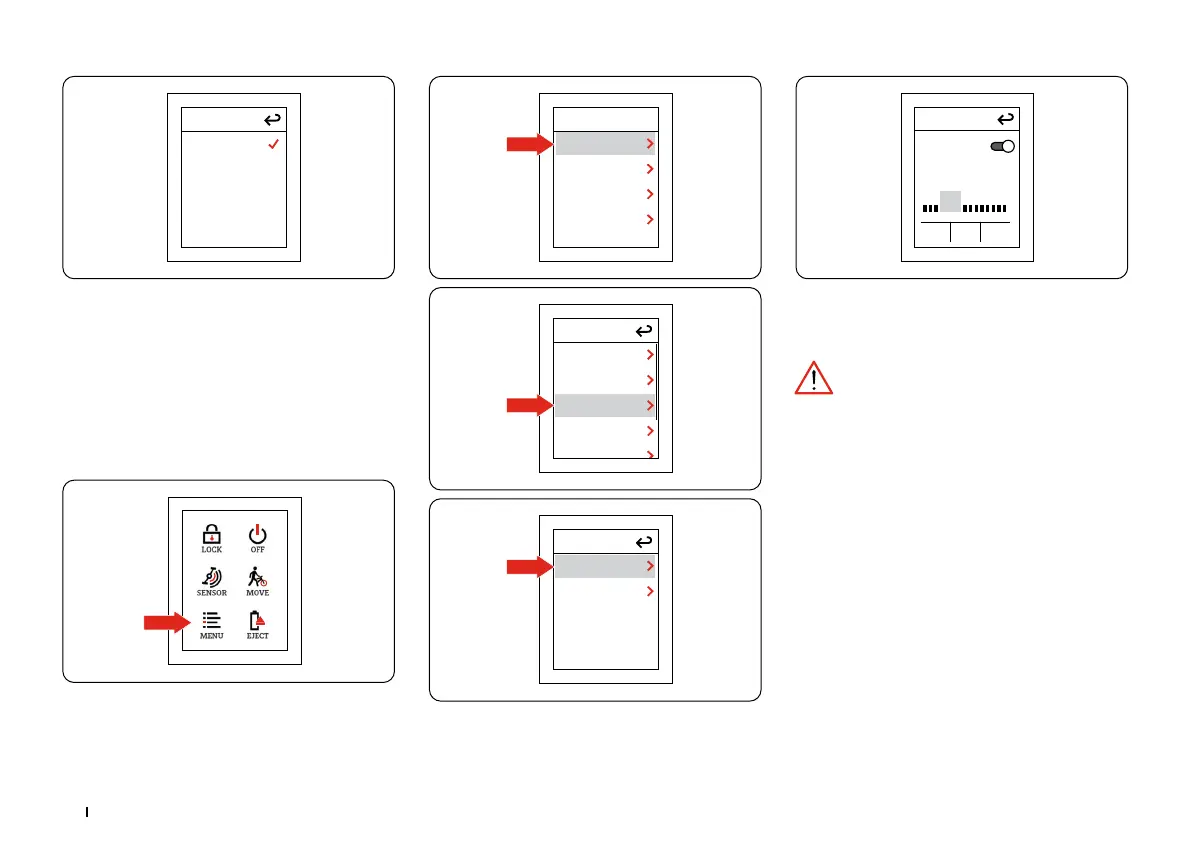
You can set the gear yourself in the settings. In
the shortcut display, select:
menu
BIKE
BLUETOOTH
SETTINGS
SYSTEM
bike
BRAKES
TORQ.SENS.
SMART.SHIFT
TOTALS
Smart.Shift
START.SELECT
TRIGGER
Start.Select
ON
At stops, the bike automatically
shifts to the selected start gear.
OK
4
- +
Turn “START.SELECT” on or off: “ON/OFF”.
Change gear with “+/-”.
Save your settings by pressing “OK”.
The drive system and the battery are sub-
jected to greater stress when you set off in a high
gear. It is better to choose a low gear as the start-
ing gear.
Assistance levels
By pressing the “+” and “-” buttons on the con-
trol element on the handlebars, you can switch
between the following assistance modes:
Bicycle mode: The motor is switched off.
Assistance mode 1: Low motor assistance opti-
mized for longer ranges.
Assistance mode 2: Medium motor assistance
– you can fine-tune this assistance mode via the
Stromer app.
Assistance mode 3: High motor assistance for
maximum speed.
Assistance mode S: Very high motor assistance
for short-term maximum assistance.


 To Next Page
 Loading...