EasyManua.ls Logo

Sub-Zero 4204490 - User Manual

Sub-Zero 4204490
2 pages
Print Icon
To Next Page IconTo Next Page
Loading...
!
!
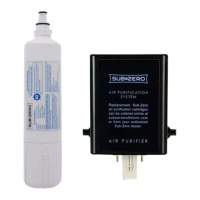
Thank you for purchasing an authentic Sub-Zero 4204490 Water Filter from Home
Appliance Specialists. We work directly with Sub-Zero to make sure we only sell
authentic and genuine appliance parts. Beware of other sellers who may purchase water
filters from third party dealers who cannot guarantee authenticity. Also, make sure to
only use Sub-Zero branded cartridges in your fridge. Any use of third party branded
water filters can and will cause problems to your unit and may void your warranty.
How to Access the Water Filter
Built-In (BI) or PRO48 Series unit, pull out on the bottom edge of the grille
assembly, and tilt the grille frame forward.
New Generation Integrated unit, remove the kick plate screws at the bottom of the
unit and tilt the kick plate out and off of the unit.
How to Remove the Water Filter
Rotate the cartridge counterclockwise one-quarter turn, and then pull it out.
There is water in the filter cartridge, so it is normal for a small amount to spill out.
How to Replace the Water Filter
Remove the new filter cartridge from its packaging and carefully remove the
plastic cap.
Insert the new filter into the manifold and turn clockwise until the filter is seated.
How to Reset the Water Filter
Built-In (BI) models: Once the filter cartridge has been replaced, press and hold
the filter reset button (located to the left of the water filter) for five seconds in
order to reset the water filter life monitor.
648PRO models: Once the filter cartridge has been replaced, the control
automatically resets; the water filter life monitor and the "REPLACE FILTER"
indicator will no longer be displayed.
New Generation Integrated models:
o Access the options menu by pressing the arrow on the left side of the
home screen
o Access the settings menu by pressing the gear icon on the options menu.
o Select the ‘I’ icon to access the information menu
o Click ‘Filters’ to access the water and air filters menu.
o Press and hold the dripping water icon on the far left for 5 seconds to
select the water filter settings.
o Continue by following the same steps below for when the change filter
message is present.
o Click ‘Filters’ to access the water and air filters menu.
Question and Answer IconNeed help?

Do you have a question about the Sub-Zero 4204490 and is the answer not in the manual?

Summary

How to Access the Water Filter

How to Remove the Water Filter

How to Replace the Water Filter

How to Reset the Water Filter

Built-In (BI) models

Describes how to reset the water filter life monitor on BI models by pressing a button for five seconds.

648 PRO models

States the control automatically resets on 648PRO models, disabling the filter life monitor and 'REPLACE FILTER' indicator.

New Generation Integrated models

Details navigating the menu and holding a dripping water icon for 5 seconds to reset the water filter settings.

Overview

This document provides instructions for the installation, removal, and maintenance of the Sub-Zero 4204490 Water Filter, an authentic replacement part from Home Appliance Specialists. The filter is designed to ensure clean water and proper functioning of Sub-Zero refrigeration units.

Function Description:

The Sub-Zero 4204490 Water Filter is a crucial component for maintaining water quality in Sub-Zero Built-In (BI), PRO48 Series, and New Generation Integrated units. Its primary function is to filter impurities from the water supply, providing clean water for ice production and dispensing. The document emphasizes the importance of using only authentic Sub-Zero branded cartridges to prevent problems with the unit and avoid voiding the warranty.

Important Technical Specifications:

While specific technical specifications like micron rating or flow rate are not detailed in this document, the filter is designed to be compatible with specific Sub-Zero models: Built-In (BI), PRO48 Series, and New Generation Integrated units. The installation process involves a quarter-turn rotation for both removal and insertion, indicating a standardized fitting mechanism. The filter is expected to remove impurities effectively, as suggested by the post-installation recommendation to discard initial ice and dispensed water to clear the system.

Usage Features:

Accessing the Water Filter:

  • Built-In (BI) or PRO48 Series units: Access is gained by pulling out the bottom edge of the grille assembly and tilting the grille frame forward.
  • New Generation Integrated units: Access requires removing the kick plate screws at the bottom of the unit and tilting the kick plate out and off.

Removing the Water Filter:

  • The cartridge is removed by rotating it counterclockwise one-quarter turn and then pulling it out.
  • It is normal for a small amount of water to spill during removal, indicating the presence of water within the cartridge.

Replacing the Water Filter:

  • Before installation, the new filter cartridge must be removed from its packaging, and the plastic cap should be carefully removed.
  • The new filter is inserted into the manifold and turned clockwise until it is securely seated.

Post-Installation Procedures:

  • After installing a new filter, it is recommended to discard the first full bucket of ice produced to help clean the water system and clear air from the line. A 24-hour waiting period is suggested before discarding this first bucket of ice.
  • For dispenser models, while the water line is typically purged before connecting to the unit, the first several glasses of water should be discarded after replacing the filter to ensure optimal water quality.

Maintenance Features:

Resetting the Water Filter Monitor:

The document outlines different procedures for resetting the water filter life monitor depending on the Sub-Zero model:

  • Built-In (BI) models: After replacing the filter cartridge, the filter reset button (located to the left of the water filter) must be pressed and held for five seconds to reset the water filter life monitor.
  • 648PRO models: For these models, the control automatically resets after the filter cartridge is replaced. The water filter life monitor and the "REPLACE FILTER" indicator will no longer be displayed.
  • New Generation Integrated models: The reset process involves navigating through the unit's digital interface:
    1. Access the options menu by pressing the arrow on the left side of the home screen.
    2. Access the settings menu by pressing the gear icon on the options menu.
    3. Select the 'I' icon to access the information menu.
    4. Click 'Filters' to access the water and air filters menu.
    5. Press and hold the dripping water icon on the far left for 5 seconds to select the water filter settings.
    6. The document indicates that the process continues by following similar steps when a "change filter" message is present, reiterating to click 'Filters' to access the water and air filters menu.

The emphasis on using authentic Sub-Zero filters and following specific reset procedures highlights the importance of proper maintenance to ensure the longevity and optimal performance of the refrigeration unit. The detailed instructions for accessing, removing, replacing, and resetting the filter cater to different Sub-Zero models, providing a comprehensive guide for users.

Sub-Zero 4204490 Specifications

General IconGeneral
BrandSub-Zero
Model4204490
CategoryWater Filtration Systems
LanguageEnglish

Related product manuals