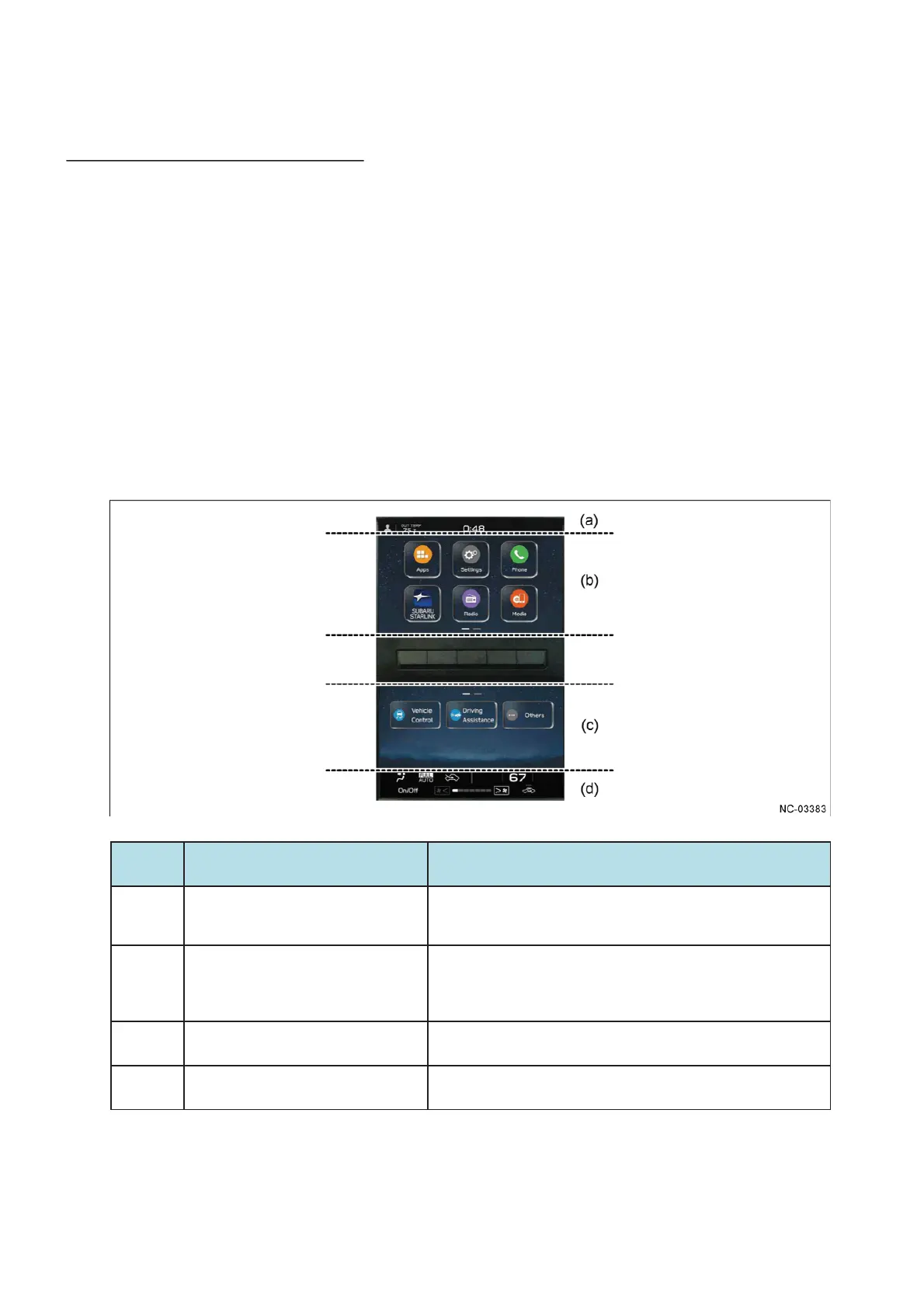
(1) 7-inch dual display Audio
- A Home screen has been adopted that is categorized with icons designed to make it easy to
identify the portals for the main infotainment system functions.
- Supports touch operations such as drag and swipe.
- Some of the operation buttons for functions provided in the vehicle and the customization
menu are integrated into the switch operations on the screen.
- The status and operation panel for the air conditioner are displayed on the screen, and most
of the operation buttons are integrated into the switch operations on the screen.
- A display area has been set on the screen to enable display of various types of information
and operation of functions simultaneously with no loss of visibility.
No. The area name Contents
(a)
Status bar area
In addition to the driver profile button, displays the exterior air
temperature, time and status icons (status of the Bluetooth-
connected devices and volume mute, etc.).
(b)
Category area
- Displays the Home screen, and screens in other hierarchical levels,
for settings and operating and selecting the audio source and other
items.
- The main operations are performed in this area.
(c)
Setting area
- Displays a settings screen for the air conditioner and other
functions provided in the vehicle.
(d)
Operation area for the air conditioner
Displays an operation screen and the status for the air㻌 conditioner.
4.2 GUI ( Graphical User Interface )


 To Next Page
 Loading...