15
Getting
Started
Instrument
Panel
Gauges Personalize Controls
While
Operating
Safety/In Case
of Emergency
Additional
Information
Windshield Wipers
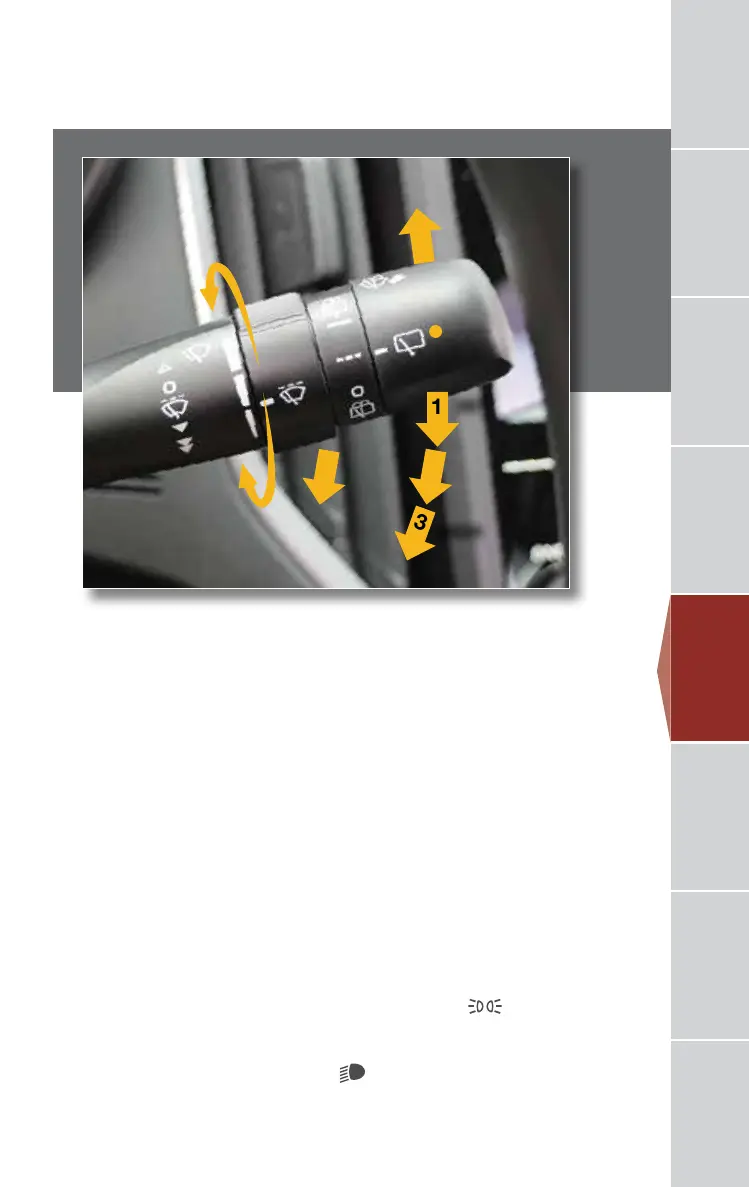
To turn on the wipers, press the wiper control lever down one level for intermittent,
two levels for low, or three levels for high speed. Return the lever to the “OFF”
position to stop the wipers. For a single wipe, move the lever up. To spray washer
uid, pull and hold the lever toward you. Rotate the dial to adjust the intermittent
wiper speed.
Rear Wiper (5-door only)
To operate the rear wiper, rotate the end of the knob upward to the intermittent,
continuous, or wash position. When the rear wiper is off, rotate the knob downward
to wash and wipe the rear window.
Daytime Running Lights
Daytime running lights are standard on your vehicle. Only a reduced brightness
high beam will be automatically turned on when the engine has started, the parking
brake is fully released and the light switch is in the “OFF” or “
” position. The
brightness of the illumination of the high beam headlights is reduced by the daytime
running light system. You must always switch on your headlights when it is dark
outside by turning the light switch to the “
” position.
1
2
3
INT.
LOW
HIGH
OFF
Controls
3220513_18b_Impreza_QRG_091217.indd 15 9/12/17 3:50 PM










 To Next Page