18
Controls
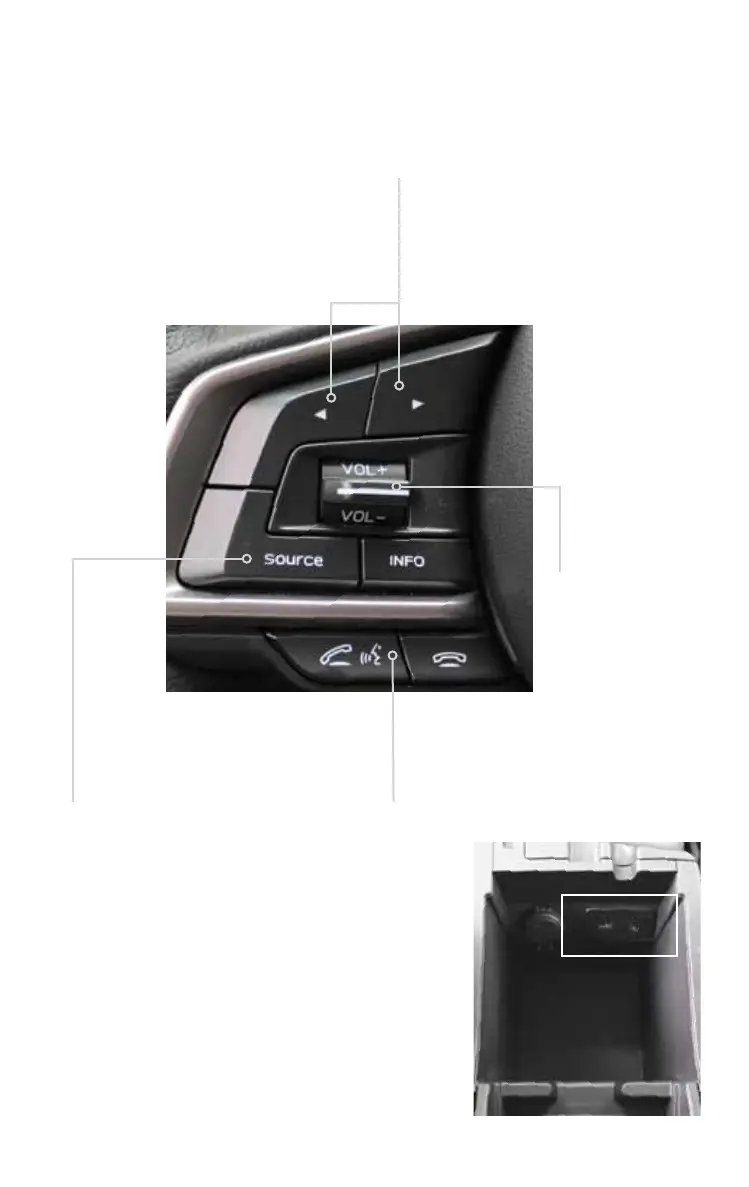
Steering Wheel Audio Controls (if equipped)
Talk switch; please refer to
the “Bluetooth audio” section
in your Owner’s Manual.
Press the button to select
the desired audio mode –
FM, AM, SAT, CD, AUX, MEDIA.
With any of the radio modes
selected, press the left or
right arrow button to skip
through your presets. In CD
mode, press the buttons to
skip forward or back a track.
Push the switch
up (+) to increase
volume or down (–)
to decrease volume.
USB Port
The USB port is located in the front of the center console.
You can connect a USB-equipped portable music player to
the USB port and hear the music stored on it through the
vehicle speakers. Press the “SOURCE” button located on
the audio system repeatedly until the USB mode is selected.
Auxiliary Input Jack
The 3.5mm auxiliary input jack is located in the front of
the center console. You can connect a portable music
player to the auxiliary jack and hear the music stored on it
through the vehicle speakers. Press the “SOURCE” button
located on the audio system to select the auxiliary mode.
3220513_18b_Impreza_QRG_091217.indd 18 9/12/17 3:50 PM














 To Next Page