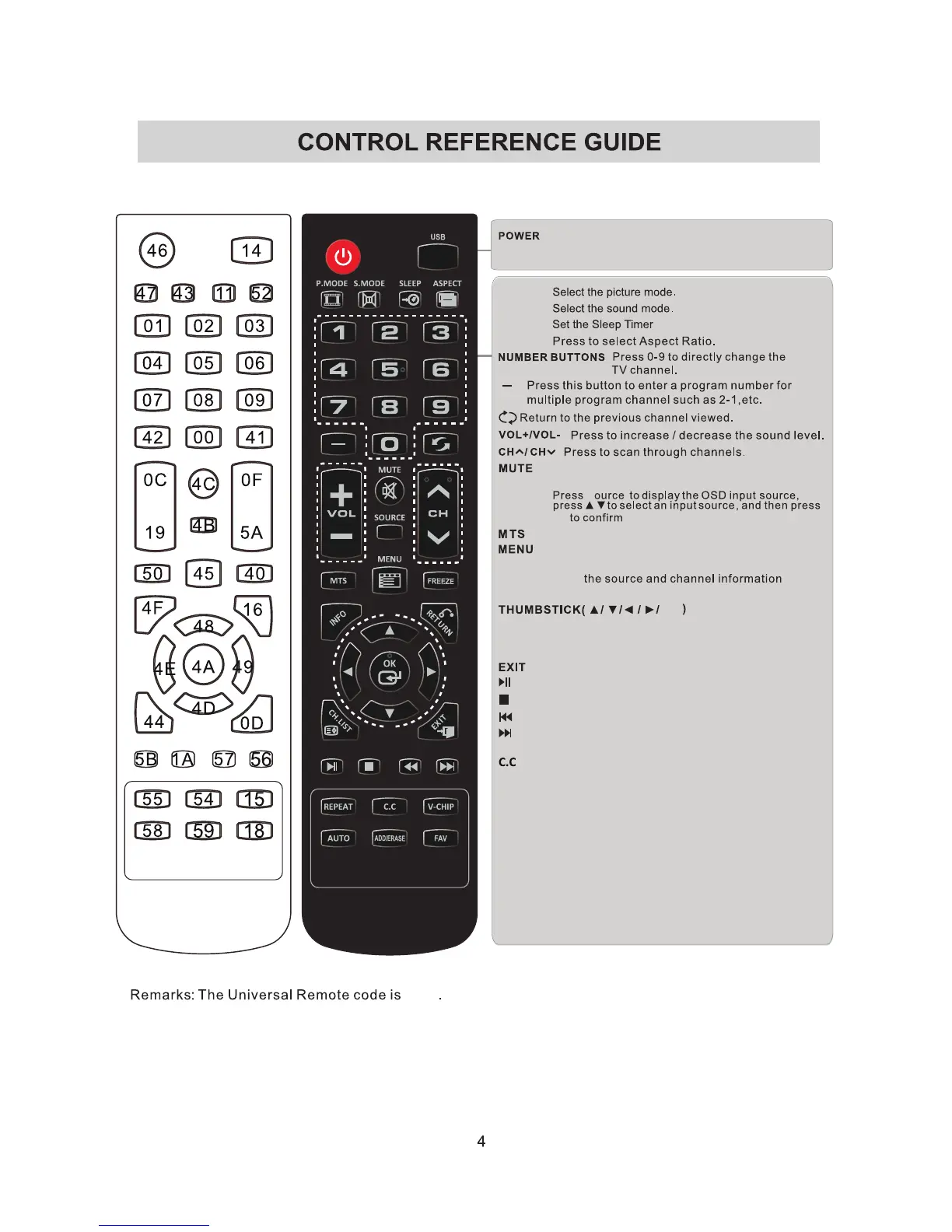
Format:NEC.
Turn the LED TV on or off.
Press once to disable the audio and press again to
enable the audio.
P.MODE
S.MODE
SLEEP
Press to adjust between available audio channel.
SOURCE
OK
S
INFO
Displays
Press to set the closed caption.
V-CH
027D
IP
Switch to V-CHIP input.
CH.LIST
Press to display TV program list.
ASPECT
Allows you to navigate the on -screen menus and adjust the
system settings to your preference.
Displays the main TV menu.
Exit the main TV menu.
FAV
Press to display the favourite program list.
Add/Erase channel to favourite program list.
ADD/ERASE
ok
Press to turn to USB mode.
USB
RETURN Return to previous menu.
Start playback or pause.
Stop the playback.
previous
chapter/track/photo.
Skip to the beginning of the next chapter/
track/photo.
Skip to the beginning of the
AUTO Press to adjust the picture automatically
in VGA source.
REPEAT Press repeatedly to select the repeat
mode.
FREEZE Freeze the picture.


 To Next Page